
An expense approval workflow is the structured path an expense takes from submission to reimbursement: submit, route, approve, verify, pay, and post to the general ledger. Its job is to enforce spending policy, speed up reimbursements, and leave a clean audit trail. Automation is the single biggest lever for making that path faster and more consistent, which is why the rest of this guide treats it as the default, not the exception.
TL;DR:
- Automated expense approval workflows reduce approval and reimbursement time to around 3.5 days on average.
- Tiered routing and escalation rules ensure approval authority matches expense amount, category, and risk level to prevent bottlenecks.
- Features like OCR receipt capture, policy enforcement, and fraud detection significantly cut manual entry and error rates.
- Small businesses often struggle with inconsistent policies and ad hoc approvals, which automation and external services can streamline.
- Proper setup and testing of approval rules, along with operational habits, are essential to prevent workflow breakdowns.
Table of Contents
- What Is an Expense Approval Workflow, Exactly?
- Steps In The Expense Approval Process
- Setting Up Approval Tiers And Routing Rules
- Automation Features That Actually Save Time
- Best Practices For Reliable Expense Handling
- Where Expense Workflows Break Down
- How To Build Or Overhaul Your Workflow
- Why Small Businesses Struggle With This More Than They Expect
- Let Kelliworks Set Up The Workflow For You
- Sources
- FAQ
What Is an Expense Approval Workflow, Exactly?
An expense approval workflow is the defined sequence of steps and rules that move a business expense from the moment an employee spends money to the moment it lands correctly in your accounting system. That sequence typically requires a handful of fields every time: date, amount, vendor, category, business purpose, and a receipt image. Skip any of those and you invite the exact disputes a written policy is meant to prevent.
There is an important distinction most small businesses blur: single-expense submissions versus batched expense reports. A single-expense workflow processes one purchase, like a client lunch, as its own transaction. A batched report groups a week or a trip’s worth of expenses into one submission for one approval decision. Neither is inherently better. Travel-heavy teams often favor batching; teams with frequent small purchases usually do better with per-transaction routing.
What ties both models together is the submission channel. A workflow only works if everyone uses the same door to walk through:
- One digital form or app, not a mix of email, spreadsheets, and text messages
- Consistent required fields on every submission, no exceptions for “small” purchases
- A single system of record that finance can query without reconstructing history from inboxes
Standard guides on expense management describe this same core sequence: submission, approval, finance review, payment, and GL coding. That consistency across industry documentation is worth noting. It’s not a company-specific quirk; it’s the accepted shape of the process.
Steps In The Expense Approval Process
Every reliable workflow for approving expenses breaks down into five roles, each with a distinct job. Miss one and the whole chain gets slower or riskier.
- Submission. The employee enters the amount, date, vendor, category, and business purpose, and attaches a receipt at the time of purchase, not weeks later. Same-day or same-week capture dramatically cuts lost receipts and fuzzy memory disputes.
- Manager approval. The direct manager checks two things: is this a legitimate business expense, and is the amount reasonable for the context? This step is not meant to be a receipt audit. It’s a judgment call on purpose and reasonableness.
- Finance verification. Finance checks the receipt against the claimed amount, screens for duplicate submissions, and confirms the expense fits tax and accounting rules. This is where policy violations that slipped past a manager usually get caught.
- Payment or disbursement. Approved expenses get paid out, often through direct deposit, payroll addition, or a corporate card reconciliation. Best-in-class organizations complete this whole cycle in about 3.5 days, compared with 7 or more days for manual processing.
- GL posting and retention. The approved expense syncs to the correct general ledger account, and the receipt and approval record get retained for as long as your audit or tax requirements demand.
Each step exists to answer a specific question. When a step gets skipped, that question goes unanswered until an audit forces it.
Setting Up Approval Tiers And Routing Rules
A flat approval process, where every expense lands on one manager’s desk, breaks down fast as headcount grows. Tiered routing fixes that by matching approval authority to dollar amount and risk.
A common tiered approval matrix looks like this:
- Under $100: auto-approved if it matches a pre-set policy category
- $100 to $500: direct manager approval only
- $500 to $2,500: manager plus department head sign-off
- Above $2,500: finance or executive approval required
Routing doesn’t have to run on amount alone. Category, department, and project code all work as routing variables. A software subscription might route straight to IT regardless of cost; a client entertainment expense might always require a department head’s eyes, even at a low dollar value. Enterprise systems build this kind of layered logic directly into their approval configuration options, chaining manager, authorized approver, and processor steps together.
Escalation rules matter just as much as the tiers themselves. Build in auto-reroute for approvers who are out of office more than a day or two, and hard-block self-approval, meaning nobody approves their own submitted expense, no matter their title.
Automation Features That Actually Save Time
Automation earns its keep when it enforces policy at the moment of submission, not just when it catches problems after the fact. A workflow that simply digitizes a manual paper chain without changing the rules underneath it will still be slow, just slower on a screen instead of on paper.
The features worth configuring:
- Receipt capture and OCR. Optical character recognition pulls vendor, date, and amount straight off a photographed receipt, cutting manual entry to near zero for routine purchases.
- Policy enforcement rules. Set spending caps by category so low-risk items under a defined threshold auto-approve without touching a human queue, per the configurable workflow types most modern platforms support, including auto-approval and line-item approval.
- Mobile and chat approvals. One-click approve or reject from a phone or a tool like Slack keeps approvals moving when managers travel, especially when integrated with platforms like BabyLoveGrowth for seamless automation.
- Duplicate and fraud detection. Automated matching flags a receipt submitted twice or an amount that doesn’t match a vendor’s typical range.
- Accounting sync. Approved expenses should flow automatically into platforms like QuickBooks or Xero, which is exactly the kind of automatic sync that eliminates manual month-end re-entry.
Pro Tip: Before switching on any automation rule for the first time, run it in parallel with manual review for two full billing cycles. That gives you a rollback path if the OCR misreads receipts or the GL mapping sends expenses to the wrong account.
Best Practices For Reliable Expense Handling
The features above only work if the governance behind them is solid. A written policy is the foundation. It should spell out reimbursable categories, dollar limits, required documentation, and submission deadlines, which is exactly what expense policy guidance from American Express identifies as the difference between a workflow that runs smoothly and one that generates constant disputes.
Beyond the policy document itself, a handful of operational habits separate reliable workflows from shaky ones:
- Require preapproval for anything unusual, like travel above a set budget or client gifts.
- Set measurable service-level targets: many organizations aim for reimbursement within 3 to 10 business days of approval.
- Train managers to evaluate business purpose, not to re-audit receipts finance will already check.
- Revisit your thresholds and routing rules at least once a year as headcount and spend patterns shift.
Missing this operational layer is a common reason automation projects underdeliver: the tool changes, but the habits around it don’t.
Where Expense Workflows Break Down
Even a well-designed workflow fails in predictable places, and each one has a direct fix.
- Ad-hoc approvals over chat or email. A manager typing “approved, go ahead” in a text thread destroys the audit trail. Force every approval through the single digital channel your workflow defines.
- Bottlenecks at one approver. A single manager on vacation shouldn’t freeze every pending request. Deputy approvers and automatic escalation after a set number of hours solve this.
- Late or missing receipts. Requiring receipt capture at the moment of submission, ideally through a mobile app, closes this gap before it starts.
- Manual month-end rework. When approved expenses don’t sync automatically to your accounting system, someone ends up re-keying data by hand, and that’s where reconciliation errors creep in.
Every one of these failure points traces back to the same root cause: a rule that exists on paper but isn’t enforced by the system itself.
How To Build Or Overhaul Your Workflow
Rolling out a new expense approval workflow, or fixing a broken one, works best as a staged project rather than a single flip of a switch.
- Write the policy and approval matrix first. Decide your dollar thresholds and who signs off at each level before you touch any software.
- Pick one submission channel and lock in the required fields: date, amount, vendor, category, business purpose, receipt.
- Configure routing, escalation rules, and auto-approval thresholds for low-risk spend.
- Connect your accounting system and run end-to-end tests with sample transactions before going live.
- Pilot the new workflow with one team, measure results, then expand company-wide.
The KPIs that tell you whether the pilot is working:
| Metric | What it signals |
|---|---|
| Approval turnaround (days) | Speed of the manager and finance review stages |
| Percent auto-approved | How much manual review low-risk automation is removing |
| Reimbursement days | Time from approval to payment reaching the employee |
| GL sync error rate | Accuracy of the accounting integration |
Watch these numbers for the first full month, not just the first week. Approval habits often slip back toward old behavior once the novelty of a new tool wears off, and the metrics catch that before it becomes a pattern.
Why Small Businesses Struggle With This More Than They Expect
Most small businesses don’t build a broken expense workflow on purpose. It happens because the founder approved every reimbursement personally for the first two years, and nobody ever formalized what happens once that’s no longer sustainable. We see this constantly: a business hits eight or ten employees and suddenly month-end close takes days longer because half the expenses arrived by text message.
An outsourced virtual accounting setup fixes this by treating the workflow as infrastructure, not an afterthought. Such services design the policy, configure the routing and approval matrix, connect it to your accounting system, and handle the ongoing processing so expenses stop piling up unapproved. Clients typically notice the difference first in how much faster month-end close moves once expenses sync automatically instead of landing in a shoebox of receipts.
— Kelli
Let Kelliworks Set Up The Workflow For You
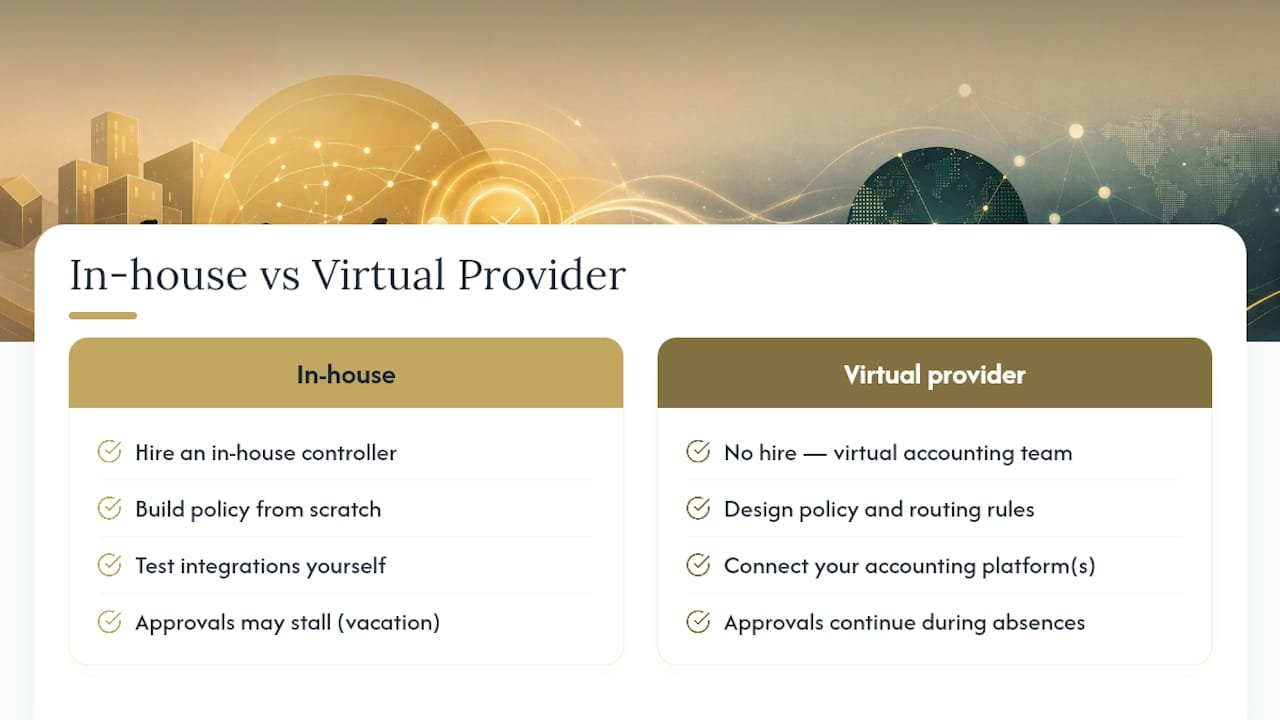
This is an alternative to hiring an in-house controller just to keep expenses moving. Instead of building a policy from scratch, testing integrations yourself, and hoping approvals don’t stall when someone’s on vacation, a virtual accounting team can design the policy, configure the routing rules, connect your accounting system, and process expenses on an ongoing basis.

If you’re evaluating whether to build this in-house or bring in outside help, ask any provider three questions: what’s their turnaround SLA on approvals and reimbursements, which accounting platforms do they integrate with, and how long does onboarding actually take. Those answers tell you more than a features list ever will.
Our virtual accounting department service builds expense workflows as part of a broader financial management setup, so approvals, GL posting, and monthly close all work off the same clean data. If chat-based approvals or scattered spreadsheets are already slowing your reimbursements down, consider consulting a virtual accounting provider to explore what a properly configured workflow would look like for your team.
Sources
For readers who want to go deeper on the compliance side, the IRS accountable plan rules covered by Corpay explain the 60-day substantiation window that keeps reimbursements non-taxable. Microsoft’s expense workflow documentation is a solid technical reference for routing logic, and SAP Concur’s approval configuration guide shows how enterprise systems chain multi-level approvals together.
- Set up workflows for expenses | Microsoft Learn
- Expense Approval Workflow: How It Works and How to Get It Right | ExpenseTron
FAQ
What is an approval workflow for expenses?
It’s the defined sequence, submission, routing, approval, finance review, payment, and GL posting, that moves an employee’s expense from purchase to reimbursement while enforcing company spending policy.
How do I create an expense approval workflow?
Start with a written policy and approval matrix, pick one submission channel with required fields, configure routing and escalation rules, connect your accounting system, then pilot with one team before rolling it out company-wide.
What are the steps in the expense approval process?
The five core steps are submission with receipt capture, manager approval for business purpose, finance verification for accuracy and compliance, payment or disbursement, and GL posting for the accounting record.
How long should expense approval and reimbursement take?
Best-in-class organizations complete the full cycle in about 3.5 days, while many companies set internal targets of 3 to 10 business days for reimbursement after approval.
Can a small business outsource its expense approval workflow?
Yes. A virtual accounting provider like Kelliworks can design the policy, set up routing tiers, connect the accounting sync, and manage ongoing processing so the business doesn’t have to build or maintain it in-house.