


A bookkeeping cleanup is a one-time project that brings your books up to date and makes them accurate: every account reconciled to its statement, every transaction in the right category, and reports you can trust for decisions and tax filing. You can work through it yourself with the process below. Or you can hand it to a team that also keeps the books clean afterward, which is what we do at KelliWorks.
This guide is for U.S. small business owners whose books have fallen behind, gone stale, or turned into a tangle in QuickBooks. It covers how to tell cleanup is needed, what to gather, the steps in order, how to check the result and how to keep it from happening again.
TL;DR
- Cleanup means reconciling every bank and card account, fixing categories, clearing duplicates and stale balances, and ending with reports that match reality.
- Start by gathering statements, loan and payroll records, prior returns and sales tax filings, then work period by period, oldest first.
- Time and cost depend on how far back the problems go, how many transactions and accounts you have, and how good your records are.
- Afterward, reconcile monthly, lock the cleaned periods and review reports on a schedule.
- U.S. tax rules vary by state, so confirm your state’s requirements before you file anything.
Table of Contents
- What a bookkeeping cleanup is (and how it differs from catch-up)
- Signs your books need a cleanup
- What to gather before you touch the file
- The cleanup process, step by step
- How to know the cleanup worked
- How long it takes and what drives the cost
- Cleanup and taxes
- Keeping your books clean after the cleanup
- Where we come in
- Our view on cleanup
- FAQ
- Sources
What a bookkeeping cleanup is (and how it differs from catch-up)
Cleanup and catch-up are related but not the same job. Catch-up bookkeeping means entering the months you never recorded. Cleanup means correcting books that exist but are wrong: miscategorized spending, duplicate entries, accounts that don’t match the bank, and balances that nobody can explain. Many businesses need both. If your main problem is months of missing entries, our catch-up bookkeeping guide walks through that side in detail.
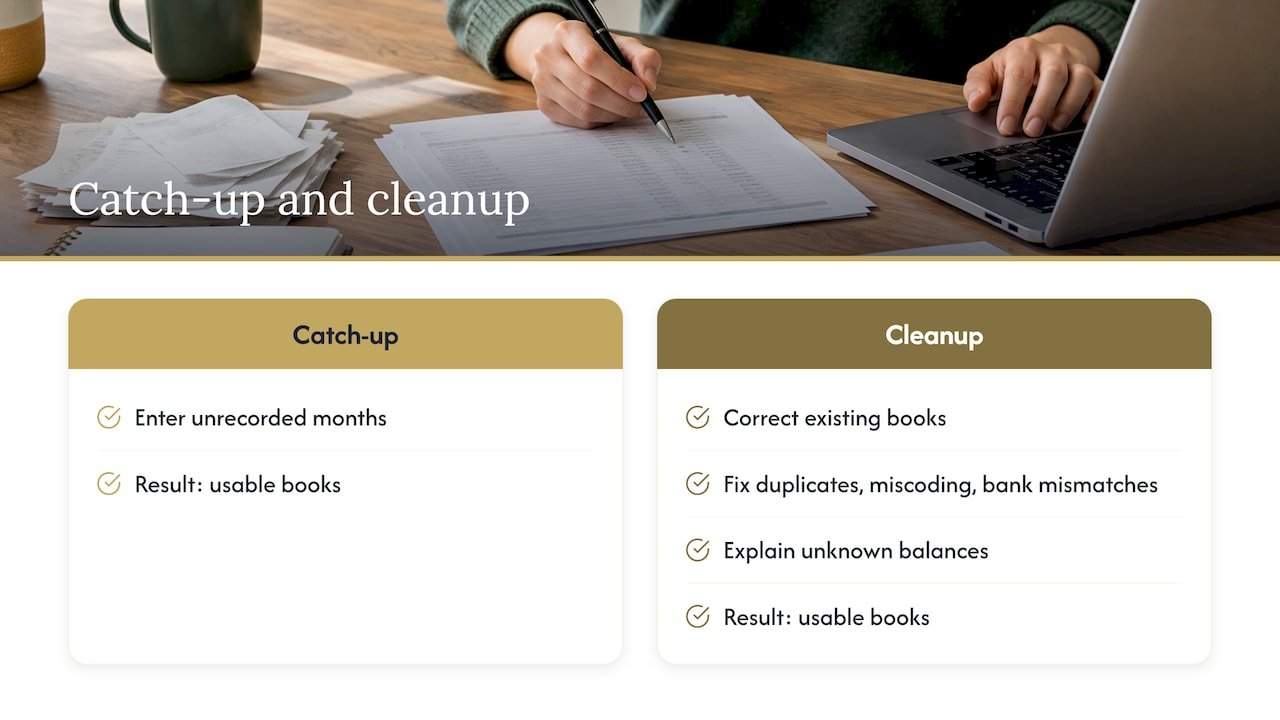
The end product of either is the same: books you can use. That means a profit and loss statement that shows what you earned, a balance sheet that shows what you own and owe, and a cash position that matches your bank.
Signs your books need a cleanup
Most owners know something is off before they can name it. These are the common signals:
- Your bank balance and the QuickBooks balance disagree, and the gap has been growing.
- A long list of uncategorized transactions sits in the register, or everything is parked in a catch-all account.
- You find the same deposit or bill entered twice.
- Undeposited Funds or similar clearing accounts carry balances that are months old.
- Your profit and loss statement shows a number that does not feel true when you look at the cash in the account.
- Your tax preparer keeps asking you for explanations or sends back questions about the same items.
- You are about to apply for a loan, bring on a partner or change preparers, and the books would not survive a close look.
One sign is a nuisance. Three or four together usually mean the file needs a structured cleanup instead of spot fixes.
What to gather before you touch the file
Cleanup is mostly detective work, and the evidence is outside QuickBooks. Before you change a single entry, collect:
- Bank and credit card statements for every account the business has used, including old or closed ones and any personal card that paid business expenses.
- Loan and line-of-credit statements, so balances and interest can be checked.
- Payroll reports and tax filings, if you have employees, including quarterly and year-end forms.
- Sales tax returns, if you collect sales tax.
- Prior-year tax returns and any year-end adjustments your preparer made.
- Invoices, receipts and contracts for large or unusual items.
- Payment platform reports from processors and marketplaces, which often show gross sales, fees and payouts separately.
- Asset purchase records for equipment, vehicles or other big-ticket items.
The IRS says the general rule is to keep records for three years, depending on the action, expense and event recorded. If some documents are missing, your bank, lenders and payment platforms can usually reissue statements, so request them early. It can take time.
The cleanup process, step by step
This order works because each step depends on the one before it. Reconciling before you fix categories, for example, prevents you from tidying numbers that are still wrong.
1. Back up the file and set a scope
Make a copy of the current file before changing anything. Then decide the period you are cleaning: the current tax year, the prior year, or several years. Write down the start date. Work in the oldest period first, because a mistake there carries into every later balance.
Where it goes wrong: owners start fixing the most recent mess because it is the most visible, then discover the opening balances were wrong all along.
2. Check the opening balances
The opening balance for each account in your first cleanup period should match the closing balance of the prior period, or the prior year’s tax return and statements. A balance sitting in an opening-balance equity account is a flag that someone entered a number to force a match and never resolved it.
3. Reconcile every bank and credit card account
Reconciliation means matching your books to the bank’s statement, line by line, until the ending balances agree. Do it month by month from the oldest period forward. The checklist from FitSmallBusiness puts source-document collection and bank and card reconciliations at the start of a QuickBooks cleanup for this reason: nothing downstream can be trusted until they tie out.
The temptation is to post a plug entry, a made-up adjustment, so the numbers agree. Resist it. A plug hides the real problem, which is usually a duplicate, a missing transaction or a transfer recorded twice. Our guide to monthly bank reconciliation without plug entries shows how to find the cause instead.

4. Remove duplicates and untangle transfers
Bank feeds sometimes import a transaction that was already entered by hand. Transfers between your own accounts, such as moving money from checking to savings or paying a credit card, should never appear as income or expense. Search each account for duplicates, then confirm every transfer has two matching sides.
5. Categorize everything that is uncategorized
Work through the uncategorized and ask-my-accountant style accounts. Use the invoice, receipt or vendor history to decide each category. Group similar transactions by vendor so you can apply the same decision consistently.
Two details that matter:
- Owner activity. Money you put in or take out of the business is not revenue or an expense. Depending on your entity type, it belongs in owner contribution, draw or distribution accounts.
- Mixed spending. If personal and business spending went through the same account, separate them. Going forward, give the business its own account and card.
6. Review accounts receivable and accounts payable
Open the aged receivables report. Every old invoice is either still owed, was paid and never matched, or should be written off. Do the same with unpaid bills. Match payments to invoices so the balance sheet shows what is actually owed to you and by you. Stale amounts here distort your income and your picture of cash. If chasing what you are owed is part of the problem, that is something we take on directly, along with paying the bills on schedule.
7. Clear clearing accounts and review liabilities
Undeposited Funds should be close to zero once deposits are matched. Check loan balances against lender statements, and sales tax or payroll liability accounts against the filings you actually made. If the balance in a liability account does not match what the agency says you owe, find out why before you file again.
8. Review payroll, inventory and fixed assets
If you pay employees, compare payroll reports with the entries in your books for wages, taxes and benefits. If you hold inventory, confirm the count and value. For equipment and other long-lived purchases, check that they were recorded as assets and not simply expensed, then talk with your tax preparer about how they should be treated. Our payroll compliance checklist covers the payroll side.
9. Tidy the chart of accounts
The chart of accounts is the list of categories your reports are built on. Over time it collects near-duplicates, one-time accounts and vague names. Merge or rename what overlaps, and make inactive what you no longer use. A simpler chart makes every future month faster to categorize.
10. Review the reports and document what you changed
Pull the profit and loss statement, balance sheet and cash flow report for each cleaned period. Compare them with what you know happened: does revenue look right, is any expense category oddly large, does the cash balance match the bank? Look at year-over-year trends for anything that jumps without a reason. Keep a short log of significant corrections and journal entries, including what was wrong and what you did. If a preparer or lender asks later, you will have the answer.
How to know the cleanup worked
A finished cleanup passes these checks:
| Check | What you should see |
|---|---|
| Bank and card balances | Ending balances in the books equal statement balances for every account |
| Uncategorized items | None remaining in the cleaned periods |
| Receivables and payables | Aged reports list only amounts really owed |
| Clearing accounts | Undeposited Funds and similar accounts near zero |
| Opening-balance equity | Resolved and not carrying a balance |
| Liabilities | Loan, sales tax and payroll balances agree with outside statements |
| Reports | Profit and loss and balance sheet make sense against what you know about the business |
| Documentation | A written list of major corrections |
This mirrors the verification approach in the QuickBooks cleanup checklist from FitSmallBusiness: compare balances to statements, review the financial reports, look into unusual trends and document significant corrections.
How long it takes and what drives the cost
No two cleanups are the same, and any fixed price quoted without seeing the file deserves a second look. These factors set the time and the effort:
- How far back the problems go. One messy quarter is a different job than three years of neglect.
- Transaction volume. A busy file with thousands of entries takes more work than a quiet one, even if both cover the same months.
- Number of accounts. Each bank account, card and payment platform has to be reconciled separately.
- Quality of records. Missing statements and undocumented transactions slow everything down.
- Complexity. Payroll, inventory, multiple entities, sales tax in more than one state and loans each add steps.
- Earlier errors. Wrong opening balances or misapplied payments force rework in later periods.
If you are weighing the options, there are three realistic paths: doing it yourself, paying for a one-time project, or moving to ongoing support that includes the cleanup. Doing it yourself costs your time, which is easiest to underestimate. A one-time project fixes the past but leaves the habits that created the mess. Ongoing support fixes the past and prevents the next backlog.
On pricing, we work for one flat monthly fee agreed up front, never a percentage of your income, so you know the cost before the work starts.
Cleanup and taxes
Books that are clean make tax preparation faster and the answers to your preparer’s questions easier. They also show where the deductions you are entitled to actually sit, though what any return produces depends on your facts, and nothing here promises a specific result.
Two points to keep in mind:
- State rules differ. U.S. tax rules vary by state, including sales tax, income tax and filing deadlines, so check the requirements where you operate.
- Your preparer. We can handle tax ourselves, or work alongside the CPA you already have. If you have a CPA, send them the cleaned reports and your correction log. If you are closing a year, our guide to closing your books for taxes shows the sequence.
If a cleanup shows unfiled returns or notices from a tax agency, bring that to a CPA or tax professional before you respond, since the right next step depends on your situation.
Keeping your books clean after the cleanup
A cleanup only lasts if the routine changes. Build these habits in right away:
- Reconcile every month. Match each bank and card account to its statement soon after month end. Our 10-step month-end close lays out a fast routine.
- Set categorization rules. Decide how recurring vendors are coded and write it down so the choice is the same every month.
- Lock the cleaned periods. QuickBooks lets you set a closing date with a password, so old periods cannot be changed by accident.
- Review bank rules and feeds. Make sure rules still categorize correctly and that every feed is connected and importing.
- Review the reports on a schedule. A monthly look at profit and loss and a quarterly deeper check catches drift early.
- Keep business and personal money apart. One business account and card for business spending removes the most common source of cleanup work.
- Build a cash cushion. Once your numbers are reliable you can see how uneven your income is, and plan a reserve with emergency fund strategies for inconsistent income.
For a fuller routine, see our bookkeeping best practices.
Where we come in
We are a real team, not an app. At KelliWorks, our accounting and bookkeeping services cover bookkeeping and monthly reporting, tax planning and preparation, bill pay and collections. We pay the bills, chase what you are owed and keep the business in good standing, for one flat monthly fee agreed up front.

For tax, we can handle it ourselves or work alongside your existing CPA. Confidentiality is standard practice for us, and we are glad to sign an NDA before we start. If your books are behind, talk with us about getting them current.
Our view on cleanup
Most cleanups we hear about start the same way: an owner who is good at the work of the business and has never had time for the money side. The books drift for a few months, then a tax deadline or a loan application makes the drift impossible to ignore.
We think the cleanup is the smaller half of the problem. The bigger half is what happens in month two, when the bills still need paying, invoices still need chasing and reconciliations still need doing. A tidy file that gets neglected again is a repeat project.
That is why we pair the cleanup with ongoing management: one team, one flat monthly fee, and an owner who sees clear numbers each month and gets back to the work. You should not have to become a bookkeeper to run your business.
Kelli
FAQ
How much does a bookkeeping cleanup cost?
It depends on how far back the problems go, how many transactions and accounts there are, and how complete your records are. A short, simple file costs far less to fix than several years of neglect. We work for a flat monthly fee agreed up front, and we can tell you what applies to your books in a free consultation.
How long does a cleanup take?
A small, simple file can come together in a matter of weeks, and a multi-year backlog takes longer. Missing statements are the usual cause of delay, so request them from your bank early.
Do I need to keep my old records once the cleanup is done?
Yes. The IRS says the general rule is three years, depending on the action, expense and event recorded. Some records, such as those tied to assets or employment, may need to be kept longer, so ask your CPA or us about your situation.
Can you work with my current CPA?
Yes. We can handle tax ourselves, or work alongside the CPA you already have by passing along cleaned reports and a record of what was corrected.
Sources
- QuickBooks Online Cleanup Checklist & Tax Prep Guide, FitSmallBusiness
- Common questions about recordkeeping for small businesses, IRS
- Taking care of business: recordkeeping for small businesses, IRS
If you would rather not do this alone, book a free consultation at kelliworks.com/consultation.
Recommended
- Catch Up Bookkeeping: A Small Business Owner’s Guide
- Bookkeeping Best Practices for Small Business Owners
- Cost-Effective Bookkeeping for Small Businesses: 2026 Guide
- Bookkeeping Cycle Explained for Small Business Owners
This article is general information, not tax, legal or financial advice. Talk to a professional about your situation.


