
Accounts receivable aging groups every unpaid invoice by how long it has sat past its due date, sorting your customer balances into buckets like 0 to 30, 31 to 60, 61 to 90, and 90-plus days. That single report tells you who to call first, how much to set aside in your allowance for doubtful accounts, and where your cash flow forecast is about to take a hit. Track your days sales outstanding (DSO) alongside it, and you have the two core signals for whether your collections are healthy or drifting. The aging schedule is best treated as a weekly worklist, not a monthly formality.
TL;DR:
- Regular weekly reconciliation of your aging report to the general ledger prevents errors and ensures actionable, current data for collection efforts.
- Customizing aging buckets to match your actual payment terms, such as net 15 or net 60, improves the accuracy of overdue invoices’ risk assessment.
- Prioritizing collection calls based on dollar amount and migration speed, instead of solely invoice age, enhances recovery effectiveness.
- Disputed invoices and unapplied credits should be resolved separately and reconciled before initiating collection actions to avoid misfires.
- Automated or platform-assisted aging management cuts manual effort, reduces errors, and enables consistent follow-up, especially for higher invoice volumes.
Table of Contents
- What Does an Accounts Receivable Aging Report Include?
- How Do You Create An Aging Report In Excel Or Accounting Software?
- How Should You Use Aging Data To Make Collection And Credit Decisions?
- What Mistakes Make An Aging Report Unreliable?
- What Should You Do For Each Aging Bucket?
- A Worked Example: Three Invoices Across Two Aging Periods
- What Kelliworks Sees Working In Practice
- Are There Legal Rules Around How You Collect On Aged Receivables?
- How Do Payment Norms In Your Industry Change Aging Benchmarks?
- How Does Aging Fit Into Broader Credit Risk Management?
- What Software Options Exist Beyond A Manual Spreadsheet?
- A Weekly Checklist Worth Keeping On Your Desk
- Let Kelliworks Handle Your Aging Reports And Collections Follow-Up
- Sources
- FAQ
What Does an Accounts Receivable Aging Report Include?
An aging report groups unpaid invoices into date ranges, most commonly 0 to 30, 31 to 60, 61 to 90, and 90-plus days, with a grand total column showing what each customer owes across every bucket. Some businesses add a “current” column for invoices not yet due, and a separate flag for disputed items or accounts on a formal payment plan. That extra granularity matters more than it sounds. Lumping a disputed invoice in with a simple late payment hides a problem that needs a different kind of conversation.
The standard layout typically lists customers down the rows, with their individual outstanding invoices nested underneath each one. Columns run across the top for each aging bucket plus a total, so you can see both the detail and the summary in one view.
A well-built report also carries a handful of supporting fields that make the totals actionable:
- Invoice number so collectors can pull up the original document instantly
- Due date to confirm the bucket assignment is accurate against actual terms
- Unapplied credits that might offset part of a balance before you call anyone
- Customer contact information so the person doing outreach isn’t hunting for a phone number
- Last payment date to spot customers who have gone quiet versus those still trickling in partial payments
Miss any of these and the report turns into a list of numbers instead of a tool your team can act on. A bookkeeper working from a clean chart of accounts and consistent bookkeeping habits will produce an aging report that actually reflects reality, rather than one full of stale invoice statuses and mismatched due dates. The report is only as trustworthy as the invoicing discipline behind it, which is why so many small businesses discover their aging schedule and their actual cash position have quietly drifted apart.
How Do You Create An Aging Report In Excel Or Accounting Software?
Building an accounts receivable aging analysis from scratch requires five data points for every open invoice: the invoice date, the due date, the invoice amount, the customer name, and any credits or partial payments already applied. Everything else, the buckets, the totals, the customer summaries, gets built from those five fields.
Here’s the spreadsheet method, step by step:
- List every open invoice in rows, with columns for customer, invoice number, invoice date, due date, and balance due.
- Calculate days past due using a formula like
=TODAY()-[Due Date]. Any negative number means the invoice isn’t due yet. - Assign each invoice to a bucket with a nested IF or IFS formula, such as
=IFS(DaysPastDue<=0,"Current", DaysPastDue<=30,"1-30", DaysPastDue<=60,"31-60", DaysPastDue<=90,"61-90", TRUE,"90+"). - Total each bucket by customer using SUMIF or SUMIFS, or build a PivotTable with customer name as rows and the bucket column as your value field. The Journal of Accountancy walks through this exact structure, including how to layer conditional formatting so overdue buckets flag themselves visually.
- Add a grand total row and column so you can eyeball the overall exposure and compare it against your GL control account.
If you’re running QuickBooks, Xero, or a similar platform, you don’t need to build this manually. The aging report lives under your standard reports menu, and most platforms let you customize the bucket widths to match your actual terms rather than the software’s default 30-day increments. That customization step gets skipped constantly, and it’s the reason so many aging reports look worse (or better) than the business really is.
Pro Tip: If your standard terms are net 15 instead of net 30, change your bucket widths to match. Otherwise, half your “current” invoices are actually late, and you won’t know it until a customer stops answering the phone.
How Should You Use Aging Data To Make Collection And Credit Decisions?
The oldest invoice on your report isn’t always the most urgent one. A $200 invoice sitting at 95 days matters far less than a $12,000 invoice that just slid from 15 days to 35 days, because the second one signals a customer relationship changing direction in real time.
Aging data feeds four distinct business decisions:
- Collection priority. Rank accounts by dollar exposure and migration speed, meaning how fast a balance is moving from one bucket to the next, rather than by pure invoice age.
- Credit terms and limits. A customer who consistently lands in the 31 to 60 bucket is telling you something about their cash position. Tighten their limit or shorten their terms before the pattern gets worse.
- Allowance for doubtful accounts. Apply historical loss percentages to each bucket’s total to estimate how much of your current receivables will never get collected. If your 90-plus bucket historically recovers only a low percentage, your allowance should reflect that.
- Cash flow forecasting. Aging trends tell you which invoices are likely to convert to cash and on roughly what timeline, which is the raw material for a short-term forecast.
The urgency behind that allowance calculation isn’t abstract. A 2022 analysis of 250,000 invoices found that 63% of one-time payment invoices were paid within 30 days, but invoices still unpaid after 90 days had only an 18% chance of ever being collected. That’s the entire case for acting on the 61 to 90 bucket before it becomes the 90-plus bucket. Once a balance crosses that threshold, the math turns against you fast.
If your DSO has been climbing for two or three periods running, check your aging report before you check your sales pipeline. Aging usually moves first, and DSO is just the lagging summary of what’s already happening bucket by bucket.
What Mistakes Make An Aging Report Unreliable?
Timing distortions are the most common reason an aging report tells you a story that isn’t quite true. If you bill everyone on the last day of the month, your “current” bucket balloons temporarily and makes your receivables look healthier than they are the moment before the next billing cycle starts. Read the report relative to your own billing calendar, not as an absolute snapshot.
Bucket width mismatches cause the same kind of false signal. If your standard terms are net 15 but your buckets are built around 30-day increments, invoices that are genuinely two weeks overdue still show up as “current.” That gap hides real risk until it’s already compounded.
Before you act on anything the report tells you, run these checks:
- Reconcile the aging total to your AR control account in the general ledger. If the two don’t match, you likely have a posting error, and collection outreach based on unreconciled numbers risks chasing invoices that were already paid or coded incorrectly.
- Clear unapplied credits. A customer sitting with an unapplied payment on file looks past due when they’re not.
- Resolve disputed invoices separately. Disputes shouldn’t sit in your standard collection queue; they need a different conversation entirely.
- Confirm bucket widths match your actual contract terms, especially if you run different terms for different customer segments.
Pro Tip: Never call a customer about a balance you haven’t reconciled to your GL first. There is nothing more damaging to a collections relationship than demanding payment on an invoice that was already settled.
What Should You Do For Each Aging Bucket?
Different buckets call for different tactics, and using the same script for a 10-day-late invoice and a 95-day-late invoice wastes your time and irritates good customers who were simply going to pay on their normal cycle anyway.
- Current and 1 to 30 days. Send automated payment reminders with a direct payment link. A small early-payment discount, even 1% to 2%, moves some customers to pay before the reminder is even necessary.
- 31 to 60 days. This is where personal outreach starts. Call or email directly, confirm the invoice was received without issue, and get a specific promise-to-pay date rather than a vague “soon.” Log that date and follow up on it.
- 61 to 90 days. Escalate to a manager-level conversation. Offer a structured payment plan if the customer’s cash position seems genuinely tight, and consider pausing further deliveries or new work until the balance moves.
- 90-plus days. Send a formal written demand referencing the specific invoices and amounts owed. Weigh the cost of a collections agency or small claims action against the balance itself, since pursuing a $400 invoice through a collector rarely makes financial sense. Document every contact attempt and date, both for your own records and in case legal action becomes necessary.
The shift many businesses are making now is from static monthly snapshots to live worklists that function more like support tickets, assigned to a specific person with a specific next action date. If your current process is “someone glances at the aging report once a month,” you’re leaving the 31 to 60 bucket unmanaged until it becomes the 61 to 90 bucket. A cash flow management approach built around weekly aging reviews catches that migration while there’s still time to act on it.
A Worked Example: Three Invoices Across Two Aging Periods
Picture three invoices from the same customer, run through the report on two different dates one month apart.
The formulas behind this are the same ones covered earlier: =TODAY()-[Due Date] for days past due, then =IFS(DaysPastDue<=0,"Current", DaysPastDue<=30,"1-30", DaysPastDue<=60,"31-60", DaysPastDue<=90,"61-90", TRUE,"90+") for the bucket, and =SUMIF(BucketColumn,"31-60",AmountColumn) to total any single bucket across all customers.
The action here is obvious once you see it laid out this way:
- INV-1003 just crossed into 61 to 90 days at $9,600, the largest balance in this set. That’s your first call this week.
- INV-1001 moved from 1 to 30 into 31 to 60. Confirm receipt and get a promise-to-pay date now, before it follows INV-1003.
- INV-1002 slid from current into 1 to 30 without any contact yet. A reminder email is enough at this stage.
Run that same view weekly and the migration pattern becomes the whole management system.
What Kelliworks Sees Working In Practice
Businesses that run their aging report weekly, reconcile it to the GL every time, and turn it into an assigned worklist collect faster than those checking it once a month out of habit. That reconciliation step is where most DIY processes quietly break down. A number on an aging report that doesn’t match the general ledger control account isn’t a report, it’s a guess.

Building discipline from the start with weekly aging pulls, GL matching before any collection call goes out, and a prioritized list handed to whoever owns the customer relationship is key to effective bookkeeping and consulting. Many clients report that the biggest shift isn’t the software, but having someone accountable for running the process every week instead of when there’s time.
If your aging report currently lives in someone’s head, or gets built the day before a bank meeting, that’s the signal to move from a spreadsheet habit to outsourced support:
- You’re spending more than two or three hours a week chasing invoices manually
- Your DSO has climbed for two consecutive months and you can’t say why
- Nobody reconciles the aging total to the GL before calls go out
- Your bad debt allowance is a guess rather than a calculation
Are There Legal Rules Around How You Collect On Aged Receivables?
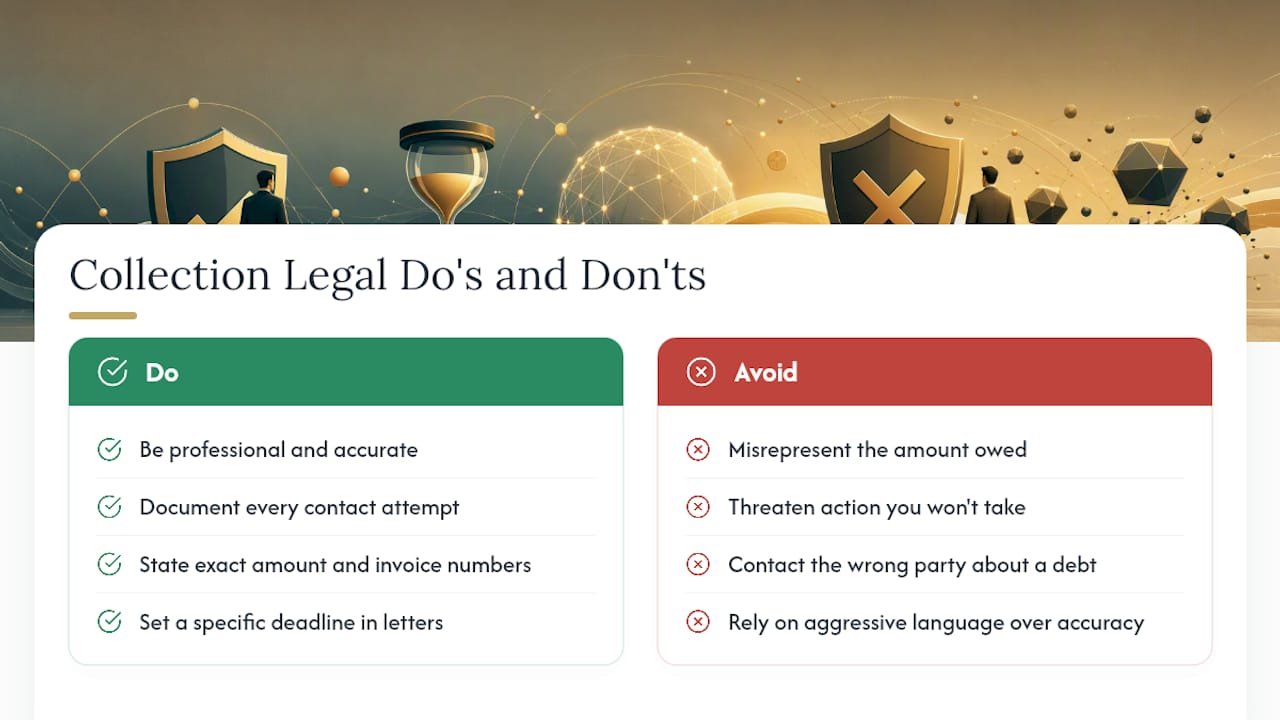
Collecting on overdue invoices from other businesses is largely a matter of contract law, not consumer protection statutes, since the Fair Debt Collection Practices Act governs debts owed by consumers, not business-to-business invoices. That distinction matters for how aggressively you can communicate. B2B collections still need to stay professional and accurate. Misrepresenting the amount owed, threatening action you don’t intend to take, or contacting the wrong party about a debt can expose your business to a breach of contract or misrepresentation claim even outside consumer protection law.
If you sell to individual consumers rather than businesses, and you use a third-party collection agency, that agency is bound by federal and state debt collection rules covering contact frequency, disclosure requirements, and prohibited practices. Handling those collections in-house doesn’t remove those obligations if state law extends similar protections to original creditors.
Written demand letters for 90-plus-day balances should state the exact amount owed, the invoice numbers, and a specific deadline, since vague demands are harder to enforce if a dispute ever escalates to small claims court. Keep a dated record of every contact attempt. That documentation is what a court or a collections agency will ask for first, and it’s also what protects you if a customer later claims they were never notified.
None of this is a substitute for legal advice specific to your state and industry, but the basic principle holds: accuracy and documentation protect you far more than aggressive language ever will.
How Do Payment Norms In Your Industry Change Aging Benchmarks?
A “good” accounts receivable aging percentage looks completely different depending on what industry you’re in, which is why comparing your aging report against a generic benchmark can be misleading. Construction and government contracting often run on net 60 or net 90 terms as a matter of course, so a balance sitting in the 61 to 90 bucket might be perfectly normal there, while the same bucket in a retail or professional services business signals a real problem.
Healthcare billing carries its own distortion, since insurance reimbursement cycles routinely stretch invoices past 60 days before a claim even finalizes, meaning aging buckets need to account for payer processing time separately from customer nonpayment. Subscription and SaaS businesses tend to run the tightest aging profiles, since most revenue collects automatically on a fixed schedule, and any invoice appearing in a 31-plus bucket usually means a failed payment method rather than a slow-paying customer, which calls for a different kind of outreach entirely.
Wholesale and distribution businesses often extend net 30 or net 45 terms specifically to match their customers’ own sell-through cycles, so their aging benchmarks should be built around those extended terms rather than a flat 30-day standard. The practical takeaway: set your bucket widths and your internal benchmarks around your own industry’s standard terms, not a one-size-fits-all model. A construction company treating every net-60 invoice as suspicious the moment it turns 31 days old will burn goodwill with customers who are paying exactly on schedule.
How Does Aging Fit Into Broader Credit Risk Management?
Accounts receivable aging is one input into a larger credit risk picture, not a standalone system. On its own, it tells you what’s already happened. Paired with a credit policy, it starts telling you what’s likely to happen next.
The connection works in both directions. Aging trends should inform how you set credit limits and terms for new and existing customers, tightening exposure for anyone whose balances consistently drift into the 31 to 60 or 61 to 90 buckets. At the same time, your credit policy should shape how you read the aging report in the first place. A customer with a strong payment history and a large approved credit limit sitting at 35 days past due is a different risk profile than a new account with a small limit showing the same lateness.
Concentration risk is the piece most small businesses underweight. If two or three customers account for the majority of your aged balances, that concentration itself is a risk factor independent of how old any single invoice is. Losing one major account to nonpayment can do more damage than a dozen small late payers combined.
A mature credit risk approach uses aging data to periodically re-score every active customer, adjusting limits and terms as payment behavior shifts, rather than setting a credit limit once at onboarding and never revisiting it. That periodic review is often the single biggest gap between businesses that catch bad debt early and those that discover it during a year-end close.
What Software Options Exist Beyond A Manual Spreadsheet?
Spreadsheets work fine at a small scale, but they demand someone manually pulling fresh invoice data, refreshing formulas, and rebuilding the report every time you want a current view. Most accounting platforms, including QuickBooks and Xero, generate an aging report automatically from your existing invoice and payment data, updating in real time as invoices get created or paid.
Beyond the built-in reports in general accounting software, dedicated accounts receivable management platforms add automated reminder sequences, embedded payment links, and collector worklists that assign specific overdue accounts to specific team members with due dates for follow-up. Some integrate directly with e-commerce or ERP systems so invoice data flows in automatically instead of requiring manual entry, which removes one of the most common sources of aging report errors: stale or missing invoice records. A platform integration between accounting systems and sales channels reduces exactly this kind of data lag, since invoices and payments sync automatically rather than waiting on manual updates.
The right level of automation depends on invoice volume more than company size. A consultant sending eight invoices a month doesn’t need a dedicated AR platform. A business issuing 200 invoices monthly across dozens of customers almost certainly does, since manual tracking at that scale starts missing the exact migration patterns that matter most.
A Weekly Checklist Worth Keeping On Your Desk
The three mistakes I see most often with small business AR: nobody reconciles the aging report to the GL before making calls, credit limits get set once and never revisited, and the oldest invoice gets chased instead of the biggest one moving fast through the buckets.
Here’s a five-item checklist worth running every week:
- Run your aging report, fresh, not from last week.
- Reconcile the total to your AR control account in the general ledger.
- Clear any unapplied credits sitting against open balances.
- Contact your top three overdue accounts by dollar amount, not by age.
- Set a specific next-action date for every account you touched.
Businesses that do this weekly catch problems while they’re still small. If your week is already full and this keeps sliding, consider exploring outsourced support options.
— Kelli
Let Kelliworks Handle Your Aging Reports And Collections Follow-Up
Running a disciplined weekly aging review takes real hours: pulling the report, reconciling it to the GL, calling three accounts, logging next steps, and doing it again next week without fail. This kind of service exists so small business owners don’t have to be the ones doing that every Friday afternoon instead of running their business.

Our bookkeeping and accounting services build weekly aging reviews directly into your monthly close, matched against your GL control account every time so you’re never chasing an invoice that was already paid. Clients get a prioritized worklist, not just a static report, along with follow-up support for the accounts that need a firmer hand. If your current process is a spreadsheet nobody has time to update, book a consultation with Kelliworks and let a team that reconciles aging reports every week take that off your plate.
Sources
- Accounts receivable aging explained | Stripe
- Accounts receivable aging – AccountingTools
- Doing accounts receivable aging reports in Excel | Journal of Accountancy
FAQ
What is the accounts receivable aging method?
It’s the practice of sorting unpaid customer invoices into time-based buckets, typically 0 to 30, 31 to 60, 61 to 90, and 90-plus days, so you can prioritize collections and estimate uncollectible balances.
What is a good AR aging percentage?
There’s no universal benchmark since it depends heavily on your industry’s typical payment terms, but as a general signal, most healthy businesses keep the large majority of their receivables in the current and 0 to 30 buckets, since 63% of one-time invoices get paid within 30 days.
How do you calculate the aging of accounts receivable?
Subtract each invoice’s due date from today’s date to get days past due, then assign that invoice to the matching bucket using a formula like =IFS(DaysPastDue<=0,"Current",DaysPastDue<=30,"1-30",...), and total each bucket with SUMIF or a PivotTable.
What is an aging of accounts receivable?
It’s a report that lists every customer’s unpaid invoices grouped by how many days each one has been outstanding, giving you a bucketed view of collection risk instead of one lump total.
Can Kelliworks help set up and manage my aging reports?
Yes. Kelliworks’ bookkeeping and accounting services include weekly aging reviews reconciled to your general ledger, with a prioritized collections worklist built from the results.