
Correct bookkeeping for ecommerce delivers five things: accurate gross sales separate from net deposits, fully reconciled platform payouts, inventory valued at true landed cost, sales tax liabilities tracked by state, and a monthly close you can trust. The minimum setup to get there is a platform connection, a payouts clearing account, an ecommerce-specific chart of accounts and a fixed reconciliation date every month. Start with the clearing account. Everything else builds on it.
TL;DR:
- Connecting your platform to a clearing account and reconciling monthly ensures accurate gross sales, avoids overstating revenue, and maintains margin integrity.
- Handling sales tax correctly involves tracking nexus, understanding marketplace facilitator laws, and maintaining separate liabilities for platform-collected and self-collected taxes.
- Valuing inventory at landed cost and updating it regularly prevents margin distortion and aligns COGS with actual purchase expenses, including freight and duties.
- Categorizing processing fees and refunds as separate ledger entries preserves top-line sales clarity and improves profitability analysis at the SKU level.
- Automating bookkeeping with layered tech tools becomes necessary once order volume exceeds a few hundred per month to save time and improve accuracy.
Table of Contents
- What Does Bookkeeping for Ecommerce Actually Involve?
- How Do You Handle Sales Tax as an Online Seller?
- How Should You Value Inventory and Calculate COGS?
- Where Do Processing Fees and Refunds Belong in the Ledger?
- Which Financial Statements Matter Most for Ecommerce?
- What’s the Right Bookkeeping Schedule for an Online Store?
- How Do You Choose the Right Bookkeeping Tech Stack?
- How KelliWorks Supports Ecommerce Sellers
- Managing Vendor Bills and Accounts Payable for Ecommerce Suppliers
- Setting Up Prepaid Expenses and Deferred Revenue in Ecommerce
- Best Practices for Digital Receipts and Invoice Records
- Common Bookkeeping Mistakes in Ecommerce (and Fixes)
- Using Your Books to Make Better Business Decisions
- What I See Most Often With Ecommerce Clients
- Get Your Ecommerce Books Built Right the First Time
- Sources
- FAQ
What Does Bookkeeping for Ecommerce Actually Involve?
Bookkeeping for ecommerce means recording, categorizing, and reconciling every transaction your online store generates, from the moment a customer pays to the moment inventory hits your cost of goods sold. That sounds like standard small-business bookkeeping, and in some ways it is. The difference is volume and structure: a single Shopify or Amazon payout can bundle hundreds of individual orders, refunds, fees, and adjustments into one bank deposit. Booking that deposit as revenue is the single most common ecommerce bookkeeping mistake, and it distorts your gross sales, your fee expenses, and your margins all at once.
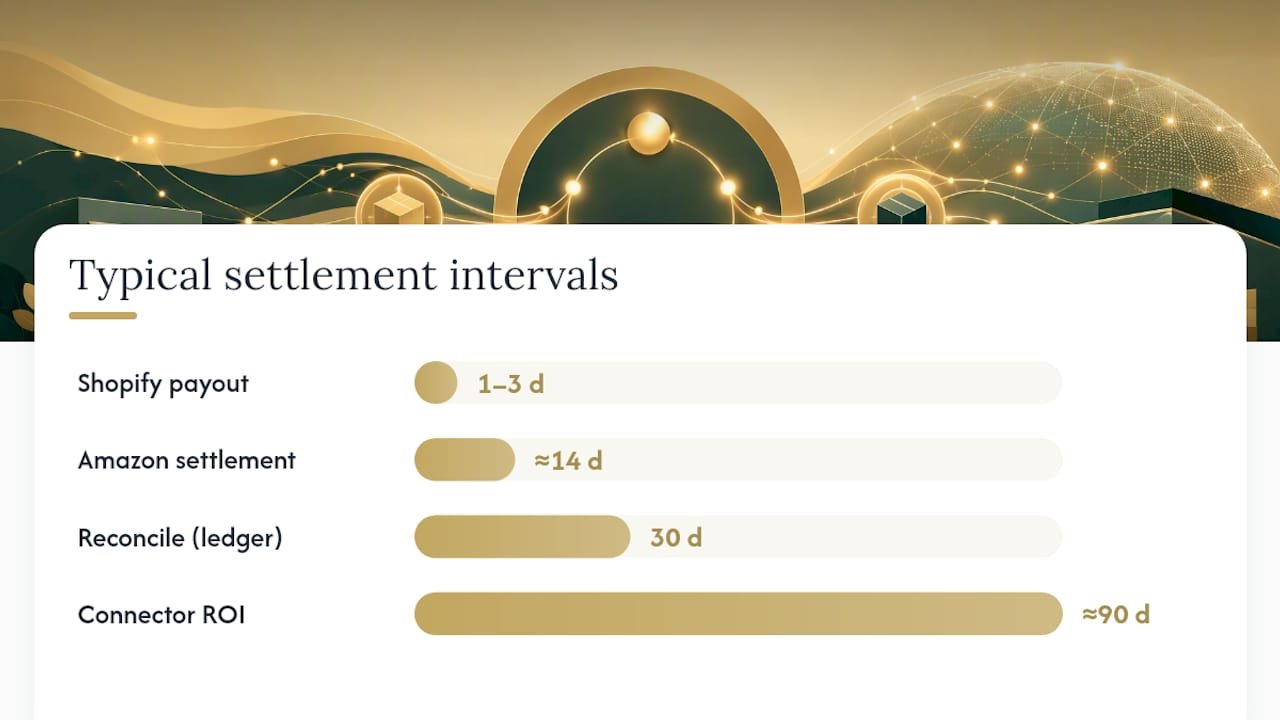
Shopify payouts work differently from Amazon settlements, and that distinction shapes your whole workflow. Shopify batches orders into a payout, typically every one to three business days, netting out Shopify Payments fees before the deposit lands. Amazon settlements run on a roughly biweekly cycle and bundle referral fees, FBA fulfillment charges, storage fees, advertising spend, and reimbursements into one number. Neither deposit tells you what actually happened at the order level, which is exactly why Shopify’s own bookkeeping guidance recommends splitting every payout into gross sales, fees, refunds, and adjustments rather than booking the net figure as revenue.
Here’s the workflow that keeps those numbers honest:
- Connect your platform (Shopify, Amazon Seller Central, or both) to a connector tool that can parse settlement-level detail.
- Route every payout through a platform clearing account rather than straight to your bank feed.
- Break out gross sales, refunds, shipping income, and each fee category as separate line items.
- Post journal entries from the clearing account to your general ledger on a fixed schedule.
- Reconcile the clearing account to $0 once the corresponding bank deposit lands.
For Amazon sellers specifically, journaling each settlement in full detail matters because a single settlement can hide referral fees, storage charges, and ad deductions that quietly erode margin if they’re never broken out. Run the reconciliation monthly, at minimum: download the platform’s payout or settlement report, match each fee category to your chart of accounts, and confirm the clearing account nets to zero once cash hits the bank.
Pro Tip: Once you’re processing more than a few hundred orders a month, do the math on a connector like A2X or Link My Books before your next close. Manually itemizing settlements at that volume eats hours you could spend on pricing or ad decisions, and automation tools consistently pay for themselves within a quarter once settlement complexity increases.
How Do You Handle Sales Tax as an Online Seller?
You handle ecommerce tax compliance by figuring out where you have nexus, understanding when the marketplace collects tax for you, and tracking what’s actually owed in your ledger, not just what’s been collected. Skipping any one of those three steps is how sellers end up with surprise notices from state revenue departments years after the sale happened.
Nexus is the legal trigger that obligates you to register and collect sales tax in a state. It comes in two flavors: physical and economic. Here’s how to check where you might already have it:
- Physical nexus check. Do you live, work, or store inventory in a state? Fulfillment by Amazon (FBA) inventory stored in a third-party warehouse counts, even if you never set foot there.
- Economic nexus check. Have your sales into a given state crossed that state’s revenue or transaction threshold, commonly $100,000 in sales or 200 transactions, though exact figures vary by state?
- Marketplace facilitator check. Is the platform you sell on registered as a marketplace facilitator in that state, meaning it collects and remits tax on your behalf automatically?
That third check matters more than most sellers realize. Marketplace facilitator laws, now adopted in nearly every state with a sales tax, shift the collection and remittance burden to platforms like Amazon, Walmart Marketplace, and Etsy for sales made through them. If all your revenue flows through a facilitator, you may not need to file returns in that state at all, even though you technically have nexus there. Sell direct through Shopify alongside a marketplace, though, and you’re back on the hook for collection and filing on that channel yourself.
Your bookkeeping needs to reflect this split clearly. Set up a sales tax payable liability account, and within it, separate what platforms have already collected and remitted from what you’re responsible for collecting yourself. Every state where you’re registered needs its own filing calendar, monthly, quarterly, or annual, depending on your sales volume in that state. Even when you owe nothing for a period, most states still require a zero-dollar return, and missing one can trigger penalties or an administratively revoked registration.
Build a short checklist you actually run:
- Confirm which states you have nexus in, at least once a quarter as sales grow.
- Register only where required, since registering unnecessarily creates ongoing filing obligations.
- Reconcile sales tax collected (per platform reports) against sales tax payable in your ledger monthly.
- File on time, including zero-dollar returns, and keep confirmation records for every filing.
- Retain exemption certificates for any wholesale or resale transactions.
If your nexus footprint is spreading across multiple states, a deeper walkthrough of registration and filing steps can save you from guessing, and a step-by-step sales tax process is worth bookmarking before your next registration deadline.
How Should You Value Inventory and Calculate COGS?
Inventory should be recorded as an asset on your balance sheet at landed cost, not just the price you paid your supplier, and moved into cost of goods sold only when the item actually sells. Get this wrong and your gross margin numbers are fiction, no matter how clean the rest of your books look.
Once inventory becomes material to your business, cash-basis accounting stops giving you a usable picture. Accrual accounting is the standard recommendation for inventory-based ecommerce businesses because it matches the cost of what you sold to the revenue from selling it, in the same period. Under accrual, unsold inventory sits on your balance sheet as an asset; only the portion tied to completed sales hits your P&L as COGS.
You’ll also need to pick a valuation method for tracking inventory cost as prices from suppliers shift over time:
- FIFO (first in, first out): the oldest inventory cost is expensed first. Most ecommerce sellers default here since it tends to mirror how physical stock actually moves.
- Weighted average: costs are averaged across all units on hand, smoothing out price swings. Useful for commodity-type products with frequent small reorders.
- LIFO (last in, first out): the newest cost is expensed first. Rare in ecommerce, and generally not permitted for companies also using FIFO for tax reporting internationally.
Landed cost is where a lot of sellers underprice their own products without realizing it. It’s not just the unit cost from your supplier. It includes inbound freight, customs duties, and any prep or labeling fees before the item reaches a warehouse or FBA. Recalculating landed cost on every inbound shipment matters because freight and duty rates move, and using a stale, static unit cost causes margin drift that compounds silently over a quarter.
At month-end, reconcile your perpetual inventory system against actual counts, and if you sell through FBA, reconcile Amazon’s inventory and reimbursement reports against your ledger separately. FBA reimbursements for lost or damaged stock need their own line item; booking them as miscellaneous income buries a signal you actually want to track.
Where Do Processing Fees and Refunds Belong in the Ledger?
Payment processing fees and refunds belong as distinct, categorized entries, never folded silently into your revenue or bank deposit figures. Most sellers record processing fees as an operating expense rather than COGS, since the fee is tied to the transaction method, not the product itself. Some ecommerce accountants argue for treating high-volume processor fees as a direct cost against revenue when they scale with sales volume closely enough to function like a variable cost. Either treatment works, as long as you apply it consistently month over month.
Reconciling processor statements to actual bank deposits is where discrepancies tend to surface. A payments platform built around clear fee structures can simplify this step, since ambiguous or bundled fee reporting from a processor is one of the more common sources of reconciliation headaches for online sellers.
Refunds and chargebacks should post as contra revenue, a negative entry against gross sales, not as an expense. This keeps your gross sales figure meaningful as a top-line number while still showing the real impact of returns on your net revenue.
A typical journal entry pattern looks like this:
- Sale processed: debit accounts receivable or clearing account, credit gross sales.
- Processing fee deducted: debit processing fees expense, credit clearing account.
- Refund issued: debit refunds (contra revenue), credit clearing account or cash.
- Chargeback received: debit chargeback expense or contra revenue, credit cash.
Run this reconciliation monthly alongside your platform payout reconciliation, since processor and platform data frequently need to be checked against each other to catch timing differences between when a sale is recorded and when cash actually lands.
Which Financial Statements Matter Most for Ecommerce?
Three statements matter for ecommerce: the profit and loss statement, the balance sheet, and the cash flow statement, and each one needs ecommerce-specific line items to be useful for decisions rather than just historical record-keeping.
Your P&L should break out COGS by product category or SKU where practical, separate ad spend by channel, and show refunds and platform fees as their own lines rather than netting them against sales. Your balance sheet carries inventory at landed cost and should reflect your platform clearing accounts as they zero out each month. Your cash flow statement matters more in ecommerce than in most small business types, since a healthy P&L can mask a cash crunch when inventory purchases and marketplace payout timing don’t line up.
SKU-level profitability is where the real decisions happen. A product can show a strong gross margin on paper while losing money once you allocate its share of ad spend, storage fees, and return rate. Bookkeeping data is the foundation for pricing and ad ROI decisions, and sellers who skip SKU-level analysis routinely keep funding ads on products that are quietly unprofitable.
Tie your monthly close to these statements directly:
- Zero out all platform clearing accounts before finalizing the P&L.
- Reconcile perpetual inventory counts against the balance sheet.
- Confirm sales tax payable matches what’s actually owed across every registered state.
- Compare gross margin by SKU against the prior month to catch drift early.
For a walkthrough on interpreting these reports beyond the mechanics of producing them, see how to read financial statements for small business owners.
What’s the Right Bookkeeping Schedule for an Online Store?
The right schedule runs on three cadences: daily glances, weekly reconciliations, and one non-negotiable monthly close. Skipping the daily and weekly steps is how small errors compound into a messy month-end that takes days to untangle instead of hours.
- Daily (5 minutes): scan for failed transactions, unusual refund spikes, or platform outages that could distort the week’s numbers.
- Weekly (30 to 60 minutes): reconcile one platform payout against your clearing account, and review any vendor bills or ad spend invoices that arrived.
- Monthly close: pull platform payout and settlement reports, zero out clearing accounts, reconcile inventory counts, confirm sales tax payable by state, review SKU-level margins, and store all supporting documents.
A documented monthly close process is what separates books that inform decisions from books that just sit there as a compliance formality.
Watch for signs that DIY bookkeeping is no longer practical: rising monthly revenue, selling across multiple platforms, managing inventory in multiple locations, or spending excessive time on reconciliations rather than business operations. Any one of those is a reasonable trigger to bring in a freelance bookkeeper or a specialist firm.
How Do You Choose the Right Bookkeeping Tech Stack?
Choose your stack in layers, not as a single tool decision, and size each layer to your current complexity rather than buying for a scale you haven’t reached yet.
- Ledger: a cloud accounting platform in the QuickBooks or Xero category handles your general ledger, chart of accounts, and financial statement generation. Most small ecommerce sellers start here and stay for years.
- Connector or middleware: tools that translate platform settlement data into ledger-ready journal entries. This layer becomes essential once you’re processing enough monthly orders that manual entry is no longer realistic.
- Inventory system: needs to track units and, critically, feed landed cost, not just supplier unit price, into your ledger so COGS stays accurate as freight and duty rates shift.
- Tax engine: automates rate calculation and filing across states once you have nexus in more than two or three, since manually tracking rate changes across jurisdictions becomes error-prone fast.
As a rough decision rule: under $10,000 in monthly revenue, a ledger alone with manual reconciliation is usually enough. Between $10,000 and $50,000, add a connector. Above that, most sellers need an inventory system that talks to the ledger and a tax engine or specialist to manage multi-state compliance.
Pro Tip: Don’t buy the inventory or tax layer before you need it. A tool that requires ongoing maintenance for a problem you don’t have yet is a cost, not a solution. Add each layer when the manual version of that task starts eating more than an hour a week.
How KelliWorks Supports Ecommerce Sellers
Kelliworks operates as a full-service virtual accounting department built specifically for small business owners who’d rather run their store than untangle settlement reports. That includes ecommerce sellers navigating exactly the reconciliation and multi-state tax questions covered above.
Kelli writes Kelliworks’s guidance on bookkeeping best practices for small businesses, drawing on practical, operational experience helping owners set up chart of accounts structures, reconciliation SOPs, and tax-ready records. The kind of structured support this article describes, a clearing account, a documented monthly close, accurate landed cost, isn’t theoretical. It’s the same groundwork that broader small-business initiatives, including Operation HOPE’s work with underserved entrepreneurs, point to as foundational for financial resilience and growth.
Managing Vendor Bills and Accounts Payable for Ecommerce Suppliers
Vendor bills in ecommerce come with a wrinkle most small-business accounts payable advice ignores: your suppliers are often overseas, invoice in irregular batches tied to production runs, and require deposits before you ever see the goods.
Track every supplier invoice in an accounts payable system the moment it’s issued, not when you pay it. This is where accrual accounting pays off again: a deposit paid in one month against inventory that arrives and sells the next month needs to be recorded as a prepaid asset, not an immediate expense.
Match each vendor bill to the corresponding inbound shipment so freight, duties, and any prep costs can be layered into that shipment’s landed cost calculation before it hits inventory. Sellers who pay supplier invoices straight out of a business checking account without logging them in accounts payable first tend to lose track of which shipments are fully paid and which still carry a balance, especially when working with multiple suppliers on staggered payment terms.
Set a simple cadence: log every vendor bill within a day of receipt, tag it to its shipment, and reconcile your accounts payable aging report monthly alongside your other closing tasks. If you’re paying international suppliers in a foreign currency, note the exchange rate at the time of payment separately from the invoiced amount, since that gap becomes relevant if you ever need to explain a landed cost swing that wasn’t caused by the supplier raising prices.
Setting Up Prepaid Expenses and Deferred Revenue in Ecommerce
Two accrual concepts trip up ecommerce sellers more than almost anything else: prepaid expenses and deferred revenue. Both exist because cash changes hands on a different timeline than when the value is actually delivered.
Prepaid expenses are payments made now for something you’ll benefit from later, think annual software subscriptions, prepaid ad credits, or supplier deposits. Record the full payment as a prepaid asset on the balance sheet, then expense it in equal portions across the months it actually covers. Booking a full year of annual software cost as a single month’s expense makes that month’s P&L look artificially weak.
Deferred revenue runs the opposite direction. If you sell gift cards, subscription boxes, or pre-orders for products that haven’t shipped yet, that cash isn’t earned revenue the moment it hits your account. It’s a liability until you deliver the product or the gift card is redeemed. Booking pre-order cash as immediate sales overstates your revenue for that period and understates it later when the product actually ships and the obligation is fulfilled.
Set up a prepaid expenses asset account and a deferred revenue liability account in your chart of accounts if you deal with either scenario regularly. Review both monthly during your close: amortize prepaid balances down as months pass, and move deferred revenue into recognized revenue as products ship or services are delivered.
Best Practices for Digital Receipts and Invoice Records
Digital receipt chaos is one of the quietest ways ecommerce sellers lose deductions and fail audits. Every supplier invoice, ad platform receipt, and software subscription confirmation needs a home outside your inbox.
Store receipts in a cloud-based system organized by month and category, matched to the corresponding transaction in your ledger. A receipt sitting unmatched in a folder somewhere isn’t useful if you can’t connect it to the expense it supports when a tax preparer or auditor asks.
Retain records for at least three years at the federal level, and longer, up to seven years, if you’re claiming losses or dealing with more complex inventory write-offs. State requirements can extend beyond federal minimums, so check your state’s specific rule if you’re audited at that level.
Set a simple retention rule: capture every receipt digitally the same week it’s received, tag it to a vendor and expense category, and back it up in at least two locations. This becomes especially important with ad platform invoices, since Facebook and Google Ads receipts often disappear from account dashboards after a set retention window on the platform’s side, not yours.
Common Bookkeeping Mistakes in Ecommerce (and Fixes)
The same handful of mistakes show up across nearly every ecommerce seller who comes to bookkeeping late. Recognizing them early saves months of cleanup later.
Booking net deposits as revenue is the most common and most damaging. It hides your actual fee expense and makes gross margin impossible to calculate accurately. Fix it by routing every payout through a clearing account first, as covered earlier.
Skipping landed cost and using supplier unit price alone for COGS overstates margin, sometimes significantly, once freight and duties are factored in. Recalculate landed cost per shipment, not once and forget it.
Reconciling infrequently, or not at all, lets small discrepancies pile up until a full quarter needs to be redone from scratch. Monthly reconciliation, at minimum, catches errors while they’re still small and explainable.
Mixing personal and business expenses through a single card or account makes every other bookkeeping task harder and raises audit risk. Separate accounts from day one, even at low revenue.
Ignoring sales tax nexus until a state sends a notice is expensive and stressful to unwind retroactively. Check your nexus footprint quarterly as sales grow into new states.
Using Your Books to Make Better Business Decisions
Bookkeeping data only earns its keep once it changes what you actually do, not just what you report. The most useful number in ecommerce bookkeeping isn’t total revenue. It’s gross margin by SKU after every fee, refund, and ad dollar is allocated.
Use that SKU-level view to decide where to spend the next marketing dollar. A product with a strong margin and low return rate deserves more ad budget than a bestseller that’s quietly break-even once fees and returns are counted. Without accurate books, that distinction is invisible, and budget tends to follow revenue instead of profit.
Cash flow data should drive inventory reorder timing. If your books show payout timing lagging supplier payment terms by three or four weeks, that gap needs to be planned for before it becomes a cash crunch during a busy season. Budgeting for ecommerce works best as a rolling forecast built off actual monthly close data, not a static annual plan, since ad costs, platform fees, and supplier pricing all shift throughout the year. A financial growth strategy built on real reconciled numbers holds up under pressure in ways a plan built on gut-feel revenue estimates never does.
What I See Most Often With Ecommerce Clients
Three mistakes repeat constantly: booking net deposits as sales, skipping landed cost recalculations, and reconciling only when tax season forces the issue. Two fixes solve most of it fast. Set up a clearing account this week. Then commit to a monthly reconciliation SOP and actually run it.
— Kelli
Get Your Ecommerce Books Built Right the First Time
Everything in this guide, the clearing account, the chart of accounts, the monthly close, is something you can build yourself. But building it while also running ad campaigns, managing suppliers, and handling customer service is where most sellers fall behind. Kelliworks serves as a virtual accounting department offering monthly bookkeeping, payout reconciliation, sales tax tracking, and tax preparation services, providing an alternative to hiring an in-house controller.

Sellers who bring in that kind of support typically see a faster, cleaner month-end close and finally get SKU-level margins they can trust for pricing and ad decisions. If your books have been running on net deposits and guesswork, the Virtual Accounting Department page provides an overview of virtual accounting department services. Book a review of your current setup, and find out what a reconciled, tax-ready ledger actually looks like for your store.
Sources
- Ecommerce Bookkeeping for Small Business
- Amazon bookkeeping and accounting for sellers: A practical 2026 guide
- How To Do Bookkeeping for Amazon Sellers: Expert Setup, Tools, and Workflow
- Shopify Accounting & Bookkeeping Guide (2026) | Omniga
- The Complete Guide to Amazon Seller Accounting and Bookkeeping
FAQ
What’s the biggest bookkeeping mistake ecommerce sellers make?
Booking net platform deposits directly as revenue instead of splitting them into gross sales, fees, and refunds through a clearing account. It’s the single change that most improves margin accuracy.
Do I need accrual accounting for my online store?
Once inventory becomes material to your business, accrual accounting is recommended over cash basis, since it matches COGS to the revenue from the same sale period.
How often should I reconcile my ecommerce books?
Monthly is the minimum, though weekly spot checks on platform payouts catch discrepancies before they compound into a difficult month-end close.
When should I hire a bookkeeper instead of doing it myself?
Consider outsourcing when your monthly revenue grows significantly, you’re selling across more than two platforms, or reconciliation is eating several hours a week. Kelliworks’s virtual accounting department is built for exactly this transition point.
Do I need to collect sales tax if I only sell through Amazon?
Often not directly, since marketplace facilitator laws require Amazon to collect and remit tax on your behalf in most states, but you still need to confirm your nexus status and any direct-channel sales separately.