
The month-end close is the routine of reconciling accounts, posting adjusting entries, and locking your books so last month’s numbers are final and trustworthy. Done well, it produces accurate, audit-ready financials within days, not weeks. Bookkeepers who follow a fixed sequence typically close in about three business days, while less disciplined teams often take 8 to 10.
TL;DR:
- Reconciliation should begin immediately after statement availability, with exceptions triaged by size and age to prevent delays in the close.
- Standardized remittance data from customers and vendors can significantly reduce manual matching time during accounts receivable and payable reconciliations.
- Maintaining a recurring journal entry register with scheduled reversal dates and well-documented source data prevents errors and double-counting in recurring AJEs.
- Automating low-effort tasks like file exports and ACH report import can improve match rates to above 80%, especially for businesses with high transaction volumes.
- Outsourcing bookkeeping and reconciliation to experienced providers can streamline the close process and prevent common sequencing errors that extend close times.
Table of Contents
- The Three-Phase Month-End Close Process, Explained
- What Are the Steps in a Month-End Close Checklist?
- How Do You Reconcile Accounts Faster During Close?
- Adjusting Entries That Keep the Close Auditable
- Which Automation Investments Actually Speed Up Close?
- Why Does the Close Take Longer Than It Should?
- Templates You Can Use This Month
- How KelliWorks Approaches Month-End Close for Small Businesses
- Let KelliWorks Handle Your Month-End Close
- Sources
The Three-Phase Month-End Close Process, Explained
Every reliable close breaks into three distinct phases, and confusing them is why so many small teams feel like they’re closing the books twice. The pre-close phase happens before the period even ends. It covers cutoff communication, data collection, and confirming that AP and AR clerks know the exact date invoices stop counting toward the old month. Execution is the close itself: reconciliations, adjusting journal entries, and the trial balance review. Post-close is often skipped entirely by smaller businesses, but it’s where you lock the period, archive supporting documents, and review what slowed you down.
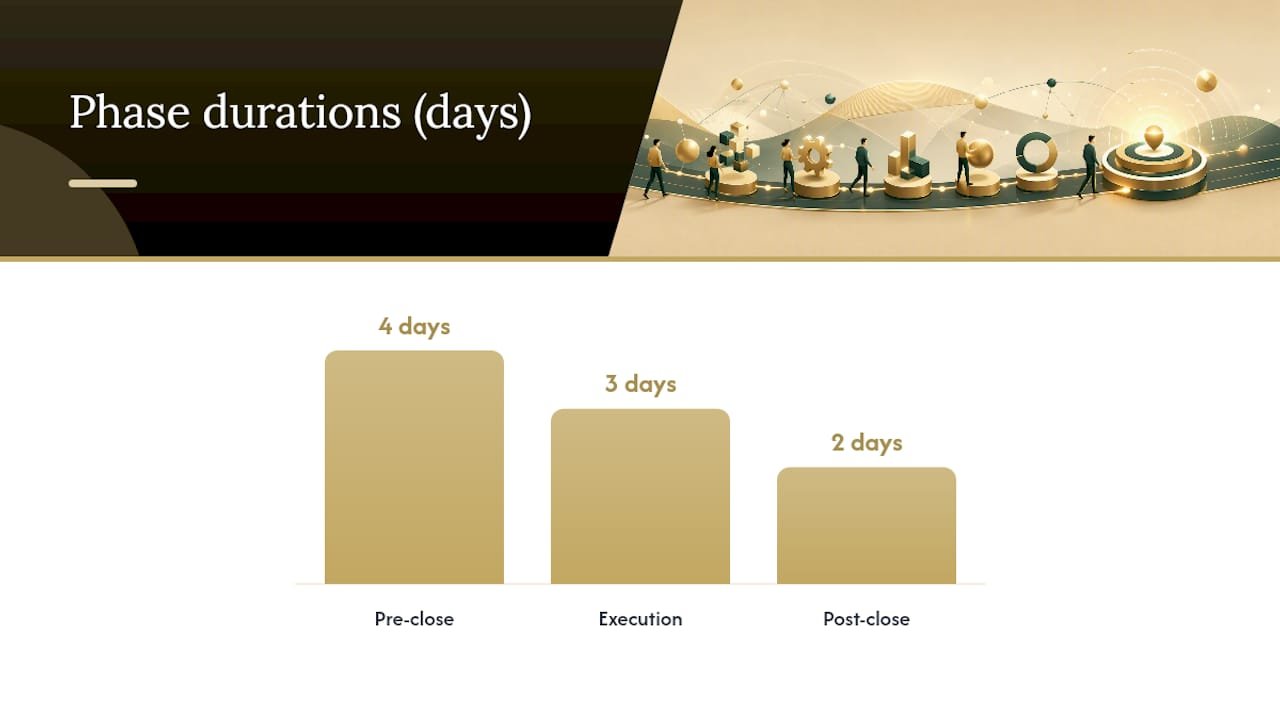
Sequencing matters more than most owners realize. You cannot post accurate accrual entries until your bank and credit card accounts are reconciled, because reconciliation is what surfaces the transactions those accruals depend on. Skipping ahead to journal entries before reconciliations are clean is the single most common reason finance teams reopen a “closed” period.
A simple phase timeline for a calendar-month close looks like this:
- Days minus 3 to 0 (pre-close): Confirm AP/AR cutoff dates, notify department heads, pull bank and card statements as they become available.
- Days 1 to 3 (execution): Complete reconciliations, post adjusting journal entries, review the trial balance.
- Days 4 to 5 (post-close): Lock the period, distribute financials, log any exceptions for next month.
Ownership should be explicit at each stage. In a small business, one bookkeeper might run all three phases solo. In a slightly larger team, the AP clerk owns cutoff enforcement, the controller owns the trial balance review, and whoever manages the bookkeeping cycle owns the lock decision. Either way, write the ownership down. Ambiguity about who signs off on what is what turns a three-day close into a ten-day one.
What Are the Steps in a Month-End Close Checklist?
A month-end close checklist works only if the order is fixed and every step has a clear pass or fail condition. Here is the sequence that consistently produces the fastest, cleanest close.
- Reconcile all bank accounts. Match every transaction on the bank statement to your general ledger. Evidence to keep: the completed reconciliation report and a note on any unresolved items over $50.
- Reconcile credit card accounts. Match statement activity to recorded expenses, paying close attention to charges that post after the statement cutoff. Evidence: reconciliation worksheet signed off by whoever manages the card.
- Enforce the AP cutoff. Confirm every invoice dated on or before period end is recorded, even if the physical bill arrived late. Cutoff enforcement based on invoice date, not receipt date, is what accrual accounting depends on, and skipping it is a leading cause of restated financials.
- Enforce the AR cutoff. Confirm all revenue earned through period end is invoiced and recorded, regardless of when cash arrives.
- Post accrual adjusting journal entries. Record expenses incurred but not yet billed (utilities, contractor work, accrued payroll) and revenue earned but not yet invoiced. Evidence: a brief narrative explaining the basis for each estimate.
- Amortize prepaid expenses. Move the appropriate slice of insurance, software subscriptions, or rent paid in advance from the prepaid asset account to the expense line.
- Record depreciation. Post the month’s depreciation expense for fixed assets using your standard schedule, whether straight-line or another method your tax preparer has approved.
- Finalize the payroll cutoff. Reconcile payroll register totals to what hit the bank and post any accrued but unpaid wages for days worked but not yet paid out.
- Review the trial balance. Scan for accounts with unexpected balances, negative numbers where there shouldn’t be any, and any account that didn’t move at all when it should have.
- Lock the period. Once the trial balance review is clean and signed off, close the period in your accounting software so no further postings can hit it without an explicit reopen and approval.
Each step needs an owner and a paper trail. A bookkeeper might sign off on reconciliations, while a fractional controller or the business owner reviews and approves the trial balance before the lock. That approval doesn’t need to be elaborate. A dated email or a checkbox in your accounting software is enough, as long as it exists.
Recurring entries deserve special attention. Accrual and prepaid entries almost always need a reversal in the following period, and forgetting to reverse is how double-counted expenses sneak into your books two months later. Build a standing list of recurring AJEs with their reversal dates built in, rather than reconstructing the logic from memory every month.
Pro Tip: Set your accrual reversal dates the same day you post the original entry, not the day you remember to reverse it. Most accounting software lets you schedule the reversal automatically, which removes an entire category of month-end mistakes.
Vendor checklists from ERP providers like NetSuite formalize this exact ordering, requiring AR to lock before AP, and AP to lock before the general ledger. That sequence exists for a reason: it prevents a stray invoice from landing in a period you already reported on.
How Do You Reconcile Accounts Faster During Close?
Reconciliation is where most closes stall, and it’s almost always solvable with better triage rather than more hours. About 90% of transactions in a healthy reconciliation match automatically or with one glance; the close drags because teams treat every unmatched item with the same level of urgency instead of sorting exceptions by size and age first.

Bank reconciliation should start the moment your statement is available, not on day one of the close. Pull transactions daily if your bank allows it, and flag anything unmatched immediately rather than letting a backlog build. When an item won’t match, triage it in this order: check for timing differences first (deposits in transit, outstanding checks), then look for duplicate entries, then investigate anything genuinely unrecorded.
Credit card reconciliation carries a timing trap that catches a lot of small businesses off guard. Statement cutoff dates rarely align with your calendar month end, so a purchase made on the 29th might not appear until next month’s statement. Handle this by accruing for known charges that occurred before period end but haven’t hit the statement yet, rather than waiting for the statement to dictate your numbers.
AR reconciliation speeds up dramatically once you standardize how customers pay and how that payment data reaches you. Remittance instructions, lockbox services, and EDI feeds each reduce the guesswork of matching a deposit to an invoice. Bank-provided lockbox services and detailed ACH data can meaningfully cut manual matching time when the file format lines up with what your accounting software expects. Unapplied cash, meaning payments received but not yet matched to an invoice, should get its own suspense account and a weekly review cadence so it never piles up into a month-end fire drill.
AP cutoff work benefits from a vendor aging report pulled a few days before period end. Compare it against last month’s recurring vendors. A vendor who invoices reliably every month but hasn’t shown up yet is a strong signal of a missing bill, and catching it before the close saves you from an awkward accrual estimate.
- Reconcile bank and card accounts daily during the last week of the month, not all at once after close.
- Triage exceptions by dollar size and age, oldest and largest first.
- Standardize remittance data with customers to cut AR matching time.
- Pull a vendor aging report before period end to catch missing AP invoices.
Adjusting Entries That Keep the Close Auditable
Adjusting journal entries are where accuracy either holds or falls apart, and the fix isn’t more scrutiny at month end. It’s better documentation built in advance. The three types you’ll post nearly every month are accruals (expenses incurred but not billed), prepaid amortization (spreading a payment across the months it benefits), and depreciation (allocating the cost of a fixed asset over its useful life).

Every AJE needs three things attached to it: the source document that justifies the number, a one-line narrative explaining the reasoning, and the name of whoever approved it. An entry that says “accrued utilities, $340, based on prior month average, approved by J. Rivera” takes ten seconds to write and saves an hour of reconstruction if a reviewer or a tax preparer asks about it eight months later.
Build a recurring AJE register rather than starting from a blank journal every close. A simple spreadsheet or a template in your accounting software works fine: list the entry name, the accounts affected, the amount or calculation method, the reversal date, and who approves it each cycle.
- Accruals: expenses incurred, not yet invoiced (contractor work, utilities, accrued interest).
- Prepaids: insurance, software licenses, or rent paid in advance, amortized monthly.
- Depreciation: monthly expense recognition for fixed assets per your standard schedule.
- Payroll accruals: wages earned but not yet paid as of period end.
Pro Tip: Tag every recurring AJE with a “next reversal date” field in your register, and review that field first thing at the start of every close. It takes thirty seconds and eliminates the double-counted expense problem almost entirely.
Which Automation Investments Actually Speed Up Close?
Automation for month-end close isn’t all or nothing. It scales with your transaction volume, and the right level depends on how much manual matching is actually eating your time.
At the low-friction end, scheduling automated exports, whether CSV or BAI2 files, on a cadence that matches your close window removes a surprising amount of manual data entry. Lockbox services and bank-provided ACH detail reports fall in the same category: minimal setup, immediate reduction in manual AR matching. Aligning these file formats with what your accounting software expects is the difference between a five-minute import and an hour of reformatting.
Higher-effort integrations, like encrypted bank-to-ERP feeds and automatic cash application rules, take longer to implement, often several weeks of setup and testing, but they compound. Teams running mature automation and clean matching rules often reach automatic match rates of 80% or higher, which means only a fifth of transactions ever need a human to look at them.
| Automation Level | Setup Effort | Best Fit For |
|---|---|---|
| Scheduled CSV/BAI2 exports | Low, hours to set up | Solo bookkeepers, low transaction volume |
| Lockbox and ACH detail reports | Low to moderate, days to configure | Businesses with steady customer payment volume |
| Encrypted bank-to-ERP feeds | High, weeks to implement | Growing businesses with dedicated finance staff |
| Automatic cash application rules | High, requires clean remittance data | Higher-volume AR with standardized customer payments |
Choosing the right level comes down to two questions: how many transactions are you manually matching each month, and do you have someone internally who can maintain the integration once it’s live. A five-person company processing forty transactions a month doesn’t need an encrypted ERP feed. A growing business processing thousands of AR line items every cycle almost certainly does, and the setup time pays for itself within a quarter or two. If you’re unsure where AP automation fits into that decision, it’s worth reviewing what AP automation actually changes day to day before committing budget to it.
Why Does the Close Take Longer Than It Should?
Three bottlenecks show up in nearly every slow close, and none of them require an expensive fix.
The first is a reconciliation backlog. Waiting until day three or four of the close to start matching bank and card transactions guarantees you’ll spend the rest of the close chasing exceptions instead of reviewing results. Teams that reconcile immediately after month end, before touching adjusting entries, consistently close faster and reopen periods less often, simply because they’re not building AJEs on top of unverified numbers.
The second is missing or inconsistent AJEs. If your team reconstructs accrual logic from scratch every month, you’ll eventually miss one, and that missed entry is what forces a reopened period later.
The third is a lack of standardized remittance data from customers and vendors. When every customer pays differently, with no invoice number, no reference, nothing, your AR team spends hours guessing which payment matches which invoice.
- Start reconciliations the day statements are available, not after other tasks are done.
- Build a recurring AJE register so entries don’t rely on memory.
- Request standardized remittance references from your top customers and vendors.
- Log every period reopening with a reason and an approver, so patterns become visible over time.
If you do reopen a locked period, document why, who approved it, and what changed. A pattern of frequent reopenings without documentation is exactly what auditors flag first, and it’s avoidable with a simple log.
Templates You Can Use This Month
A working checklist doesn’t need to be complicated. It needs sign-off columns, consistent formatting, and a place for evidence.
One-page close checklist columns: task name, owner, due date, status, and a signature or initials field. Ten rows, matching the ten steps above, printed or built as a shared spreadsheet.
AJE register columns: entry name, accounts debited and credited, dollar amount, source document reference, approver, and reversal date. Sort by reversal date so nothing gets missed at the top of the next cycle.
Trial balance sign-off checklist: confirm no account has an unexpected balance, confirm all accounts that should have moved this month actually did, confirm intercompany or owner accounts tie out, and get a dated signature before locking.
| Team Size | Recommended Setup |
|---|---|
| Solo bookkeeper or owner | Single shared spreadsheet, all three templates in one file |
| Small team (2 to 5 people) | Separate AJE register with approver column enforced |
| Larger team | Templates built into accounting software workflow with automated sign-off tracking |
How KelliWorks Approaches Month-End Close for Small Businesses
Most of the close problems we see at Kelliworks trace back to sequencing, not effort. Business owners work incredibly hard on their books, but they’re often reconciling out of order, posting accrual entries before the bank account is clean, or rebuilding the same journal entry logic from scratch every single month.

Our approach leans hard on the recurring AJE register and reconciliation triage described above, because that combination is what turns a stressful, unpredictable close into a routine one. When we take over bookkeeping for a client, one of the first things we build is that standing AJE list with reversal dates already scheduled. It sounds small. It eliminates most of the “why doesn’t this number match last month” conversations before they start.
Outsourcing tends to make the biggest difference for owners who are doing the close themselves after hours, squeezed between running the business and everything else. If reconciliations are piling up past the tenth of the month, or if you genuinely don’t know whether last month’s numbers are locked, that’s usually the signal it’s time for a second set of hands.
— Kelli
Let KelliWorks Handle Your Month-End Close
Running this checklist alone every month is manageable for a while, until invoicing spikes, a bank feed breaks, or tax season pulls your attention elsewhere. Kelliworks operates as your outsourced back office, handling the bookkeeping, reconciliations, recurring AJEs, and trial balance review so the close happens on schedule whether or not you have time to run it yourself.

Instead of hiring, training, and managing an in-house bookkeeper, you get a team that already runs this exact checklist every month for other small businesses. Our virtual accounting department picks up bank and credit card reconciliations, posts and tracks your recurring adjusting entries, and reviews the trial balance before anything gets locked, so your financials are accurate and ready whenever you need them for a lender, an investor, or your own decision-making.
If your close currently takes two weeks and a weekend, that’s the clearest sign it’s worth handing off. Schedule a consultation and find out what a reliable, done-for-you close looks like for your business.
Sources
For deeper detail on cycle-time benchmarking, see APQC’s close metrics. For treasury and reconciliation guidance, see J.P. Morgan’s close and reconciliation tips and NetSuite’s close process overview.
- Month-End Close Process: A Bookkeeper’s Workflow Checklist | Growthy
- What Is the Financial Close Process? | NetSuite