


Accounting workflow efficiency measures how well your firm converts inputs (documents, data, staff time) into completed accounting outputs, tracking throughput, cycle time, error rate, and resource use per task. When you improve it, the primary result is a faster close with fewer errors and more capacity per full-time employee. Three numbers to keep front of mind:
- Days to close: how many business days from period end to final financials
- Error/rework rate: percentage of tasks requiring correction before delivery
- Capacity per FTE: billable or productive hours recovered per staff member per month
Key Takeaways
Accounting workflow efficiency is a measurable control lever: firms that standardize before automating and move review out of email consistently close faster, make fewer errors, and recover capacity without adding headcount.
| Point | Details |
|---|---|
| Definition and scope | Efficiency measures throughput, cycle time, error rate, and resource use across all five workflow stages. |
| Measure before you change | Establish baseline KPIs (days to close, rework rate, cycle time) before any process change so you can prove ROI. |
| Standardize first, automate second | Write SOPs and assign ownership before configuring any tool; automating an undefined process compounds errors. |
| Start with high-volume workflows | AP, bank reconciliation, and client intake deliver the fastest return and build the control foundation for everything else. |
| Controls belong inside the workflow | Automate routing and evidence capture; reserve human judgment for exceptions to maintain audit readiness at speed. |
Table of Contents
- Why does accounting workflow efficiency matter to your firm?
- What are the core components of an efficient accounting workflow?
- How do you measure accounting workflow efficiency with real KPIs?
- How to improve accounting workflow efficiency step by step
- What technology and automation options deliver the highest ROI?
- What obstacles do accounting teams face when improving workflows?
- What does a realistic rollout timeline and budget look like?
- How do internal controls fit inside an efficient workflow?
- How a virtual accounting department improves workflow efficiency
- The one thing worth doing first
- Sources
Why does accounting workflow efficiency matter to your firm?
Process efficiency in accounting is a risk-management and capacity lever, not just a speed metric. When your close is slow, your leadership team makes decisions on stale data. When your review cycle runs through email, errors compound quietly until they surface at the worst moment. Efficiency in accounting directly affects close speed, reporting quality, audit readiness, and staff retention, with reconciliations and month-end close delivering the fastest ROI when targeted first.
Firms that move review out of email and into a structured workflow tool report reductions in review cycle time and measurable capacity gains that reduce the need to hire. That matters when good accounting staff are hard to find and harder to keep.
Low efficiency shows up in predictable, costly ways:
- Late invoices and missed billing windows that erode margin
- Review bottlenecks that push close past the 10-business-day mark
- Duplicate data entry across disconnected systems
- Staff time consumed by status-update emails instead of actual accounting work
- Audit preparation that requires rebuilding evidence after the fact
Each of these is a symptom of a workflow problem, not a people problem. Fixing the process fixes the outcome.
What are the core components of an efficient accounting workflow?
Every accounting cycle, regardless of firm size, shares five stages: intake, work completion, internal review, delivery, and billing. Most firms have gaps in at least two of them, typically review and billing. A well-defined workflow assigns a clear owner, trigger, definition of done, evidence requirement, and SLA to each stage.
Here is what each stage requires:
- Intake: defined document checklist, client portal or upload method, auto-acknowledgment, and a named owner who confirms completeness within one business day
- Work completion: task assigned by trigger (date or document receipt), SLA in business days, and a checklist of required outputs before the task moves forward
- Internal review: reviewer assigned at task creation, not at completion; review SLA of one to two business days; comments logged in the workflow tool, not email
- Delivery: client-facing output formatted to a standard template, sent through a tracked channel, with read-receipt or confirmation captured
- Billing: triggered automatically on delivery confirmation, not manually initiated days later
Pro Tip: Document your current workflow before you redesign it. A simple process map with five columns (one per stage), the owner’s name, the trigger, and the definition of done takes under two hours to build and immediately reveals where tasks stall. Use a shared spreadsheet or a tool like Lucidchart if you want a visual version.
How do you measure accounting workflow efficiency with real KPIs?
Measurement starts at the workflow-item level: timestamps, owner, and status on every task. Without that data, you are managing by feel. The table below shows the six primary KPIs, how to calculate each, and how often to review them.
| KPI | Formula / Calculation | Review Cadence |
|---|---|---|
| Days to close | Last day of close activities minus period-end date | Monthly |
| Cycle time per task | Average of (completion timestamp minus start timestamp) across all instances | Weekly |
| Error/rework rate | (Tasks requiring correction ÷ total tasks completed) × 100 | Weekly |
| Cost per transaction | Total labor cost for a process ÷ number of transactions processed | Monthly |
| % accounts reconciled pre-close | (Accounts reconciled before period end ÷ total accounts) × 100 | Monthly |
| Time to review | Average hours from task submission to reviewer sign-off | Weekly |
Front-loading recurring journal entries and preparing reconciliations before period end are the process changes that most reliably shorten close time. Top-performing teams close in 4–5 business days; teams with clean, pre-staged data can close in 3 or fewer.
For reporting cadence: run daily dashboards on task status and overdue items, hold a weekly team review on cycle time and rework rate, and present a monthly management report covering days to close, cost per transaction, and capacity per FTE. The daily dashboard surfaces bottlenecks without interrupting the team.
How to improve accounting workflow efficiency step by step
The sequence matters. Automating a broken process accelerates failure, so diagnose and standardize before you automate.
Step 1: Assess
Map every recurring workflow using the five-stage framework above. Record the current cycle time, error rate, and owner for each. Identify where tasks wait, where rework occurs, and where handoffs are unclear.

Step 2: Prioritize
Score each workflow on four dimensions: frequency (how often it runs), time cost (total staff hours per cycle), error impact (downstream consequences of mistakes), and automation feasibility (how rule-based the work is). High-volume, repeatable workflows such as accounts payable, bank reconciliation, and client document intake score highest on all four and should be your first targets.
Step 3: Standardize
Before touching any software, write a one-page SOP for each priority workflow. Define the owner, the trigger, the steps, the definition of done, and the evidence required. Assign a RACI (Responsible, Accountable, Consulted, Informed) for each task. This step alone often cuts cycle time by removing ambiguity about who does what next.
Step 4: Automate
Follow this sequence for the highest return: AP capture and coding first, then bank reconciliation rule-based matching, then client document intake and acknowledgment, then recurring journal entries, and finally month-end close checklists and approvals. Each stage builds on the controls established in the previous one.
Step 5: Monitor
Set SLAs for each workflow stage, build a dashboard that shows real-time task status, and schedule a monthly review to compare KPIs against baseline. Adjust SOPs when a workflow consistently misses its SLA.
90-day implementation checklist:
- Days 1–30: Map all recurring workflows, record baseline KPIs, identify top three priority workflows
- Days 31–60: Write SOPs and RACI for priority workflows, pilot one workflow in a structured tool
- Days 61–90: Automate intake and routing for the pilot workflow, measure cycle time improvement, expand to second workflow
A simple priority matrix: score each workflow from 1–3 on frequency, time cost, error impact, and automation feasibility. Total scores of 10 or higher go to the top of your list.
What technology and automation options deliver the highest ROI?
Tool selection should follow your standardization work, not precede it. Workflow management tools reduce administrative overhead by automating task assignments, reminders, and status updates, freeing staff for review and judgment rather than coordination.
The main tool categories and their roles:
- Document capture and management: digitizes and routes incoming client files; eliminates manual sorting and lost documents
- AP automation: extracts invoice data, matches to purchase orders, routes for approval, and posts to the GL with minimal manual entry
- Bank reconciliation engines: apply rule-based matching to clear the majority of transactions automatically, flagging only exceptions for human review
- Close management tools: replace close checklists in spreadsheets with assigned tasks, due dates, status tracking, and sign-off capture
- Workflow orchestration platforms: coordinate task sequences across team members, send automated reminders, and surface bottlenecks in real time
- Review-first layers: structured comment and approval tools that keep review inside the workflow rather than in email
Selection criteria that matter most: native integration with your GL or ERP, immutable evidence capture, configurable approval routing, exception handling with clear escalation paths, a full audit trail, and role-based access controls.
| Automation target | Primary benefit |
|---|---|
| AP invoice capture | Eliminates manual data entry; reduces coding errors |
| Bank reconciliation matching | Clears routine transactions automatically; surfaces exceptions only |
| Client document intake | Confirms receipt, checks completeness, assigns work automatically |
| Recurring journal entries | Removes manual posting for standard month-end entries |
| Close checklist management | Replaces spreadsheet tracking with assigned, timestamped sign-offs |
For workflow improvement best practices that apply across industries, the consistent finding is that standardization before automation is what separates firms that see lasting gains from those that automate chaos.
What obstacles do accounting teams face when improving workflows?
The most common failure modes are predictable, and each has a direct fix.
- Poor inputs: clients submit incomplete or inconsistent documents, stalling every downstream stage. Fix: build a standardized intake checklist and automate a completeness check before the task is assigned.
- Missing ownership: tasks sit in a queue with no named owner. Fix: assign ownership at task creation, not at completion, and make the SLA visible to the owner and their manager.
- Over-automation: firms automate posting before they automate controls, hiding errors until close. Fix: automate evidence capture and routing first; leave posting and judgment calls to humans until the control layer is proven.
- Email-based review: comments and approvals in email create version confusion and leave no audit trail. Fix: move all review into the workflow tool so every comment, approval, and override is timestamped and attributed.
- Billing leakage: work is delivered but billing is not triggered because the delivery step is not connected to the billing workflow. Fix: link delivery confirmation to an automatic billing trigger.
Pro Tip: Controls-first automation is the principle that protects you. Automate routing and evidence capture before you automate any posting or approval. That way, faster processing does not amplify errors; it surfaces them sooner, when they are still cheap to fix.
Change-management checklist for a smooth rollout:
- Secure buy-in from at least one senior manager before the pilot begins
- Run the pilot on one workflow with one team before firm-wide rollout
- Train staff on the new SOP and tool in a single session, with a written reference guide
- Set SLAs publicly so the team knows what “on time” means
- Review the pilot results at 30 days and adjust before expanding
What does a realistic rollout timeline and budget look like?
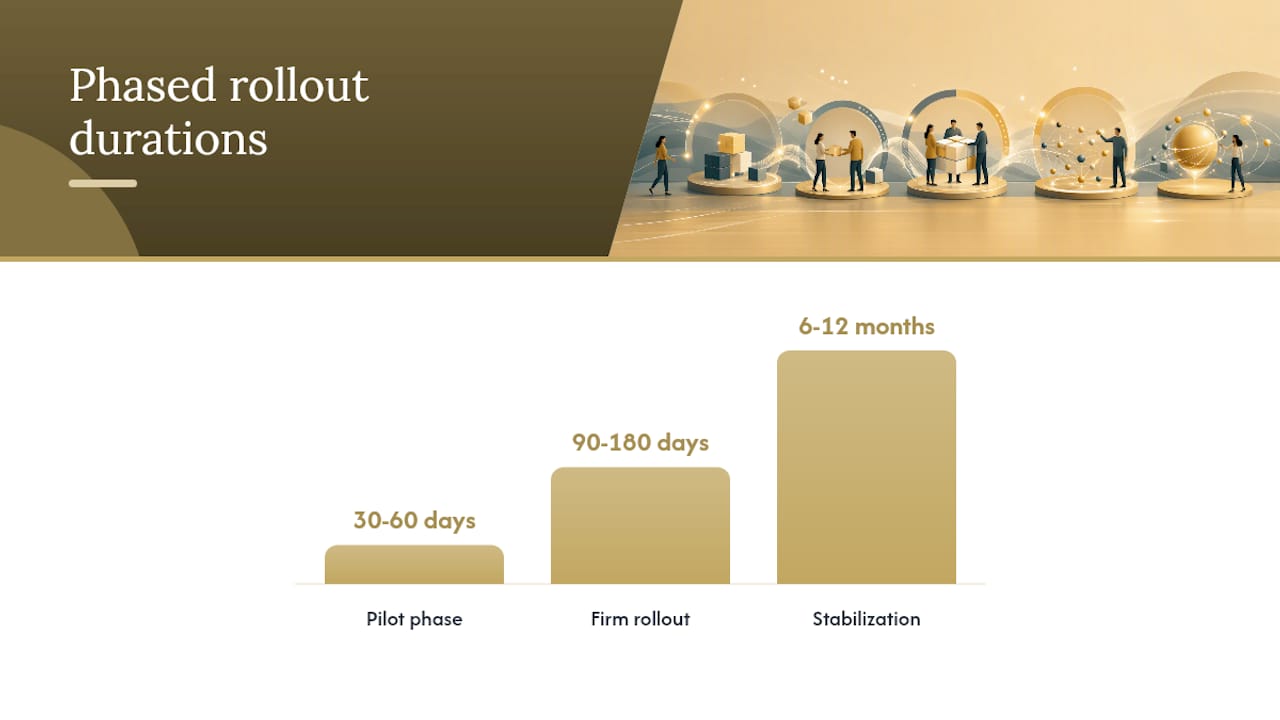
A phased approach reduces risk and builds organizational confidence. Here is a practical structure:
- Pilot phase (30–60 days): select one high-volume workflow, map it, write the SOP, configure the tool, and run it in parallel with the old process. Measure cycle time and error rate against baseline.
- Firm rollout (90–180 days): expand to the remaining priority workflows, integrate with the GL, train all affected staff, and retire the old process.
- Stabilization (6–12 months): refine SOPs based on real data, add automation layers, and establish the monthly KPI review cadence.
Cost buckets to plan for:
- Staff time for workflow mapping and SOP writing (typically 20–40 hours for the first three workflows)
- Software subscriptions for workflow management and automation tools
- Integration or customization work to connect tools to your GL or ERP
- Training time per staff member (typically 2–4 hours per tool)
- Change management: communication, documentation, and a designated internal champion
For a payback example: if your close currently takes 8 business days and you recover 3 days through pre-close reconciliation and automated journal entries, that is roughly 3 days of senior staff time per month redirected to advisory or billable work. At even a modest billing rate, the payback period on a workflow tool subscription is typically well under 12 months. Cost-saving accounting strategies that combine process improvement with the right service model tend to compound those gains over time.
How do internal controls fit inside an efficient workflow?
Best-practice implementations standardize inputs, automate routing and approvals, capture evidence by default, and use exception queues to maintain control while scaling. Speed and control are not in tension when the workflow is designed correctly.
Control checklist for every automated workflow:
- Approval thresholds defined by dollar amount and transaction type, with named approvers at each tier
- Segregation of duties enforced by the system: the person who enters cannot also approve
- Evidence attached automatically at each stage (document, timestamp, system log)
- Immutable timestamps on every action so the audit trail cannot be edited after the fact
- Exception log for any override, with required rationale and secondary approval
For overrides specifically: any exception to the standard routing must be approved by a manager one level above the task owner, logged with a written rationale in the workflow tool, and flagged in the monthly KPI review. This keeps the exception rate visible and prevents workarounds from becoming the default process.
The principle is straightforward: automate routing and evidence capture, reserve human review for exceptions and judgment calls. A reviewer who only sees exceptions is more effective than one who reviews everything, because their attention is focused where it matters.
How a virtual accounting department improves workflow efficiency
Consider a small business with a five-person accounting function closing in 12 business days, a 14% rework rate on reconciliations, and no formal intake process. Client documents arrived by email, task ownership was informal, and billing was initiated manually after delivery.
The intervention sequence in a virtual accounting department (VAD) engagement typically follows the same five steps outlined above. In this scenario:
- Intake was standardized first: a client portal replaced email, with an automated completeness check before any task was assigned.
- Reconciliations were pre-staged before period end, using a close checklist tool with assigned owners and due dates.
- Review moved from email into the workflow tool, with a two-business-day SLA and timestamped sign-offs.
- Billing was linked to delivery confirmation, eliminating the manual trigger.
| KPI | Before | After |
|---|---|---|
| Days to close | 12 business days | 5 business days |
| Rework rate | 14% | Under 4% |
| Review turnaround | 4–5 days | 1–2 days |
| Capacity per FTE | Baseline | Approximately 20% increase |
The transferable lessons: fix intake before you touch close, move review out of email before you automate anything else, and measure every stage so you know which intervention moved which number. A scalable accounting service structured as a VAD applies these same principles across clients, which is why the gains tend to be faster and more durable than internal-only improvement projects.
The one thing worth doing first
Most firms want to start with automation. That instinct is understandable but usually wrong. The single highest-leverage action is mapping your current workflows and writing a one-page SOP for your three most frequent processes before you open a single software demo.
Here is why. Automation tools surface problems in your workflow design within weeks. If you have not defined ownership, triggers, and definitions of done before you configure the tool, you will spend months reconfiguring it to match a process you never fully understood. The firms that see the fastest gains are the ones that spent two weeks on documentation before they spent a dollar on software.
For the next 30 days: involve your most experienced staff member and your newest hire in the mapping exercise together. The experienced person knows what actually happens; the new hire reveals where the process is unclear. Measure your current close time and rework rate as your baseline. Then pick one workflow, write the SOP, and pilot it. That single pilot will teach you more about your firm’s workflow gaps than any consultant’s assessment.
Sources
The following resources informed the recommendations in this guide and are worth reading in full for deeper implementation detail:
- How to Improve Accounting Processes and Procedures
- How To Reduce Manual Work In Accounting Workflows (Without Losing Control)
- Efficiency in Accounting: Guide for Controllers and CFOs | Numeric
- Accounting Process Improvement: Key Steps, Tools & Examples
- Accounting workflow management: Key components and …
- Mastering modern accounting workflows: your guide to …
- How to Automate Accounting: 5 Workflows to Automate First
If you are ready to apply these principles to your own firm, Kelliworks offers a full-service virtual accounting department built around exactly this workflow model. From intake standardization to close management and compliance, we design the process around your business so you can focus on growth.
Explore Kelliworks accounting services or learn why firms hire a virtual accountant to see how a structured workflow engagement works in practice.



One Response