
Open a spreadsheet right now. Pull your last 12 months of bank statements or your recent sales totals, and start filling in a simple small business startup budgeting template in Excel or Google Sheets. That single move, done in the next 15 minutes, puts you ahead of most owners who keep budgeting as a mental math exercise instead of a written plan.
Here is the one-sentence verdict: you can build a working budget for your business this week, not next quarter, and you do not need an accounting degree to do it. After your first session, you should walk away with two things: a clear monthly cash position and a prioritized list of expenses ranked by how much control you have over them. That is the foundation everything else in this guide builds on.
Key Takeaways
A working small business budget requires six sequential steps, a monthly review cadence, and a contingency reserve to stay useful past the first month.
| Point | Details |
|---|---|
| Start with 12 months of data | Pull bank statements and sales history before building any projections, so your averages reflect real activity. |
| Build in a contingency line | Set aside 5% to 10% of predicted sales as a buffer before finalizing any other line item. |
| Separate budget from bookkeeping | A budget forecasts what’s coming; bookkeeping records what already happened, and both matter differently. |
| Review monthly, adjust quarterly | Run a two-page variance check every month, and reassess the full plan on a quarterly or rolling 90-day cycle. |
| Watch for hire signals | Missed payroll, five-plus hours a month on your own spreadsheet, or recurring cash surprises all signal it’s time to escalate to outsourced support. |
| Consider Kelliworks for hands-off execution | Kelliworks builds the template, manages monthly bookkeeping, and delivers ongoing variance and cash-flow reporting for owners who want the budget maintained, not just built. |
Table of Contents
- What Is Small Business Budgeting, Exactly?
- Why Does Your Business Need a Budget?
- What Types of Budgets Should a Small Business Use?
- Which Budgeting Method Fits Your Business?
- How Do You Build a Budget in Six Steps?
- How Often Should You Review Your Budget?
- Which Tools Should You Use to Build Your Budget?
- What Does an Outsourced Accounting Team Actually Do With Your Budget?
- What Do Most Owners Get Wrong About Budgeting?
- How Can Kelliworks Help You Get Your Budget Running Faster?
- Frequently Asked Questions
- Sources
What Is Small Business Budgeting, Exactly?
Small business budgeting is the process of forecasting your income and expenses over a set period, usually a month, quarter, or year, so you know what’s coming in and what has to go out before it happens. It is a plan, not a record.
That distinction trips up a lot of new owners. Bookkeeping tells you what already happened. Your bookkeeper logs the $4,200 you paid a supplier last Tuesday. Budgeting tells you what you expect to happen next month, and it forces you to make decisions ahead of time about where money should go. A cash-flow statement sits somewhere between the two: it tracks the actual timing of money moving in and out of your accounts, while your budget is the forecast you are measuring that movement against.
Most small businesses run on monthly or quarterly budgets, reviewed against actual results at each period’s close. If your revenue swings a lot, whether from seasonality, a small client base, or a new product launch, a rigid 12-month budget can go stale fast. Many owners in that position adopt a rolling 90-day plan instead, updating projections every quarter based on what actually happened the quarter before. It is more work, but it keeps the plan honest.
Why Does Your Business Need a Budget?
A budget gives you cash-flow visibility before a shortfall becomes an emergency. It also gives you a rational basis for decisions that otherwise get made on gut feeling, like whether you can afford to hire, when to buy new equipment, and how much to pay yourself.
Here is what a real budget does for you in practice:
- Shows you weeks or months in advance when cash will be tight, so you can adjust before it’s a crisis.
- Gives you a defensible number to bring to a lender or investor conversation, since a documented budget makes those conversations far easier than a verbal estimate.
- Helps you decide whether a new hire, a lease, or a piece of equipment fits your actual cash position, not just your hope for growth.
- Reduces the owner-anxiety that comes from not knowing your numbers, which is its own kind of operating cost.
Consider a seasonal retailer that does 40% of its annual revenue in November and December. Without a written budget, the January payroll run becomes a nail-biter every single year. With a budget that flags the seasonal dip and sets aside a cash reserve during the strong months, that same payroll run is a non-event.
Pro Tip: Build your contingency line before you build anything else. A reserve between 5% and 10% of your predicted sales is a reasonable starting target for most small businesses, and it is the single line item most owners forget to include.

What Types of Budgets Should a Small Business Use?
Different budgets answer different questions, and most small businesses need at least two working at once. Here is how they break down.
An operating budget covers your day-to-day revenue and expenses, the one most owners mean when they say “the budget.” A cash-flow budget tracks the timing of money in and out, which matters more than total profitability when you’re worried about making Friday’s payroll. A capital budget (or capex budget) plans for larger, less frequent purchases like equipment, vehicles, or a buildout. A master budget rolls all of these into one consolidated view, usually built annually. A rolling budget, typically on a 90-day cycle, gets rebuilt every period using the freshest data instead of locking in assumptions a year out.
Startups and businesses with unpredictable revenue tend to get the most value from a rolling 90-day plan layered on top of a basic operating budget. Seasonal businesses, retailers especially, need a cash-flow budget front and center because their profitability and their cash timing rarely match up. Service providers with steady monthly retainers can often get by with a straightforward annual operating budget and lighter monitoring.
If you’re starting from zero, don’t try to build all five at once. An operating budget paired with a simple cash-flow tracker covers most small businesses’ real needs, and you can layer in a capital budget once you’re planning a specific purchase.
Which Budgeting Method Fits Your Business?
The method you choose determines how much time budgeting costs you every month versus how much control it gives you over spending. There is no universally correct method, only a correct tradeoff for your situation.
Incremental budgeting starts with last period’s numbers and adjusts up or down by a percentage. It’s fast and requires little analysis, but it can quietly carry forward expenses that no longer make sense. Zero-based budgeting starts every category at zero and requires you to justify each expense from scratch. It takes more time up front but tends to surface waste that incremental budgeting lets slide, which is why it works especially well for discretionary categories like marketing or software subscriptions. Flexible budgeting adjusts expense targets based on actual revenue or activity levels, useful when your costs scale directly with sales volume. Activity-based budgeting ties costs to specific business activities or outputs rather than broad categories, giving more precision but demanding more granular tracking. Participative budgeting brings department heads or team leads into the process instead of the owner setting every number alone, which tends to improve buy-in on a team of any real size.
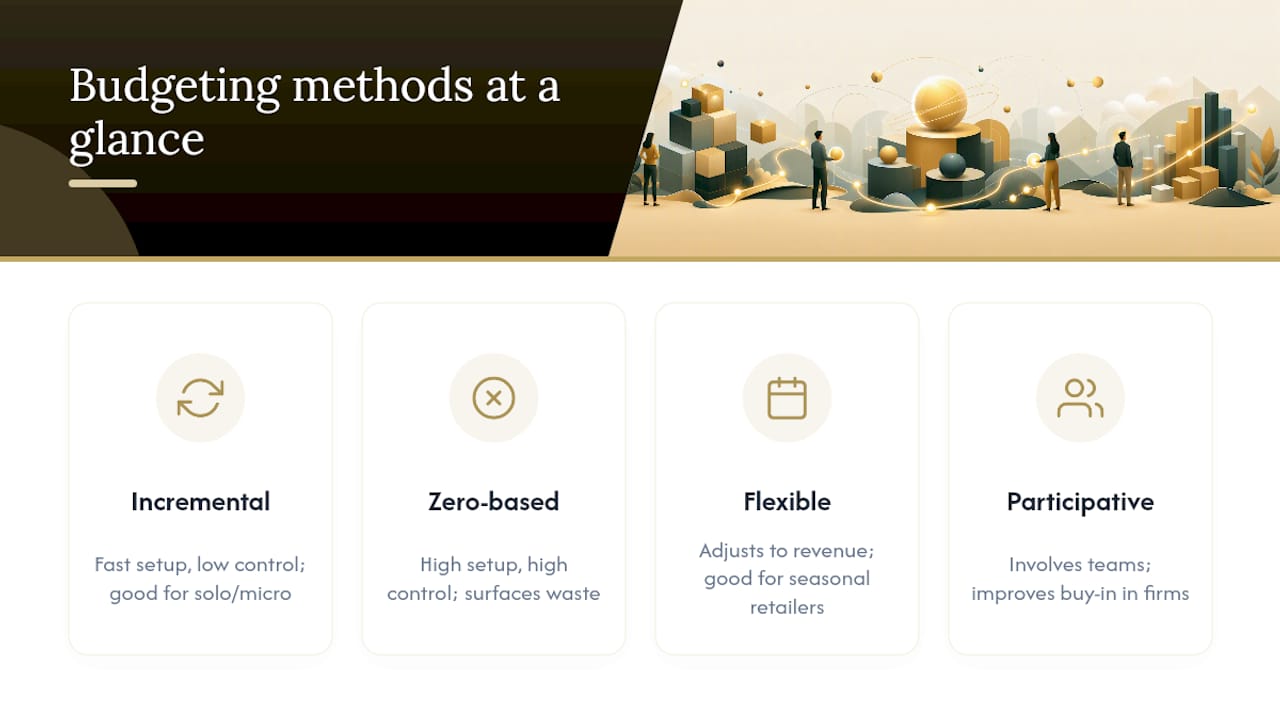
A handful of these methods covers nearly every small business situation, and you don’t have to pick just one. A solo consultant or micro-business usually does fine with straightforward incremental budgeting. Growing startups benefit from zero-based budgeting on discretionary spend paired with incremental treatment for fixed costs like rent. Seasonal retailers lean on flexible budgeting since their revenue swings so widely by month. Professional services firms with multiple partners or department heads often get the best results from participative budgeting, simply because it forces alignment before the numbers get finalized.
Many owners mix methods by category. Run zero-based reviews on marketing and subscriptions once a quarter, and let rent, utilities, and insurance ride on simple incremental adjustments.
How Do You Build a Budget in Six Steps?
Building a working budget is a sequencing problem more than a math problem. Get the order right, and the numbers mostly take care of themselves.
- Gather your historicals. Pull 12 months of bank statements and accounting records so you can calculate real monthly averages instead of guessing.
- List every revenue stream separately. Don’t lump “sales” into one line if you have distinct product lines, service tiers, or client types. Each stream behaves differently.
- Identify your fixed costs. Rent, insurance, loan payments, and salaried payroll are your fixed costs, obligations that don’t move much with volume.
- Estimate your variable costs. Materials, hourly labor, shipping, and payment processing fees scale with activity, so use your 12-month average as a baseline.
- Set your contingency and owner pay. Build in that 5% to 10% buffer alongside a realistic number for what you’ll actually pay yourself.
- Finalize the numbers and set a review date. Put a specific day on the calendar, monthly at minimum, to check the plan against reality.
This sequence follows the same core logic used to build organizational budgets at any scale: determine income, allocate for fixed and variable costs, set aside contingency, and monitor.
Here is how that plays out on paper for a small graphic design studio in a single month:
- Revenue (client billings): $18,000
- Cost of delivery (contractor design hours, stock assets): $5,400
- Gross margin: $12,600
- Fixed costs (rent, software, insurance): $3,800
- Variable costs (software overages, subcontractor rush fees): $1,200
- Contingency (7% of revenue): $1,260
- Owner pay: $4,000
- Ending cash position: $2,340
That last number, the cash left over after every obligation and reserve, is the figure that tells you whether the month actually worked. Your worksheet should have dedicated fields for each revenue stream, each fixed cost category, your variable cost average, your contingency target, and any debt service payments, so nothing gets buried inside a vague “miscellaneous” line. If you’re setting near-term targets alongside this process, it helps to connect the budget to specific financial goals rather than treating it as an isolated spreadsheet exercise.
How Often Should You Review Your Budget?
A budget you never look at again is just a document. The real value comes from checking it against what actually happened and adjusting your assumptions accordingly. This is called variance analysis, and it’s simpler than it sounds: subtract actual spending from budgeted spending, express the difference as both a dollar figure and a percentage, then decide whether that gap is worth acting on.
A 25% variance on materials costs, or a client payment that’s now 45 days late when your budget assumed 30, is a signal that something in your plan needs to change, not just this month but going forward.
Most small businesses do well with a monthly close and review, paired with a deeper quarterly strategy session where you step back and ask whether the whole plan still makes sense. If your revenue is genuinely unpredictable, a rolling 90-day update cycle keeps your numbers closer to reality than a static annual budget ever will.
Pro Tip: Run a two-page monthly review you can finish in 20 to 30 minutes. Page one: budget versus actual by category, with variances flagged. Page two: three numbers only, your current cash position, your gross margin percentage, and your runway (cash on hand divided by monthly burn). That’s usually enough to catch a problem while it’s still small. Comparing those numbers accurately depends on knowing how to read your own financial statements, which is worth ten minutes of study if you’ve never done it before.
Which Tools Should You Use to Build Your Budget?
Most small businesses start with a spreadsheet, and there is nothing wrong with staying there for years if it fits your complexity level. Microsoft offers free, ready-to-use Excel budget templates built specifically for tracking payroll, insurance, utilities, revenue, and expenses in one file, and Microsoft’s own template library has several variations depending on whether you want monthly detail or an annual rollup. Google Sheets versions of the same basic structure work just as well if your team collaborates in Google’s ecosystem already.
The honest comparison comes down to cost, control, and how much manual effort you’re willing to put in every month.
| Approach | Monthly cost | Setup effort | Automation level |
|---|---|---|---|
| Excel or Google Sheets template | Free | Low, a few hours | None, fully manual entry |
| Entry-level accounting software | Roughly $15 per month | Moderate, requires bank sync setup | Partial, transactions import automatically |
| Outsourced bookkeeping and budgeting | Flat-rate or monthly engagement | Low for the owner, handled by the provider | High, reporting and variance tracking done for you |
Whichever route you take, protect the data. Keep a backup copy of every budget version, restrict spreadsheet editing permissions if more than one person touches the file, and store historical budgets somewhere retrievable for when you’re comparing year over year. On the cash side, keep your working capital in an insured bank account and confirm your balances fall within standard deposit insurance coverage. It’s a basic step, but plenty of growing businesses skip it until a balance gets uncomfortably close to a limit.
What Does an Outsourced Accounting Team Actually Do With Your Budget?
A budget only stays useful if someone keeps updating it, and that someone is often the first job an owner delegates once the business gets busy. A virtual accounting department typically handles monthly budget updates, variance reports, cash-flow forecasting, payroll reconciliation, and a short set of recommended actions based on what the numbers are showing.
Here’s what that ongoing support usually includes:
- Monthly budget-versus-actual reports with variances flagged and explained, not just listed.
- Rolling cash-flow forecasts updated as new revenue and expense data comes in.
- Payroll reconciliation so labor costs match what was actually budgeted.
- A short list of recommended adjustments each month, tied directly to what the variance analysis shows.
A few signals tend to mean it’s time to hand this off. If you’ve missed a payroll deadline because cash wasn’t where you expected it, that’s a hard signal. If you’re spending more than five hours a month wrestling with your own budget spreadsheet, that’s time you’re not spending on clients or sales. Recurring cash surprises, the kind where you’re genuinely unsure why the account is lower than expected, point to a tracking gap rather than a bad month. And if you’re heading into a loan application or an investor conversation, a professionally maintained budget carries far more weight than a spreadsheet you built alone at midnight.
Clients who move their budgeting and bookkeeping to a dedicated virtual accounting team consistently describe the same shift: less time spent untangling their own numbers, and more confidence walking into decisions about hiring, pricing, or growth.
Engagement models in this space are usually flat-rate or monthly retainer based, which makes the cost predictable in a way that hourly billing rarely does. For owners who want the budget built and maintained without becoming a part-time bookkeeper, this is the more sustainable long-term path, and it’s worth comparing against a financial consulting checklist before you decide how much to hand off.
What Do Most Owners Get Wrong About Budgeting?
The most common mistake I see is treating variable costs as an afterthought. Owners build a careful fixed-cost list, rent, insurance, the loan payment, and then guess at materials, shipping, or contractor fees because those numbers move around. That guess is usually optimistic, and it’s the gap between optimistic and real that eats a contingency fund month after month.
The second mistake is skipping the contingency line entirely, treating it as something to add “once the business is more stable.” That’s backward. A reserve matters most while you’re still building predictability, not after you’ve already achieved it.
The third, and the one that surprises new owners the most, is budgeting payroll at gross salary and forgetting the full cost of an employee: payroll taxes, workers’ compensation insurance, benefits, and any employer-side contributions. That gap between the number on a job offer and the actual monthly cash outflow routinely runs 20% to 30% higher than owners expect.
Three fixes take less than a week each and pay for themselves immediately. Set up an automated transfer that moves your contingency percentage into a separate savings account the same day revenue lands, so the reserve builds itself instead of depending on willpower. Centralize every software and service subscription into one list with renewal dates, since scattered subscriptions are one of the most common budget leaks in small operations. And run a quick vendor renegotiation pass, calling your three largest recurring vendors once a year to ask about better terms. Most won’t budge, but the ones that do tend to move the needle more than people expect.
None of this requires perfect financial fluency. It requires a written plan, a repeatable review habit, and the humility to update the plan when reality disagrees with it.
How Can Kelliworks Help You Get Your Budget Running Faster?
Building the spreadsheet is the easy part. Keeping it accurate every month, reconciling payroll against it, and turning variance reports into decisions is where most owners lose momentum, and it’s exactly where Kelliworks steps in as a virtual accounting department built for small businesses.
Kelliworks sets up your budget template, handles the monthly bookkeeping behind it, and delivers ongoing budget-versus-actual reporting alongside cash-flow forecasting, so the plan you build this week doesn’t quietly go stale by March. New engagements typically start with a review of your current numbers and a template built around your actual revenue streams and cost categories, not a generic form. If you’re deciding whether that level of support makes sense for where your business is right now, the virtual accounting department overview walks through exactly what’s included and what onboarding looks like in the first month.
Frequently Asked Questions
How much should a small business budget for contingency?
Most guidance points to a range between 5% and 10% of predicted sales as a reasonable starting reserve, adjusted based on how predictable your revenue actually is.
What’s the difference between a budget and a cash-flow forecast?
A budget projects total expected income and expenses over a period. A cash-flow forecast tracks the specific timing of when money actually moves in and out, which matters more for day-to-day survival than total profitability does.
How often should a small business update its budget?
Monthly reviews against actuals, with a deeper quarterly reassessment, work for most businesses. If revenue is unpredictable, a rolling 90-day update cycle keeps the plan closer to reality.
Should I use Excel or accounting software for budgeting?
Excel or Google Sheets templates work well for straightforward operations and cost nothing beyond setup time. Accounting software adds automation and bank syncing once your transaction volume makes manual entry burdensome.
When should I hire outsourced help for budgeting?
Consider it once you’re spending more than five hours a month managing your own budget, you’ve had a missed payroll or recurring cash surprises, or you’re preparing for a loan or investor conversation that needs professionally maintained numbers.
This article is general information, not a substitute for advice from a qualified financial advisor. Consult a qualified financial professional about your own circumstances before acting on anything here.
Sources
A handful of resources cover almost everything else you’ll need once your first budget draft is done.
- How to Prepare a Budget for an Organization: 4 Steps
- Business budget templates | Microsoft Create
- Small Business Budgeting Guide: How to Build a Financial Plan | U.S. Chamber of Commerce