


Start a weekly 30 to 60 minute bookkeeping session, open a dedicated business checking account, and capture every receipt digitally the day you get it. IRS Publication 334 lays out what records self-employed taxpayers must keep, and a virtual accounting partner like Kelliworks can take the routine off your plate entirely once your workload outgrows a weekly session. Set aside 25 to 30 percent of gross income for taxes now, because quarterly payments via Form 1040-ES come faster than most freelancers expect.
TL;DR:
- Freelancers should conduct weekly 30 to 60-minute sessions to import transactions, categorize, match receipts, and send overdue invoice reminders.
- Monthly reconciliation and profit and loss statements are essential for tracking actual profitability and transferring estimated tax savings.
- Quarterly reviews involve calculating estimated taxes with Form 1040-ES and analyzing cash flow patterns to inform business decisions.
- Automation tools like bank rules, receipt capture apps, and dedicated business accounts significantly reduce time spent on bookkeeping tasks.
- Outsourcing bookkeeping becomes cost-effective if tasks take more than three to four hours monthly, especially when books require cleanup or year-end tax-ready reports.
Table of Contents
- What Does Bookkeeping for Freelancers Actually Involve?
- Building a Bookkeeping Routine You’ll Actually Keep
- How to Track Income and Expenses Without Losing Your Mind
- What to Look for in Bookkeeping Software
- Getting Tax Ready: Schedule C, Estimated Payments, and What to Keep
- When Is It Time to Hire a Bookkeeper Instead of DIY?
- Monthly Close Checklist and Ready-to-Use Templates
- Kelli’s Perspective: Bookkeeping as a Growth Habit
- How Kelliworks Takes Bookkeeping Off Your Plate
- Primary Sources and IRS References
- Sources
- FAQ
What Does Bookkeeping for Freelancers Actually Involve?
Bookkeeping for independent contractors boils down to four moving pieces: income records, expense records, receipts, and invoices. Miss one, and your Schedule C at tax time becomes a guessing game instead of a form you fill out with confidence.
You need a running record of every dollar in and out of your business, tagged with enough detail to prove it later. That means:
- Invoices sent and paid — dates, amounts, client names, and payment status
- Receipts for every business expense — digital or paper, matched to a purpose
- Bank and credit card statements — ideally from an account used only for business
- Contracts or statements of work — proof of the business relationship behind the income
- Time logs — especially useful if you bill hourly or split time across multiple clients
Most freelancers use cash-basis accounting, meaning you record income when you receive it and expenses when you pay them, not when you invoice or get billed. It is simpler to track and it is the method Publication 334 walks through for small, cash-basis businesses. Accrual accounting, which records income and expenses when earned or incurred, matters more for freelancers carrying inventory or large unpaid balances across months, which is rare in service-based freelance work.
Underneath both methods sits a simple ledger structure: income categories (by client or project type) and expense categories (mapped loosely to what Schedule C will ask for later, covered in detail below). You do not need a chart of accounts built for a manufacturing company. You need one that answers two questions fast: how much did I make, and where did the money go?
On retention, the IRS recommends keeping records that support income and deductions for as long as they are material to your tax return, and three years is the common baseline auditors use to look back. Electronic storage is fine as long as the images are legible and retrievable, which is one more reason to build a digital habit early rather than shoebox paper receipts you will never scan later. Our guide on what documents freelancers should keep breaks this down by document type if you want the full list.
Building a Bookkeeping Routine You’ll Actually Keep
A routine only works if it fits inside a realistic time budget. Most freelancers can handle their books in a few hours a month, split across three cadences: weekly, monthly, and quarterly.
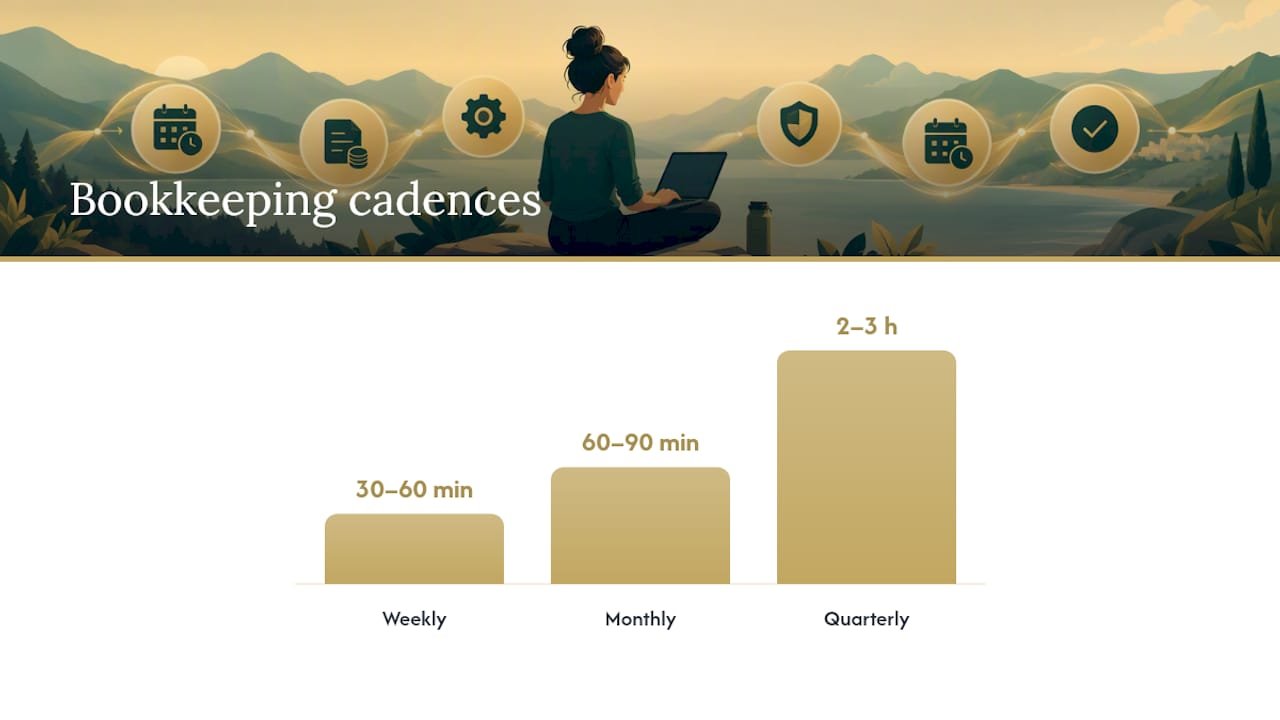
The weekly session (30 to 60 minutes)
This is the core habit. A short, consistent weekly session prevents the kind of pileup that turns bookkeeping into a dreaded weekend project. During this session:
- Import new transactions from your business bank feed
- Categorize each transaction (income by client, expenses by type)
- Match receipts to the transactions they belong to
- Flag any invoices that are now overdue and send a reminder
That is it. No spreadsheets from scratch, no digging through email for a receipt from three weeks ago, because you are handling it in near real time.
The monthly close (60 to 90 minutes)
Once a month, step back and reconcile. This means confirming that your bookkeeping software’s version of your bank and credit card balances matches what the actual bank statement says. Discrepancies here usually mean a missed transaction, a duplicate entry, or a bank fee you forgot to categorize.
After reconciling, run a profit and loss statement for the month. This single report tells you whether you are actually making money on a monthly basis, not just cashing checks that feel good when they land. Many freelancers also use the monthly close to transfer that month’s tax set-aside percentage into a separate savings account, so the money is already gone from your checking balance before you can spend it on something else.
The quarterly check-in (2 to 3 hours)
Four times a year, your bookkeeping routine intersects directly with the IRS. This is when you calculate and pay estimated taxes using the worksheet in Form 1040-ES, which walks through figuring your expected tax liability and paying it in four installments across the year. If your income swings a lot of quarter to quarter, the form’s instructions also cover the annualized income installment method, which adjusts your payment based on actual quarterly earnings instead of an even split.
Quarterly is also a good time to review cash flow trends. Are certain months consistently slower? Are one or two clients responsible for most of your revenue? These patterns matter more for planning than any single week’s numbers.
Pro Tip: Set up bank rules in your bookkeeping software so recurring vendors (a co-working space, software subscriptions, a phone bill) get auto-categorized every time. This alone can cut your weekly session by ten minutes or more, and it’s the single highest-leverage automation most freelancers skip.
The full checklist, start to finish
- Every week: Import transactions, categorize, match receipts, send overdue invoice reminders
- Every month: Reconcile bank and card accounts, run a profit and loss report, transfer tax savings
- Every quarter: Calculate estimated taxes with Form 1040-ES, pay by the deadline, review cash flow trends
- Every year: Export a full profit and loss statement, categorized expense list, and mileage log for tax filing
Shortcuts help more than willpower does. Bank feed automation, receipt capture apps that photograph and file in one motion, and recurring bank rules are what actually make the weekly habit stick past month two. Our bookkeeping best practices guide covers a few more workflow tweaks that shave time off each of these steps.
How to Track Income and Expenses Without Losing Your Mind
Categorization is where most freelancer books fall apart, not because the work is hard, but because it is tedious enough to get sloppy fast. The fix is mapping your expense categories to Schedule C lines before you need to file, not after.
Common freelance deductions map roughly like this:
- Advertising — website hosting, paid ads, business cards
- Car and truck expenses — mileage or actual vehicle costs for business driving
- Office expense — software subscriptions, a portion of your phone bill, printer supplies
- Supplies — anything consumed in delivering your service (materials, small equipment)
- Legal and professional services — accountant fees, contract review, business consulting
Bank feeds and categorization rules do most of the heavy lifting here. Connect your business checking account and card to your software once, set a rule that any charge from a known recurring vendor auto-categorizes the same way every time, and you eliminate the majority of manual entry. This single setup step is what most freelancer bookkeeping guides point to as the biggest time saver in the whole process.
Receipts need more than a photo. Keep the receipt itself as proof of payment, and pair it with a short note of business purpose, a project name, a client, a calendar invite reference, because bank statements alone often fail as audit proof. An auditor wants to see not just that you spent $340 at an office supply store, but why. A two-second note when you file the receipt saves you a scramble two years later.
Client payments bring their own wrinkles. If any single client pays you $600 or more in a year, expect a 1099-NEC. Payments processed through platforms like PayPal or Stripe may generate a 1099-K depending on transaction volume and state thresholds, and that income needs to match what you report even if the 1099 itself arrives late or not at all. Track it in your own books regardless of whether a form shows up.
The most common mistakes worth avoiding: mixing personal and business purchases on one card, categorizing everything as “miscellaneous” because it is faster in the moment, and letting overdue invoices sit uncontacted for weeks. Every one of these is fixable with the weekly routine above, and every one of them gets more painful to untangle the longer it sits.
What to Look for in Bookkeeping Software
The best bookkeeping software for freelancers is not the one with the most features. It is the one that matches how you actually work and what your accountant can read without a translation headache.
Before comparing anything, know what you actually need:
- Bank feed connections so transactions import automatically instead of manual entry
- Invoicing built in if you bill clients directly rather than through a third-party platform
- Receipt capture via mobile photo upload, ideally with automatic data extraction
- Standard reports — profit and loss, expense summaries, and a mileage tracker if you drive for work
Match the tool class to your work pattern. If you bill hourly across several active clients, an invoicing-first platform with time tracking built in will save more hours than a general ledger tool ever will. If you are already working with an accountant or a service like Kelliworks, accountant-friendly compatibility matters more than flashy dashboards, because a platform your accountant already knows means faster onboarding and lower cleanup costs at tax time. Freelancers just starting out with simple, low-volume finances sometimes get by fine on a free or minimal-tier tool for the first year.
Cost adds up fast once you start layering add-ons. Payment processing fees, payroll modules (if you eventually hire), and accountant seat access are usually priced separately from the base subscription. Read the add-on pricing before you commit, not after your first invoice payment gets clipped by a fee you did not expect.
Whatever you pick, run one full invoice-to-payment cycle before deciding it is the right fit. A platform that looks great in a demo can still fall apart the first time you try to reconcile a real bank statement against it.
Getting Tax Ready: Schedule C, Estimated Payments, and What to Keep
If your net earnings from freelancing hit $400 or more, you owe self-employment tax and you report your business income and expenses on Schedule C, which flows into your personal Form 1040. This is where all that weekly categorizing pays off, because Schedule C is essentially a structured summary of the ledger you have already been keeping.
A quarter’s worth of planning happens on one worksheet. Form 1040-ES provides the estimated tax worksheet freelancers use to calculate and pay quarterly installments, and it also includes the annualized income method for anyone whose income swings sharply between quarters.
At filing time, you need three exports ready: a full profit and loss statement for the year, a categorized expense list that lines up with Schedule C categories, and a mileage log if you claim vehicle expenses. Setting aside 25 to 30 percent of gross income throughout the year, as most freelancer guides recommend, keeps you from scrambling in April, though your actual rate depends on your total income, filing status, and state tax obligations, so treat that percentage as a starting point rather than a fixed rule. For deduction support, keep the receipt and the business purpose note for every claimed expense. That pairing is what protects you if the IRS ever asks you to substantiate a line on your return.
When Is It Time to Hire a Bookkeeper Instead of DIY?
A few signals tell you the weekly session is no longer enough on its own. If you are spending more than three or four hours a month on bookkeeping, missing invoice follow-ups, or discovering reconciliation errors months after they happened, DIY has stopped saving you money and started costing you billable time.
Outsourced bookkeeping typically delivers:
- A cleanup of existing books to fix miscategorized transactions and reconcile prior months
- Ongoing monthly reconciliations across all business accounts
- Tax-ready financial reports handed off at year-end, not assembled in a panic in March
- A monthly close process you never have to think about again
When you bring in a provider, expect the first 30 to 60 days to focus on cleanup and setup, connecting your accounts, reviewing the last several months of transactions, and establishing categorization rules before ongoing monthly work begins. A well-scoped engagement should tell you upfront what that cleanup phase covers and what happens once you move into steady-state monthly service.
Kelliworks works specifically with freelancers and small business owners who have outgrown the spreadsheet-and-shoebox phase, offering full-service bookkeeping and accounting that pairs monthly reconciliations with tax-ready reporting. Our piece on why freelancers mismanage their finances covers the specific patterns that usually signal it is time to hand this off.
Monthly Close Checklist and Ready-to-Use Templates
Closing the month cleanly sets up everything else, tax filing, cash flow decisions, and any future handoff to an accountant. Here is the sequence, start to finish:
- Import all outstanding transactions across every connected account
- Categorize anything that did not auto-sort through your bank rules
- Reconcile each account against its actual bank or card statement
- Run your profit and loss report and review it against the prior month
- Transfer that month’s tax set-aside percentage into a separate savings account
Two templates make this faster. For an overdue invoice, a short reminder works better than a lengthy explanation: “Hi [Client], just following up on Invoice #[number], due [date]. Let me know if you need anything from me to process payment. Thanks!” For receipt naming, a consistent format like YYYY-MM-DD_Vendor_Amount_Project makes searching your archive instant instead of a scavenger hunt.
If you are prepping files for a bookkeeper or accountant, export your categorized transaction list, your P&L, and a folder of receipts named consistently. A freelance graphic designer juggling five retainer clients might close in under an hour using bank rules alone; a consultant billing project-based fees with irregular income may need the full quarterly review to catch swings the monthly close would miss.
Pro Tip: Build your receipt naming template once as a note on your phone. Copy and adjust it every time you save a receipt, and you’ll never face an unlabeled folder of forty PDFs again.
Kelli’s Perspective: Bookkeeping as a Growth Habit
Most freelancers treat bookkeeping like a chore they owe the IRS, and that framing is exactly backwards. The weekly session is not busywork. It is the fastest way to know, in real time, whether your business is actually working. I have watched freelancers avoid checking their numbers for months because they assumed bad news was waiting, only to find the opposite once they finally looked.
Start smaller than you think you need to. Ten minutes categorizing last week’s transactions is enough to build the habit before you add reconciliation or reporting on top of it. The routine scales with you, and it should. A freelancer with one client does not need the same rigor as one juggling eight. If you want to go deeper on the fundamentals before building your own system, our freelance bookkeeping basics guide is a solid next stop.
— Kelli
How Kelliworks Takes Bookkeeping Off Your Plate
If the weekly routine above sounds manageable but the thought of doing it every single week for the next year does not, that is exactly the gap Kelliworks fills. We handle monthly bookkeeping, cleanup of messy prior-year books, and tax preparation as one connected service instead of three separate headaches you have to coordinate yourself.

What you get is straightforward: reconciled accounts every month, reports that are ready the moment tax season starts instead of assembled in a scramble, and hours back in your week that used to go toward categorizing transactions. Freelancers who bring us disorganized books typically see them cleaned up and current within the first 30 to 60 days, after which the monthly close becomes something you never have to think about again. If your books need cleanup before this year’s filing, our tax preparation and filing service picks up right where your recordkeeping leaves off.
Ready to see what full-service support actually looks like for your business? Visit our accounting services page to see what is included, or book a free consultation to walk through your specific setup.
Primary Sources and IRS References
The rules above come directly from federal guidance, not general advice. For anything tax-specific, verify against the primary source:
- Publication 334 (Tax Guide for Small Business) — accounting methods, deductible expenses, and recordkeeping for the self-employed
- Form 1040-ES (Estimated Tax for Individuals) — quarterly estimated tax worksheets and payment instructions
- What kind of records should I keep? (IRS) — retention periods and electronic storage rules
- Bookkeeping for freelancers: taxes, expenses, cash flow (Xero US) — practical routines and software selection guidance
Sources
- Publication 334 (Tax Guide for Small Business)
- Form 1040-ES (Estimated Tax for Individuals)
- What kind of records should I keep? (IRS)
- Bookkeeping for freelancers: taxes, expenses, cash flow | Xero US
- QuickBooks vs Xero vs FreshBooks: 2026 CPA Comparison | Taxstra
FAQ
How often should freelancers do bookkeeping?
Weekly is the practical minimum, in a session of 30 to 60 minutes spent importing transactions, categorizing them, and matching receipts. Add a monthly reconciliation and a quarterly tax review on top of that weekly habit.
What records do freelancers legally need to keep?
The IRS requires records that support the income and deductions on your tax return, generally kept for at least three years. That includes invoices, receipts, bank statements, and contracts.
Do freelancers need separate business and personal bank accounts?
A dedicated business checking account is not always legally required for sole proprietors, but it is essential practically. Mixing accounts makes categorization slower and makes it far harder to prove business purpose if the IRS ever questions a deduction.
How much should freelancers set aside for taxes?
A common rule of thumb is setting aside 25 to 30 percent of gross freelance income for taxes, though your actual obligation depends on total income, deductions, and state taxes. Estimated payments are calculated using the worksheet in Form 1040-ES.
When should a freelancer hire a bookkeeper instead of doing it themselves?
If bookkeeping is eating more than three or four hours a month, or invoices and reconciliations are consistently falling behind, outsourcing usually pays for itself in recovered time. Kelliworks offers full-service bookkeeping built specifically for freelancers making that switch, with pricing available directly on the site.



One Response