


QuickBooks Online is a solid default for most startups that want scalable, accountant-friendly bookkeeping, provided you configure accrual accounting, class tracking, and a startup-focused chart of accounts from day one. The software itself isn’t the hard part. The setup is. Founders who skip the configuration step end up with books that look fine until an investor or accountant starts asking questions, and then they need a costly cleanup.
Here’s how to get it right the first time:
- Pick the plan that matches your funding stage, not just your current headcount.
- Switch to accrual accounting before you start fundraising conversations.
- Connect your bank feeds and build a class-tracked chart of accounts before you record a single transaction.
Key Takeaways
QuickBooks Online works for startups when accrual accounting, class tracking, and a department-based chart of accounts are configured before the first transaction is recorded, not after.
| Point | Details |
|---|---|
| Choose Plus if funded | Class tracking, only available from Plus up, is what enables investor-style departmental reporting. |
| Set accrual before fundraising | Cash-basis books hide real burn rate and fail investor diligence expectations. |
| Rebuild the chart of accounts early | Split spending into R&D, sales and marketing, and G&A, plus dedicated deferred revenue and founder loan accounts. |
| Lock closed periods monthly | Enable “close the books” with a password to prevent silent backdated edits after reconciliation. |
| Outsource once hours or errors pile up | Missed deadlines, investor data requests, or a messy chart of accounts are signals it’s cheaper to hire help. |
Table of Contents
- QuickBooks for Startups: Core Features Worth Configuring First
- How to Set Up QuickBooks Online for a Startup, Step by Step
- Choosing the Right QuickBooks Plan for Your Startup Stage
- Accounting Conventions That Make Your Books Investor-Ready
- Common QuickBooks Pitfalls That Cost Startups Time and Money
- When to Bring in a Bookkeeper or Virtual Accounting Team
- Get Investor-Ready Books Without the Setup Guesswork
- Authoritative Pages to Verify Claims and Learn More
- Why Most QuickBooks Advice Skips the Part That Actually Matters
- Sources
QuickBooks for Startups: Core Features Worth Configuring First
The reason QuickBooks Online dominates the startup accounting conversation isn’t novelty. It’s breadth. You get bank and card feeds, automated transaction categorization, invoicing paired with QuickBooks Payments, mobile receipt capture, payroll add-ons, and the three reports every investor eventually asks for: profit and loss, balance sheet, and cash flow statement.
Founders who automate invoicing and adopt QuickBooks Payments save several hours per month compared with manual bookkeeping, according to QuickBooks’ own usage data. That time adds up fast when you’re also fundraising, hiring, and building product.
The integration ecosystem matters more than most founders realize early on. Stripe feeds sync revenue data automatically. Gusto handles payroll without duplicate entry. Shopify connects sales tax and inventory movement directly into your books. Each integration removes a manual step that would otherwise eat into your week, and QuickBooks’ onboarding resources walk new businesses through which connections to prioritize.
If you’re setting up QuickBooks for the first time, enable these features in this order:
- Bank and card feeds so transactions flow in automatically instead of manual entry.
- Invoicing with QuickBooks Payments so clients can pay online and cash arrives faster.
- Basic reporting (P&L and balance sheet) so you can see your burn rate at a glance.
- Payroll integration only once you have W2 employees, not before.
Everything else, like advanced inventory or project costing, can wait until you actually need it.
How to Set Up QuickBooks Online for a Startup, Step by Step
Getting this sequence right the first time saves you from a painful restatement later, especially once an accountant or investor starts reviewing your books.
- Choose your plan before you create the account. Simple Start works for a solo founder with no employees. Plus is the practical default once you’ve raised capital or have more than one class of spending to track. (More on this in the next section.)
- Set company settings immediately. Fix your fiscal year end, switch the accounting method to accrual if you’re raising capital, turn on account numbers under Advanced settings, and enable “close the books” with a password so past periods can’t be edited silently.
- Build a startup chart of accounts and turn on class tracking. Replace the generic default categories with accounts split by function, such as R&D, sales and marketing, and general and administrative, and add dedicated accounts for deferred revenue and founder loans. This structure, recommended by startup accounting practitioners, is what lets you produce department-level P&Ls that investors actually expect to see.
- Connect your bank and card feeds, then verify before you categorize. Import 60 to 90 days of history, check for duplicate transactions from manual entries you made earlier, and only then start batch categorizing.
- Automate the recurring stuff. Set up bank rules for repeat vendors, recurring journal entries for prepaid expense amortization and deferred revenue recognition, and standardized invoice templates with your accepted payment methods locked in.
Pro Tip: Do the chart of accounts redesign before you connect bank feeds, not after. Reclassifying hundreds of already-categorized transactions is a miserable afternoon you can skip entirely by sequencing this correctly.
Choosing the Right QuickBooks Plan for Your Startup Stage
The plan question comes down to one feature: class tracking. It’s only available starting with Plus, and it’s the single feature most likely to force an upgrade once your startup takes outside money.
Here’s the practical breakdown by stage:
- Simple Start fits a pre-revenue solo founder with no employees and no immediate fundraising plans. It covers basic invoicing and expense tracking but caps out fast.
- Essentials adds multiple users and bill management, useful for a very early team that still doesn’t need departmental reporting.
- Plus is the default recommendation for funded startups. Class tracking lets you break out spending by department, which is exactly the kind of reporting investors and accountants ask for during diligence, a point startup CFO guidance makes explicitly.
- Advanced makes sense once you cross five users, need custom user roles, or require batch invoicing and more complex automation than Plus supports.
Budget for add-ons beyond the base subscription. Payroll processing, time tracking, and priority support all carry separate monthly fees that can double your effective QuickBooks cost once your team grows past a handful of people. Factor those into your monthly software budget rather than treating the sticker price as the full cost.
Accounting Conventions That Make Your Books Investor-Ready
Software configuration only gets you halfway. The accounting conventions you adopt on top of QuickBooks are what actually separate investor-ready books from a shoebox of receipts with a nicer interface.
Switch to accrual accounting before you start raising. Cash-basis accounting might feel simpler, but it hides your real burn rate and makes ARR calculations meaningless. Investors doing diligence expect accrual-based statements, and QuickBooks’ own startup bookkeeping guide treats choosing an accounting method as the first real decision a founder has to make.

Treat deferred revenue as a real liability, not an afterthought. If you collect annual contracts upfront, that cash isn’t revenue yet. Set up a deferred revenue account and use recurring journal entries to recognize it monthly as you deliver the service. SaaS startups with ASC 606-style recognition needs should build this into the chart of accounts from the start rather than trying to reconstruct it during a fundraising deadline.
Amortize prepaid expenses instead of expensing them all at once. Annual software licenses, insurance premiums, and prepaid rent should hit your P&L over the period they cover, not the month you paid. A recurring journal entry handles this automatically once it’s set up.
Follow this close cadence every month:
- Reconcile every bank and credit card account against statements.
- Review and clear any uncategorized transactions sitting in suspense accounts.
- Post recurring entries for prepaid amortization and deferred revenue recognition.
- Close the books and lock the period with a password, a safeguard practitioners specifically recommend to prevent silent backdated edits.
- Pull a class-based P&L so you can see spending by department at a glance.
Pro Tip: Track founder loans and capital contributions in their own dedicated equity accounts from day one. Lumping them into a generic “owner’s draw” category is one of the most common cleanup items accountants find when startups prepare for their first real audit.
Common QuickBooks Pitfalls That Cost Startups Time and Money
Most of the frustration founders report with QuickBooks traces back to setup shortcuts, not software limitations.
- Add-on costs creep up fast. Payroll, time tracking, and priority support each carry separate fees, so budget for the fully loaded cost, not just the base subscription.
- The default chart of accounts is too generic for real reporting. Leaving class tracking off until you need it means months of transactions have to be recategorized retroactively.
- Duplicate bank feed transactions are a recurring headache, especially when you’ve manually entered transactions before connecting a feed. Always verify a new connection against 30 days of manual entries before batch categorizing.
- The mobile app can lag with large receipt uploads. If you’re capturing expenses on the go, upload in smaller batches rather than dumping a month of receipts at once.
- Plan for a data cleanup if your books have gone more than two or three months without reconciliation. A proper catch-up typically takes several weeks depending on transaction volume, and it’s far cheaper to do it early than to discover the mess during due diligence.
When to Bring in a Bookkeeper or Virtual Accounting Team
There’s a point where DIY QuickBooks stops being the efficient choice. Watch for these signals:
- You’re spending more than a few hours a week on bookkeeping instead of building your product.
- You’ve missed a filing deadline or a bank reconciliation for more than one month running.
- An investor has asked for financials in a format your current books can’t produce.
- Your chart of accounts has become a patchwork of one-off categories nobody remembers the logic behind.
A virtual accounting engagement typically includes QuickBooks setup and cleanup, chart of accounts redesign, a recurring monthly close, payroll coordination, and investor-ready reporting prepared on a schedule you can count on. QuickBooks itself acknowledges that once bookkeeping complexity grows, bringing in professional help becomes the more cost-effective path.
Founders don’t lose fundraising deals because their product isn’t ready. They lose momentum when a data room request for clean financials turns into a three-week scramble that could have been a non-event.
If you’re weighing whether outsourcing makes sense for where your startup is right now, Kelliworks’ guide on the role of an accountant in startup growth walks through the decision in more detail.
Get Investor-Ready Books Without the Setup Guesswork
Configuring QuickBooks correctly the first time takes real accounting judgment, not just software familiarity. Kelliworks builds a full virtual accounting department around your startup, handling QuickBooks setup, chart of accounts design, class tracking, monthly close, and investor reporting so you’re not reverse-engineering accrual accounting from a help article at 11 PM before a board meeting.
If your books need a cleanup before you can trust them, or you’re setting up QuickBooks for the first time and want it done right, Kelliworks’ virtual accounting department is built specifically for founders in exactly this position. The engagement typically starts with a cleanup and chart of accounts redesign, then moves into a standardized monthly close cadence and ongoing advisory as your reporting needs grow more complex.
Authoritative Pages to Verify Claims and Learn More
- QuickBooks: Small Business Accounting Tips
- QuickBooks: Starting a New Business
- QuickBooks: Bookkeeping for Startups Guide
- Kelliworks: Virtual Accounting Department Explained
- Kelliworks: Bookkeeping Best Practices for Small Business Owners
Why Most QuickBooks Advice Skips the Part That Actually Matters
Most guidance on QuickBooks for startups treats it as a feature comparison exercise: which plan has the most bells, which integration saves the most clicks. That framing misses the actual risk. The software rarely fails founders. The bookkeeping conventions layered on top of it do.
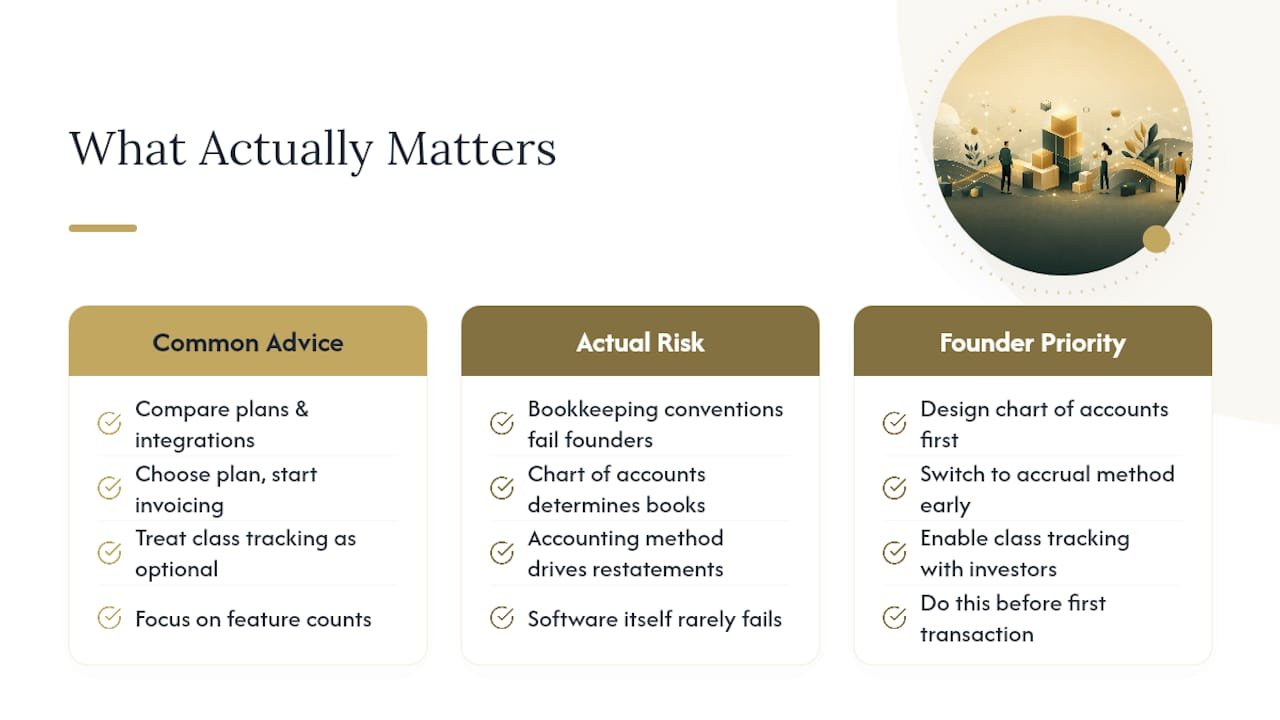
Conventional advice tells founders to “pick a plan and start invoicing.” What the research on startup accounting practices actually supports is narrower and more specific: the chart of accounts and the accounting method are the two decisions that determine whether your books survive investor scrutiny intact or require a costly restatement. Class tracking gets treated as a nice-to-have upgrade feature in most comparisons, but it’s closer to a prerequisite the moment you take outside capital.
If I had to pick one priority for a founder setting up QuickBooks this week, it wouldn’t be learning every feature. It would be spending an afternoon on the chart of accounts and the accrual switch before recording a single transaction. Everything else is reversible. That decision, made late, rarely is.
— Kelli
Sources
- 19 Small Business Accounting Tips | QuickBooks
- Start a new business with the right management tools | QuickBooks
- Bookkeeping for Startups: A 2026 Guide | QuickBooks



2 Responses