


For every U.S. new hire, you must collect a completed Form I-9 and Form W-4. I-9 Section 1 is due on or before the employee’s first day, and you have three business days to finish Section 2 and physically verify their documents. The W-4 must be in hand before the first payroll run. Most states also require a separate withholding form and new-hire reporting within a short window after hire.
The single best move to stay compliant: assemble a Day-1 packet and send it a few days before the employee starts.
- Form I-9 (federal, deadline-driven)
- Form W-4 (federal, before first paycheck)
- State withholding certificate and new-hire report (varies by state)
- Offer letter, handbook acknowledgment, direct deposit form
Missing an I-9 deadline isn’t a paperwork slip. It’s a federal violation that can carry fines per employee, per error.
Key Takeaways
A compliant new hire paperwork checklist requires collecting Form I-9 on Day 1, Form W-4 before first payroll, state-specific forms, and sending the full packet 3 to 5 days before the start date.
| Point | Details |
|---|---|
| I-9 has a hard deadline | Section 1 on or before Day 1, Section 2 within three business days of hire. |
| W-4 must precede payroll | Employers default to single-status withholding if the form isn’t submitted on time. |
| State forms vary widely | Confirm withholding certificates and new-hire reporting windows by the employee’s work state. |
| Send the packet early | Distributing forms 3 to 5 days before start reduces Day 1 admin overload and errors. |
| Benefits run on separate clocks | Track the 30-day enrollment window and 90-day plan document deadline independently. |
Table of Contents
- New Hire Paperwork Checklist: Federal Forms You Cannot Skip
- What Should Happen on Day 1 Versus Day 30?
- Do State Forms Add to the Federal Requirements?
- Which Company Documents Belong in the Packet?
- How Can HR Teams Track Paperwork Without Losing Anything?
- How Kelliworks Handles the HR-to-Payroll Handoff
- When Do Benefits Enrollment Windows Actually Open and Close?
- What Happens If You Get New Hire Paperwork Wrong?
- How Does Federal New Hire Reporting Actually Work?
- Which Workplace Posters and Notices Are You Required to Display?
- What Paperwork Covers Workers’ Compensation and Unemployment Insurance?
- When Should You Require an NDA or Non-Compete?
- Where to Find Official Forms and Employer Guidance
- Why Most Onboarding Checklists Miss the Real Risk
- Sources
New Hire Paperwork Checklist: Federal Forms You Cannot Skip
Two federal forms sit at the top of any legitimate new hire paperwork checklist, and neither one is optional.
Form I-9 verifies identity and work eligibility. Section 1 must be completed by the employee no later than their first day of work. Section 2 belongs to you, the employer, and it has a hard deadline: within three business days of the start date, you must physically examine the employee’s original identity and work-authorization documents and sign off. There’s no grace period built into the rule, and remote-only review of a scanned document does not satisfy the requirement unless your company uses a qualified authorized representative.
Form W-4 determines federal income tax withholding. The IRS requires a completed W-4 before you run the first payroll. If an employee hasn’t submitted one by payday, you’re required to withhold as if they filed as single with no adjustments, which usually means over-withholding until they submit the form.
Common mistakes worth flagging for your team:
- Accepting expired identity documents on the I-9 (a frequent audit trigger)
- Letting Section 2 slide past day three because “the manager was busy”
- Running payroll on a verbal promise of a W-4 that never actually arrives
- Skipping background-check consent disclosures required under the Fair Credit Reporting Act before pulling a report
The official I-9 PDF from USCIS is the only version you should use for verification and retention. Older versions get rejected in audits, and using an outdated template is an easy, avoidable error.
What Should Happen on Day 1 Versus Day 30?
A clean onboarding document checklist works best when it’s mapped to a timeline instead of a single giant pile of forms.
- 3 to 5 days before start: Send the offer letter, W-4, applicable state withholding form, benefits packet, and direct deposit authorization through a secure link.
- Day 1: Complete I-9 Section 1, collect the signed handbook acknowledgment, gather emergency contact information, and issue equipment with a signed receipt.
- Within 3 business days: Finish I-9 Section 2 with original document verification, and confirm payroll entry is complete and accurate.
- Within 30 days: Confirm benefits elections are locked in before the special enrollment window closes.
- Within 90 days: Distribute finalized plan documents and complete any probationary review paperwork.
Front-loading the administrative burden before the start date, rather than dumping it all on day one, keeps new hires focused on actually learning their job instead of filling out forms in a conference room.
Do State Forms Add to the Federal Requirements?
Yes, and this is where a lot of employee onboarding documents get missed. Federal forms cover the baseline, but most states layer on their own requirements.
- California uses the DE-4 for state withholding, separate from the federal W-4.
- New York requires the IT-2104.
- Seven states, including Texas and Florida, have no state income tax, so no state withholding form applies there.
- Most states require new-hire reporting within about 20 days of the hire date, though a handful require faster turnaround.
Pro Tip: Build a simple jurisdiction checklist keyed to the employee’s work state, not your company’s headquarters. Remote and multistate hiring means you may be filing new-hire reports in a state you’ve never had an office in.
If you’re hiring across multiple states, verify each state’s labor department page directly rather than relying on a directory of professional service providers. Requirements change, and the penalty for missing a reporting deadline falls on you, not the employee.
Which Company Documents Belong in the Packet?
Beyond what the government requires, a well-built new employee forms list includes documents that protect both sides of the employment relationship.
- Offer letter: Get a signed copy back before the start date. An unsigned offer letter creates ambiguity about start date, pay, and role that can turn into a dispute later.
- Handbook acknowledgment: A signed receipt confirming the employee received and reviewed your policies, not just a verbal mention in orientation.
- NDAs and IP assignment agreements: Require these when the role touches proprietary information, client data, or original work product.
- Direct deposit authorization: Collect banking details early enough to run a test deposit before the first real paycheck.
- IT and equipment receipt: A signed acknowledgment of what was issued, useful for offboarding and asset tracking later.
None of these carry the same legal deadlines as I-9 or W-4, but skipping them is how small businesses end up in avoidable disputes over pay, confidentiality, or laptop return.
How Can HR Teams Track Paperwork Without Losing Anything?
The onboarding checklist itself is only half the job. The other half is making sure it actually gets completed on time, every time.
- Send the packet several business days before start date through a digital portal with automated reminders rather than email attachments that get buried.
- Keep a documented audit trail of I-9 verification, including who reviewed the documents and when.
- Run a test payroll deposit before the first live paycheck to catch bad account or routing numbers early.
- Store signed documents in a secure, access-controlled system, and schedule a quarterly audit of your files.
Pro Tip: A digital onboarding portal with reminder logic does more than save time. It creates a timestamped record that proves you met your I-9 and W-4 deadlines, which matters enormously if you’re ever audited.
How Kelliworks Handles the HR-to-Payroll Handoff
Once HR collects the required hiring paperwork, someone still has to turn it into a working payroll setup. That’s the part Kelliworks handles for small business clients.
- Manage payroll setup and run test deposits before the first live paycheck
- Maintain payroll records and support state new-hire reporting submissions
- Accept forwarded documents through secured uploads, with clear formatting requests (name, tax ID, banking fields, start date)
- Apply document retention practices that match federal recordkeeping expectations
The handoff between HR and accounting is where most payroll errors originate. A completed I-9 or W-4 sitting in someone’s inbox instead of the payroll system is functionally the same as not having it at all.
If your team wants that handoff automated, a virtual accounting department can take over the payroll side entirely once HR completes the intake work.
When Do Benefits Enrollment Windows Actually Open and Close?
Benefits paperwork runs on a different clock than tax and identity forms, and mixing up the deadlines is a common source of confusion.
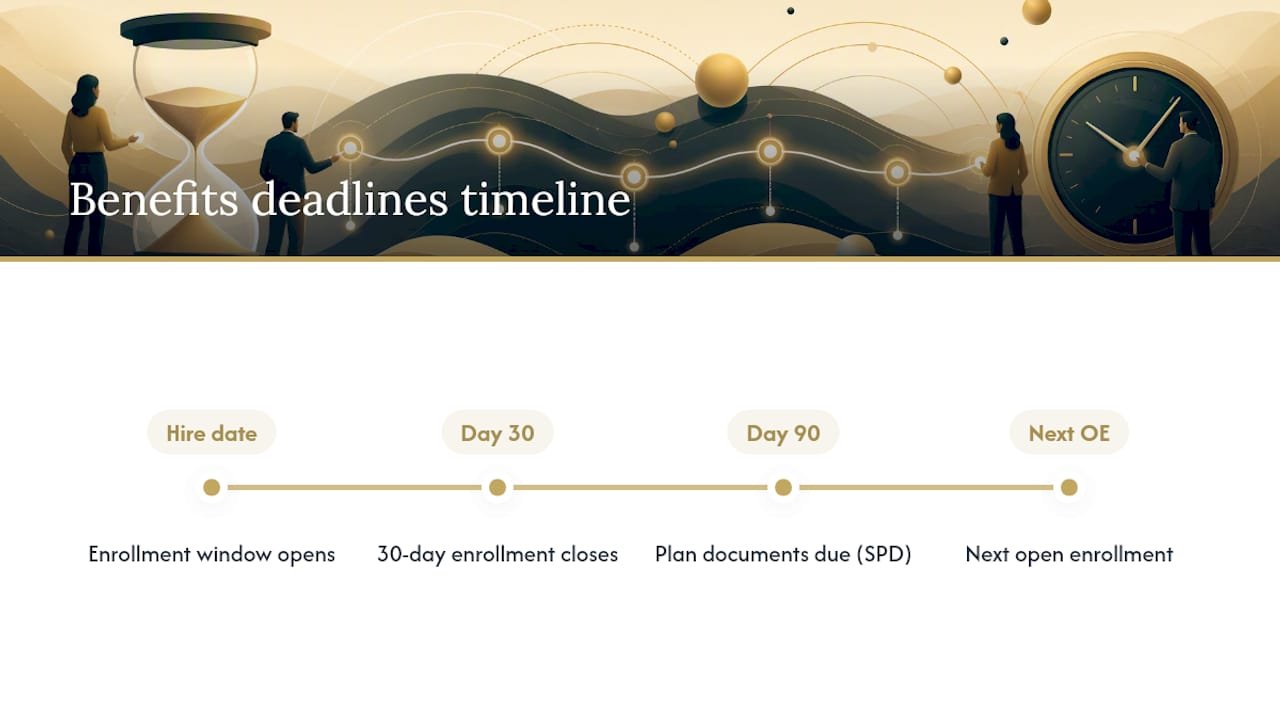
Most employer health plans offer a 30-day special enrollment window starting on the employee’s hire date or their benefits-eligible date, whichever the plan document specifies. Miss that window, and the employee may be locked out until the next open enrollment period, sometimes months later. That’s a real problem if a new hire has a health condition, a dependent, or a life event they expected to cover immediately.
Plan documents themselves, including the Summary Plan Description required under federal benefits law, typically need to reach the employee within 90 days of when coverage begins. Employers sometimes treat this as a soft deadline. It isn’t. Delayed plan document delivery is one of the more common items benefits auditors flag.
Practical sequencing matters here. Benefits elections should go out with the pre-start packet, not wait until day one, because the 30-day clock is often already ticking by the time paperwork gets to the employee’s desk. If your benefits packet ships during onboarding week instead of before it, you’re compressing the employee’s decision window without meaning to.
For employers running lean HR teams, tracking two separate benefits clocks (30-day election, 90-day documentation) alongside I-9 and W-4 deadlines is exactly the kind of overlapping timeline that a financial consulting checklist built for startups can help formalize into a repeatable process.
What Happens If You Get New Hire Paperwork Wrong?
The financial exposure from sloppy paperwork is bigger than most small employers assume.
I-9 violations carry civil penalties that scale with severity and repeat offenses, and they apply per form, not per company. A business with a dozen incomplete I-9s isn’t looking at one fine. It’s looking at a dozen.
Withholding mistakes create a different kind of exposure. If you fail to collect a W-4 and don’t apply the correct default withholding, or if you misclassify an employee’s tax status, the IRS holds the employer responsible for correcting underpayment, and that can mean penalties plus interest on top of the back taxes owed.
The pattern behind most of these pitfalls isn’t malice. It’s timing. Forms get signed late, verification gets rushed, or a manager assumes HR “already handled it.” Building deadlines into a calendar system, rather than trusting memory across a busy first week, closes most of the gap. The employers who get burned are almost always the ones treating paperwork as a formality instead of a compliance deadline with real financial consequences attached.
How Does Federal New Hire Reporting Actually Work?
Every state runs a new-hire reporting program, originally created to help enforce child support orders, but the reporting obligation falls on employers in all fifty states.
You’re generally required to report basic hire information, name, address, Social Security number, and start date, to your state’s new-hire reporting agency within a defined window after the hire date, often within 20 days, though several states set a shorter timeframe.
Submission methods vary by state but typically include an online portal, a state-provided form faxed or mailed in, or an electronic file transfer for employers reporting large volumes of hires. Multistate employers have the option to designate one state for centralized reporting under federal rules, rather than reporting separately in every jurisdiction where they hire, which is worth setting up if you’re growing across state lines.
Missing this requirement doesn’t carry the same headline risk as an I-9 violation, but states can and do assess penalties for repeated noncompliance. It’s also one of the easiest requirements to build into a repeatable checklist since the data points needed are ones you’re already collecting for payroll setup anyway.
Which Workplace Posters and Notices Are You Required to Display?
Federal law requires employers to display specific posters covering topics like minimum wage, workplace safety, and equal employment opportunity, and most states layer on their own required notices covering things like workers’ compensation carriers and paid leave policies.
The EEOC’s guidance for small businesses outlines the nondiscrimination notices employers must post, and it’s worth reviewing directly rather than relying on a generic poster kit that may be missing state-specific additions.
Beyond physical posting, many employers now supplement required notices with a digital acknowledgment during onboarding, having the new hire confirm in writing that they were informed of key workplace rights. This isn’t a substitute for physical posting where required, but it creates a second layer of documentation if a dispute ever arises about whether an employee was informed of their rights. For remote employees who never see a physical breakroom, some states now require that the same notices be provided electronically or by mail, so don’t assume a remote hire is exempt just because there’s no shared office wall to post on.
What Paperwork Covers Workers’ Compensation and Unemployment Insurance?
Workers’ compensation insurance is mandatory in nearly every state once you have even one employee, and the paperwork obligation starts before you ever make a hire: you need an active policy in place, along with the required notice to employees about their rights under that coverage.
Unemployment insurance works differently. As an employer, you register with your state’s unemployment insurance agency and pay into the system through payroll taxes, both federal (via FUTA) and state-level. New hires themselves don’t sign a separate unemployment form in most cases, but you’re responsible for accurate wage reporting so the system reflects the right contribution base if an employee ever files a claim.
The paperwork risk here isn’t usually the new-hire packet itself. It’s failing to register for either program before the first hire lands, which can create gaps in coverage and, in workers’ compensation’s case, personal liability exposure for the business owner in some states. If you’re setting up payroll for the first time, confirming both registrations are active belongs on the same pre-launch checklist as your first W-4.
When Should You Require an NDA or Non-Compete?
Confidentiality and non-disclosure agreements make sense for any role that touches client data, proprietary processes, or product development, and they’re worth including as standard hiring paperwork requirements rather than an afterthought added after a problem occurs.
Non-compete agreements are a different story, and the legal ground has shifted. Several states restrict or ban non-competes entirely for most workers, and enforceability varies significantly even where they’re allowed. Before including a non-compete in your standard packet, confirm current state law rather than reusing a template written for a different jurisdiction or a different year.
A more universally usable middle ground is an IP assignment clause, confirming that work product created during employment belongs to the company, paired with a standard confidentiality agreement. These two documents cover most of what a non-compete is trying to protect, without the same legal uncertainty. Have the employee sign these alongside the offer letter, before the start date, so there’s no ambiguity about what they agreed to and when.
Where to Find Official Forms and Employer Guidance
- USCIS — Completing Form I-9: verification steps and deadlines
- IRS — About Form W-4: withholding form and instructions
- U.S. Department of Labor — Forms for New Employees: federal onboarding form categories
- EEOC — Legal requirements for small businesses: nondiscrimination and notice obligations
Why Most Onboarding Checklists Miss the Real Risk
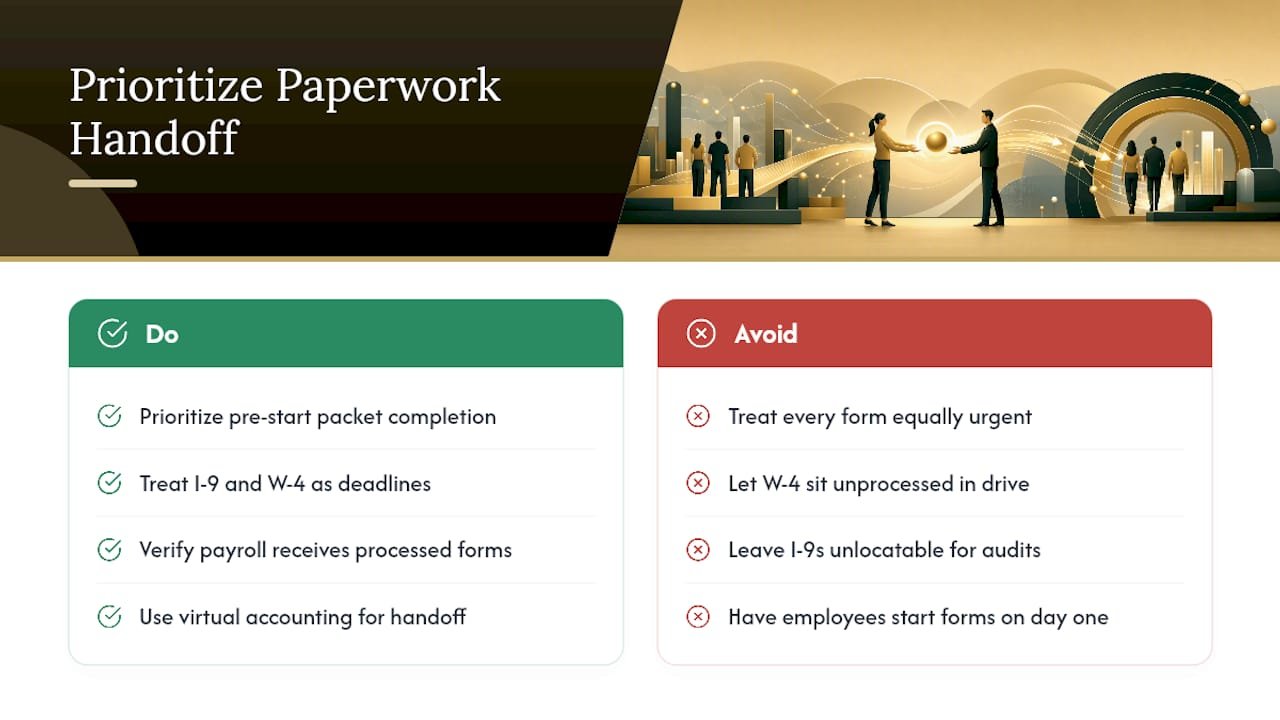
The conventional advice on new hire paperwork treats every form as equally urgent, and that’s exactly backward. I-9 and W-4 carry federal deadlines with financial teeth. Everything else, handbook acknowledgments, NDAs, IT receipts, matters for a different reason: reducing disputes down the road, not avoiding a fine next week.
What gets underestimated is the handoff moment between HR finishing the paperwork and payroll actually using it. A signed W-4 sitting in a shared drive isn’t withholding correctly. A verified I-9 isn’t protecting you if nobody can locate it during an audit two years later. The paperwork existing and the paperwork functioning are two different things, and most compliance failures happen in that gap.
If you take one thing from this checklist, prioritize the pre-start packet. Everything downstream, from I-9 verification to benefits enrollment, gets easier when the employee isn’t filling out their first form on their first day. A virtual accounting department that handles the payroll side of that handoff removes the single biggest point of failure in the entire process.
This article is general information, not a substitute for advice from a qualified lawyer. Consult a qualified legal professional about your own circumstances before acting on anything here.
Sources
- USCIS — Completing Form I-9
- IRS — About Form W-4
- U.S. Department of Labor — Forms for New Employees
- EEOC — Legal requirements for small businesses



One Response