
Use locations for where your business operates, such as stores, offices or rental properties. Use classes for what the business does, such as departments, service lines or product categories. The mechanical difference is simple: a location applies to a whole transaction, while a class can be set on each line of a transaction. Most small businesses need only one of the two, and some need both.
This guide explains how each feature works, which QuickBooks Online plans include them, when tags are the better tool, and how to avoid the setup mistakes we see most often when we clean up books.
TL;DR
- Locations tag an entire transaction with one place. Classes tag each line, so one bill or invoice can be split across several classes.
- Pick locations for physical or legal separation (stores, offices, properties). Pick classes for lines of business, departments or revenue types.
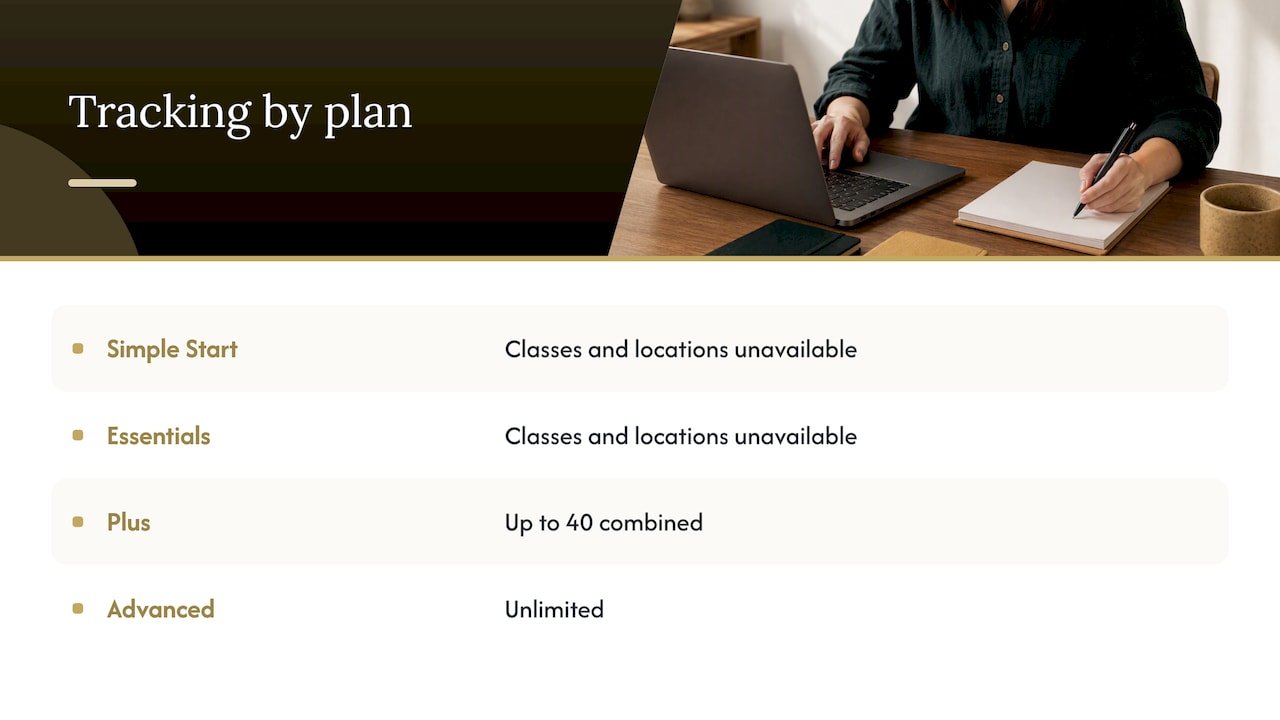
- Class and location tracking is not available in Simple Start or Essentials. Plus has a combined cap of 40 tracked classes and locations, and Advanced is unlimited.
- Tags are the lighter option: available on every plan and kept out of your standard Profit and Loss unless you run a report by tag.
- Decide the structure before you start tagging, and keep it small. Cleaning up a messy structure later costs far more than planning it.
Table of Contents
- How classes and locations differ
- When locations are the right choice
- When classes are the right choice
- Using both together
- Do you have the right QuickBooks Online plan?
- Classes vs. tags vs. projects
- Perspective: how we set this up for clients
- Common mistakes to avoid
- How to set it up in five steps
- When to get help
- FAQ
- Sources
How classes and locations differ
Both features sort income and expenses into groups that cut across your chart of accounts. Without them, you would need a separate income account for every store and every service line, and your chart of accounts would balloon. With them, you keep one tidy chart of accounts and run reports by the dimension you care about.
The difference sits at the level where you apply the tag:
- Class tracking assigns a class to each detail line of a transaction, while location tracking assigns one location to the whole transaction, according to Intuit’s own guide.
- A transaction can have only one location, but each line can carry its own class, as a QuickBooks training firm also explains.
That single rule drives most of the decision. Picture a supply bill for $1,000 from one vendor. If $600 of it was for your design department and $400 for your installation crew, you can split the lines and give each a class. But the bill can only belong to one location, say your Denver office.
A quick side-by-side
| Classes | Locations | |
|---|---|---|
| Applied to | Each line of a transaction | The whole transaction |
| Best for | Departments, service lines, product categories | Offices, stores, properties, regions |
| Can split one bill across groups | Yes | No |
| Can be nested (sub-groups) | Yes | Yes |
| Available on | Plus (capped) and Advanced | Plus (capped) and Advanced |
Both can be nested. Intuit notes that sub-classes and sub-locations can go up to five levels deep. You will rarely need more than two.
When locations are the right choice
Choose locations when the question you want answered is “Where did this happen?” Typical cases:
- A retailer with three stores that wants a Profit and Loss for each.
- A service company with offices in different cities or states.
- A landlord with several buildings under one company.
- A business with separate legal or operational units that never share a single transaction.
The rental property case is the one readers ask about most. If each property gets its own rent, repairs and utilities, and bills rarely cover more than one property, locations are a natural fit. If one invoice routinely covers several properties, such as a shared roofing contract, classes let you split the lines. In that situation, many bookkeepers tag by class instead, or use classes for the properties and locations for the city.
The gentle limit to remember: locations are generally used for offices, stores or rental properties, while classes lean toward divisions and product or service categories.
When classes are the right choice
Choose classes when the question is “What kind of work earned or consumed this money?” Typical cases:
- A consulting firm that wants to compare advisory, training and software revenue.
- A contractor that wants to separate residential from commercial work.
- A nonprofit-style structure with programs and administration.
- A business with several departments that share vendors.
Because a class lives on the line, one credit card charge can be allocated to several classes in one entry. That makes classes the more flexible and the more precise tool, and also the one that is easiest to misuse. Every line needs a class, or your reports show an “Unassigned” bucket that hides the real picture.
A service-based business can think of classes as its service lines, much the way a studio owner organizes revenue by type of lesson or program so each offering shows its own margin.
Using both together
The most common pattern pairs them: locations for the place, classes for the activity. Intuit’s example is a store with several departments, where the locations are the stores and the classes are departments such as men’s wear or shoes.
A worked example for a two-office accounting-style practice:
- Locations: Austin, Dallas
- Classes: Tax, Bookkeeping, Consulting
A $2,400 client payment for bookkeeping received at the Dallas office is tagged Location: Dallas and Class: Bookkeeping. Now you can see Dallas as a whole, bookkeeping as a whole, and Dallas bookkeeping specifically.
A word of caution: two dimensions double the tagging work. If nobody on your team will tag consistently, one dimension done well beats two done halfway.
Do you have the right QuickBooks Online plan?
This is where many owners get stuck. Per Intuit’s subscription page, tracked classes and locations are not available in Simple Start and Essentials. The same page states that Plus includes up to 40 combined tracked classes and locations, and Advanced includes unlimited.
The 40 limit is combined, so 25 classes and 15 locations uses it all. That is another reason to keep the structure lean. If you are on Simple Start or Essentials and need this reporting, you have two options: upgrade, or use tags, covered next. Check Intuit’s page for current plan pricing, since it changes.
If you are still deciding which plan fits a new company, our guide to QuickBooks for startups walks through setup and plan choices.
Classes vs. tags vs. projects
Readers often ask about “tracking categories” in QuickBooks. In QuickBooks Online the options are classes, locations, tags, and projects. They answer different questions.
Tags
Intuit describes tags as flexible labels that don’t touch your general ledger, and don’t change your Profit and Loss or Balance Sheet unless you run a report by tag. The same page says tags are available on all QuickBooks Online plans, which makes them the practical choice for Simple Start and Essentials users.
Tags suit short-lived or informal groupings: an ad campaign, a sales rep, a trade show, a seasonal promotion. The same help page lists ad campaigns, sales reps and events as typical uses.
Projects
Classes and locations are meant for broad categories. Intuit says they are best for large categories of the business, not for individual jobs or projects, and points to the Projects feature for job-by-job profitability. If you create a new class for every customer job, you will hit the plan cap fast and your reports will turn unreadable.
Which one should you pick?
| Your question | Best tool |
|---|---|
| How did each store or office perform? | Locations |
| How did each department or service line perform? | Classes |
| Did this ad campaign pay off? | Tags |
| Is this one customer job profitable? | Projects |
| I’m on Simple Start or Essentials | Tags (or upgrade) |
Perspective: how we set this up for clients
We see the same pattern in most small business files we review: the owner turned on class tracking in a burst of enthusiasm, tagged half the transactions for three months, and then stopped. The reports look precise but the numbers are wrong, because the untagged half sits in an “Unassigned” bucket.
Our approach is to start from the decision, not the feature. We ask what the owner will actually do with the report. Decide whether to close a location, raise prices on a service line, hire for a department? If there is no decision attached, we do not add a dimension.
From there we keep a few habits:
- One dimension first. Start with either classes or locations. Add the second only when a real question demands it.
- Few categories. Three to six classes is usually plenty. Long lists make tagging slow and inconsistent.
- Rules written down. A one-page note on what belongs in each class means your bookkeeper, your team and your tax preparer all tag the same way.
- Bank rules for repeat items. Recurring charges can be tagged automatically so the habit does not depend on memory.
- Monthly review. An “Unassigned” balance is the first thing to clear at each month-end close.
Because we work with small businesses both virtually and on site, we can sit with the person who enters the transactions and make the structure fit how they actually work. A perfect design that nobody follows is worse than a simple one that gets used. Consistent tagging is just good bookkeeping practice, and it makes tax time and financial planning easier too.
— Kelli
Common mistakes to avoid
- Using classes as a customer or job list. That is the job of customers, sub-customers or projects.
- Tagging only expenses. Class reports mean little if income is untagged. Tag both sides.
- Mixing the two dimensions. Don’t create a class called “Dallas” and a location called “Dallas.” Pick one home for each idea.
- Forgetting transfers and journal entries. They can carry tags too, and untagged ones skew reports.
- Renaming and merging without a plan. Merging classes rewrites history in your reports. Decide the final names first, then tag.
- Ignoring the cap. On Plus, the combined limit of 40 arrives sooner than you expect if you create a class per client.
How to set it up in five steps
- Write your questions. List the three reports you want each month.
- Map them to a dimension. Place questions go to locations, activity questions to classes.
- Draft the list. Keep it short, with at most one level of sub-groups to start.
- Turn on tracking. In QuickBooks Online, open Settings, then Account and settings, then the Advanced tab, and switch on the features under Categories. Menu names shift over time, so check Intuit’s current help if yours differs.
- Clean up the past. If you want historical reports, tag prior-period transactions in batches, or start the structure at the beginning of a fiscal period so your comparisons are clean.
If you are moving data from another system, plan the structure before the move. Our guide on avoiding data loss when migrating to QuickBooks Online covers what to check first.
When to get help
A structure that is too complex, or one that has drifted for a year, is slow to fix on your own. If you are weighing the cost of getting it right, our overview of accounting service pricing for small business owners explains how fees are typically set up.
We set up and maintain QuickBooks for small businesses, including class and location structures, monthly bookkeeping and reporting. If you want a second pair of eyes on your current setup, see our accounting and bookkeeping services and tell us what decisions your reports need to support. We will help you choose a structure you can sustain.
FAQ
Can I use classes and locations on the same transaction?
Yes. Location is set once for the whole transaction, and each line can carry its own class. Many businesses use locations for sites and classes for departments, and then run reports that filter by both.
Is a QuickBooks class worth it?
It is worth it if you will act on the reports, such as comparing service-line margins. It is not worth it if nobody will tag consistently. In that case, tags or a few extra income accounts may do the job with less upkeep.
Can I track classes in QuickBooks Simple Start or Essentials?
Not as tracked classes. Intuit says tracked classes and locations are not available in those plans. Tags are available on every plan, so they are the usual workaround.
Should I use a class or a location for rental properties?
If each bill belongs to a single property, locations work well. If bills often cover several properties, classes let you split by line. Pick one approach and apply it to every property so the reports compare cleanly.
What is the difference between classes and tags?
Classes are built into transaction lines and show up in standard reports once enabled. Tags are optional labels you apply when needed, and they don’t affect your Profit and Loss unless you run a report by tag.
Sources
- Using Classes and Locations in QuickBooks Online, Intuit
- QuickBooks Online subscription levels, Intuit
- Custom fields and tagging in QuickBooks, Intuit
- How to Use Classes and Locations in QuickBooks Online, Gentle Frog