
To close your books for taxes, reconcile every account through December 31, record late-year accruals, assemble a CPA-ready close package, and set a lock date in your accounting software. Then hand the package to your preparer. Keep the books open a few weeks into January for late bills, and anchor your timing to the IRS tax calendar and the January payroll and information return deadlines.
TL;DR:
- Keep the books open for a few weeks into January to capture late bills, and accrue costs incurred before invoices arrive.
- Reconcile bank and card accounts through December 31, using stub period activity when statements end early, and split loan payments between principal and interest.
- Verify employee details, collect vendor W9 forms, reconcile payroll to Forms 941 and W 3, and plan for the usual January 31 1099 NEC deadlines.
- Post permanent CPA corrections to the ledger, keep tax only adjustments in a separate book to tax reconciliation, and lock the books after agreed entries.
- Give your preparer a trial balance, general ledger, reconciled statements, aging reports, asset schedules, payroll reconciliations, and notes on unusual transactions.
Table of Contents
- What does a year-end close checklist look like for your business?
- How do you reconcile accounts through December 31?
- Which payroll and information return deadlines apply after year end?
- How do you clean up receivables, payables, inventory, and fixed assets?
- How do you lock your books in accounting software?
- What goes into the CPA-ready close package?
- What happens after your CPA reviews the books?
- Why does handing off the close save you time?
- Get your year-end close and tax filing handled by KelliWorks
- FAQ
- Sources
What does a year-end close checklist look like for your business?
Closing the books is an internal project, not an IRS deadline. Practitioner guidance describes the close date as an agreement between you and your preparer, set by working back from filing deadlines. Work through these steps in order:
- Finish invoicing. Find unbilled projects and delivered work, then finalize your receivables aging so December revenue is complete.
- Record every expense. Enter vendor bills dated in the year. If an invoice has not arrived, book an accrual estimate so the cost lands in the period you incurred it.
- Reconcile bank, card, and loan accounts to December 31 and flag anything uncleared.
- Close out payroll and build your list of W-2 employees and 1099 vendor candidates.
- Check fixed assets and inventory for additions, disposals, and counts.
- Run a trial balance and the key reports your preparer will ask for.
Experts suggest keeping the books open for a few extra weeks into the new year to capture late-arriving bills. That window is how you match expenses to the right period without guessing. If you want a smaller version of this routine to run monthly, our month-end close process walks through it.
How do you reconcile accounts through December 31?
Reconciliation is what makes your balances auditable. Every number on your tax return should trace back to a statement you can show.
- Reconcile each bank and credit card account to December 31. If a statement cuts off mid-month, download the stub-period activity so your year-end balance is exact.
- Agree loan balances to year-end lender statements. Split each payment between interest and principal, since only the interest is an expense.
- Review outstanding checks. Before voiding or reissuing old ones, check your state’s unclaimed-property rules, because some checks must be reported rather than simply written off.
- Keep a supporting schedule for every balance-sheet account. A one-page schedule per account lets a CPA review faster and answers audit questions without a scramble.
Reconciling only once a year is where plug entries creep in. Our guide to monthly bank reconciliation shows how to avoid them.
Which payroll and information return deadlines apply after year end?
Payroll and vendor reporting carry the earliest hard dates, so settle them before anything else. Start by reconciling your payroll totals to your Form 941 deposits and your W-3 totals, and fix any gap before W-2s go out.
- Confirm employee names and Social Security numbers match your records before you furnish W-2s.
- Build your 1099 vendor list and verify you hold a W-9 for each payee.
- Plan for the usual January 31 timing for 1099-NEC and many 1099-MISC cases.
- Check deposit and filing dates against the IRS calendar instead of memory.
IRS Publication 509 supplies general, employer, and excise tax calendars and explains which calendar to use so you do not miscalculate a due date.
For a fast final pass, use our payroll year-end checklist.
How do you clean up receivables, payables, inventory, and fixed assets?
These areas hold many of the judgment calls at year end, so give each a deliberate review.
- Receivables: Review the aging report and write off balances you know you will not collect. Where collection is only uncertain, adjust your allowance for doubtful accounts instead.
- Payables: Review the payables aging. Settle critical bills, and write off only those that are truly not payable under your accounting method.
- Inventory: Complete a physical count, or reconcile your perpetual system to the ledger, then adjust cost of goods sold for any difference.
- Fixed assets: Verify purchase invoices, disposals, and accumulated depreciation so year-end balances are right.
Calendar-year taxpayers report income and expenses from January 1 to December 31, and IRS Publication 538 notes that your records must support every entry on your books and returns. Clean receivables and inventory are what make that support real.
How do you lock your books in accounting software?
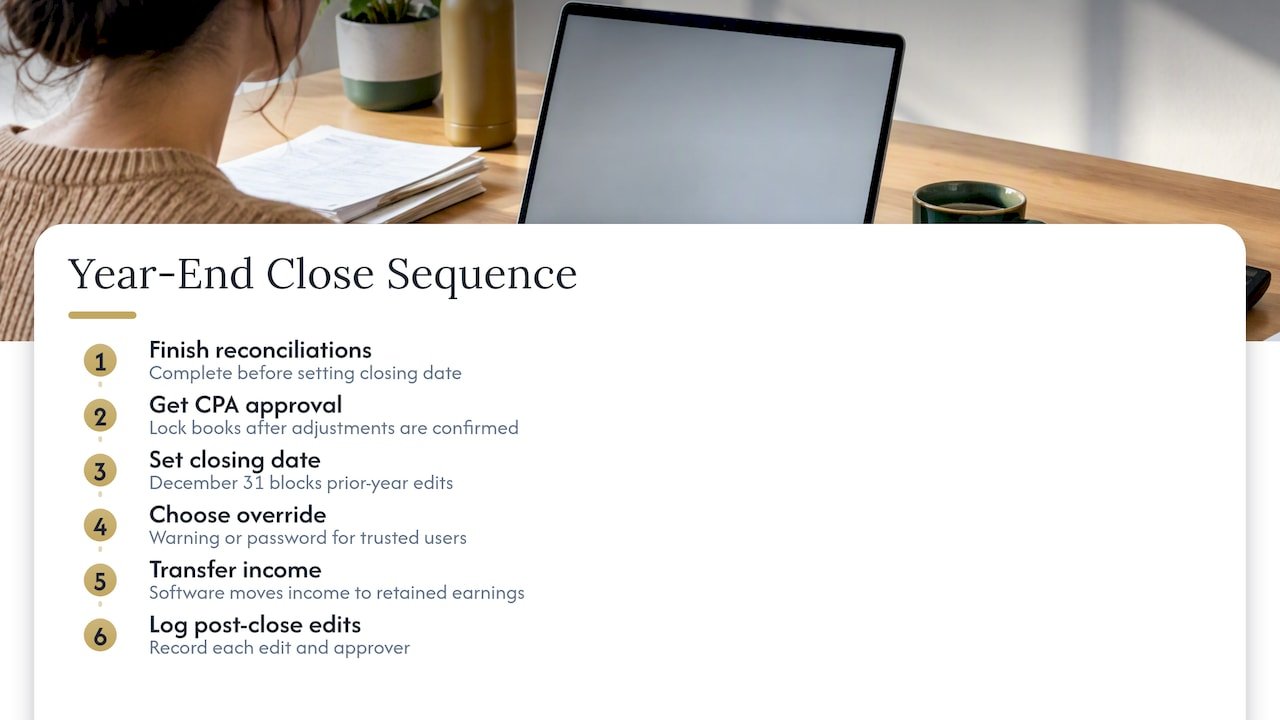
Once reconciliations are done, set your closing date to December 31. That stops anyone from quietly changing prior-year transactions. QuickBooks Online uses a closing date setting that blocks edits on or before that date unless an authorized override is used.
You choose how strict to be. A warning lets users proceed after a prompt, while a password override restricts changes to people you trust. Limit that password to as few users as possible. Your software also moves the year’s income into retained earnings automatically, so note any edit you make after closing.
Pro Tip: Lock the books only after your CPA confirms the adjustments, then keep a short log of any post-lock change and who approved it.
What goes into the CPA-ready close package?
Send everything in one organized folder so your preparer never has to chase you. Include these items:
- Trial balance and general ledger detail for the year, plus reconciled December statements, and receivables and payables aging reports.
- Fixed-asset listing with additions, disposals, and depreciation schedules, along with payroll reports and your W-3 to 941 reconciliations.
- Your 1099 vendor list with copies of forms filed, the year’s sales tax returns, and a short list of unusual transactions or open questions.
That last item saves the most time. A two-line note on a large one-off deposit prevents an email thread later. For broader context on keeping your ledger tidy all year, see our bookkeeping best practices.
What happens after your CPA reviews the books?
Your preparer will return adjustments, and not all of them belong in your ledger. Ask which entries are permanent book corrections and which are tax-only.
- Post permanent corrections to the ledger, such as a missed accrual or a misclassified expense.
- Keep tax-only adjustments off the ledger. Track them in a book-to-tax reconciliation, the kind of reconciling items found on a Schedule M-1, so your books are not polluted with entries that only exist for the return.
- Set the final lock date after the agreed adjustments are posted.
- Keep the close package with the filed return so your support stays together for record retention.
Practitioner guidance draws the same line between book and tax adjustments. If you ever need to send forms to the IRS by fax, this IRS fax number reference lists the routing details.
Why does handing off the close save you time?
The close is where owners lose evenings, and where small errors compound into slow CPA turnarounds. When a dedicated team prepares your reconciliations and close package, you review a finished product instead of building one. Your preparer gets clean files sooner, and fewer questions come back. Hand off the close, and January becomes about running your business again.
— Kelli
Get your year-end close and tax filing handled by KelliWorks

You should not have to choose between running your business and finishing your books. We take the close off your plate, from reconciliations to a CPA-ready package. Here is what we handle:
- Full-service accounting and bookkeeping that keeps your records current all year
- Payroll tie-outs against your 941 and W-3 totals
- Preparation of your complete close package
- Tax preparation and filing once your books are final
Schedule a consultation on our tax preparation page, and we will map out your close timeline.
FAQ
How do I close the books for the year?
Reconcile all accounts through December 31, record any accruals for late bills, and run a trial balance. Then assemble your close package for your preparer and set a lock date in your software once adjustments are posted.
What is the difference between book and tax adjustments?
Book adjustments are permanent corrections to your ledger. Tax-only adjustments exist just for the return and belong in a separate book-to-tax reconciliation, so they do not clutter your accounting records.
How do I close journal entries?
Post every entry dated in the year, review them against your reconciled statements, and then set your software’s closing date. After that, edits to those entries require an authorized override.
Is there an IRS deadline for closing the books?
No. Closing the books is an internal workflow, and you and your preparer agree on the close date. Work backward from your filing deadlines and the IRS tax calendar.
Sources
- 2026 Publication 509
- Lock your books in QuickBooks Online
- Year-End Close: How Books Get Ready for the CPA – Bookkeeping Notes