


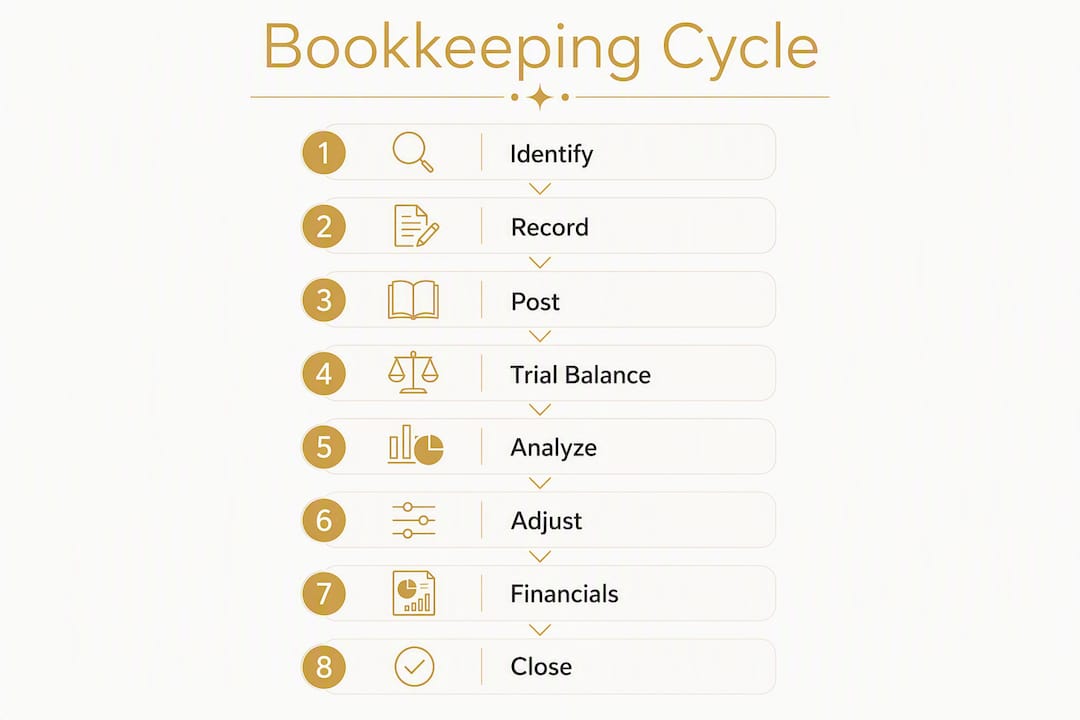
The bookkeeping cycle, formerly known as the accounting cycle, is an eight-step, repeatable process that moves raw financial transactions into finalized, GAAP-compliant financial statements at the end of every reporting period. According to NetSuite, the eight standard steps are:
- Identify and analyze transactions
- Record in the general journal
- Post to the general ledger
- Prepare an unadjusted trial balance
- Analyze with a worksheet
- Make adjusting journal entries
- Prepare financial statements
- Close the books
Your cycle is working when three things are true: your books reconcile to your bank statement, your adjusted trial balance is in balance (total debits equal total credits), and you lock each period before moving to the next. If any of those three markers are missing, there is a gap in the process worth fixing. Kelliworks works with small business owners every day to close exactly those gaps, whether that means cleaning up a backlog or building a reliable monthly routine from scratch.
One clarification worth making early: bookkeeping and accounting are not the same thing. Bookkeeping is the clerical foundation — recording, classifying, and reconciling transactions. Accounting uses those records for analysis, strategy, and IRS compliance reporting. Both matter, but they are distinct roles.

Table of Contents
- What does each step of the bookkeeping cycle actually involve?
- Why do debits and credits always have to balance?
- Cash basis vs. accrual basis: which one should you use?
- How do you close the books reliably every month?
- What are the most common bookkeeping mistakes, and how do you fix them?
- How does accounting software change the bookkeeping cycle for you?
- When should you outsource the bookkeeping cycle?
- Key Takeaways
- The discipline that actually makes the cycle work
- Let Kelliworks run the cycle for you
- Authoritative sources and further reading
What does each step of the bookkeeping cycle actually involve?
The eight steps below are the industry-standard accounting cycle as documented by Coursera and Dummies, among other authoritative teaching resources. Each step has a clear output. If you can check off every output, you have completed the cycle for that period.

Step 1: Identify and analyze transactions
Every cycle starts with a source document — a sales receipt, a vendor invoice, a bank charge, a payroll record. Your job at this step is to determine whether the event is a financial transaction and, if so, which accounts it affects.
Mini-checklist:
- Collect all receipts, invoices, and bank notifications
- Confirm the transaction date and amount
- Identify the accounts involved (cash, revenue, expense, liability)
- Determine whether it is a cash or credit transaction
Step 2: Record in the general journal
Once you have analyzed a transaction, you record it as a journal entry. Every entry must follow double-entry bookkeeping: one account is debited, another is credited, and the totals must match.
Sample journal entry — sale on account ($500):
| Account | Debit | Credit |
|---|---|---|
| Accounts Receivable | $500 | |
| Sales Revenue | $500 |
Sample journal entry — office supplies paid by card ($75):
| Account | Debit | Credit |
|---|---|---|
| Office Supplies Expense | $75 | |
| Credit Card Payable | $75 |
Mini-checklist:
- Debits equal credits for every entry
- Transaction date is recorded accurately
- Memo or description is attached for audit trail
Step 3: Post to the general ledger
Posting means transferring each journal entry to its corresponding account in the general ledger. The ledger gives you a running balance for every account — cash, accounts receivable, rent expense, and so on.
Mini-checklist:
- Every journal entry has been posted
- Ledger balances are updated after each posting
- No entries are posted to the wrong account
Step 4: Prepare an unadjusted trial balance
Pull every ledger account balance into a two-column report. Total debits must equal total credits. If they do not, there is a posting error to find before moving forward.
Mini-checklist:
- All ledger accounts are listed
- Debit column total equals credit column total
- Any discrepancy is investigated and corrected
Step 5: Analyze with a worksheet
A worksheet is an internal working document — not a formal financial statement — where you list the unadjusted balances and work through the adjustments you will need to make. Many small businesses skip a formal worksheet and move directly to adjusting entries, which is fine as long as the adjustments are documented somewhere.
Mini-checklist:
- Unadjusted balances are transferred from the trial balance
- Needed adjustments are identified (depreciation, prepaid expenses, accruals)
- Adjusted balances are calculated
Step 6: Make adjusting journal entries
Adjusting entries correct timing differences between when cash moves and when revenue or expense is actually earned or incurred. Common adjustments include depreciation, prepaid expense amortization, accrued revenue, and accrued expenses.
Mini-checklist:
- Depreciation is recorded for all fixed assets
- Prepaid expenses are reduced for the period used
- Accrued revenue and expenses are recognized
- All adjustments are documented with supporting calculations
Step 7: Prepare financial statements
With adjusted balances in hand, you produce three core reports: the income statement (profit and loss), the balance sheet, and the cash flow statement. These are the outputs your lender, investor, or tax preparer will use. For guidance on reading these reports once they are produced, see how to read financial statements for small business.
Mini-checklist:
- Income statement reflects the correct period’s revenue and expenses
- Balance sheet assets equal liabilities plus equity
- Cash flow statement ties to the bank reconciliation
Step 8: Close the books
Closing the books zeroes out temporary accounts — revenue and expense accounts — and transfers the net result to retained earnings. Permanent accounts (assets, liabilities, equity) carry their balances forward. After closing, lock the period in your software so no one can accidentally post a backdated entry.
Mini-checklist:
- Revenue and expense accounts are zeroed out
- Net income is transferred to retained earnings
- Period is locked in accounting software
Bookkeeping vs. accounting: Bookkeeping covers steps 1 through 4 and much of step 6. Accounting interpretation — deciding what the financial statements mean for your business strategy — starts at step 7. Knowing where the line falls helps you hire the right help at the right time.
Pro Tip: If you use QuickBooks Online, Xero, or FreshBooks, steps 3 and 4 happen automatically as you record journal entries. Your real manual work is steps 1, 2, 6, and 8.
Why do debits and credits always have to balance?
Double-entry bookkeeping is the system behind every step of the accounting cycle. The rule is simple: every transaction affects at least two accounts, and the total value of debits must always equal the total value of credits. That balance is not arbitrary — it reflects the accounting equation.
The accounting equation:
Assets = Liabilities + EquityEvery transaction either increases or decreases one or more elements of this equation, but the equation always stays in balance. Debits increase assets and expenses; credits increase liabilities, equity, and revenue.
Here is how a single transaction works through the equation. Your business pays $1,200 in cash for one month of office rent.
- Debit: Rent Expense increases by $1,200 (an expense account)
- Credit: Cash decreases by $1,200 (an asset account)
The equation stays balanced because the asset (cash) and the expense (which reduces equity through net income) move in equal and opposite directions. If you record only one side of this entry, the trial balance will not balance, and the error surfaces immediately. That built-in error detection is exactly why double-entry has been the standard for business financial reporting for centuries.
Single-entry systems — essentially a running list of income and expenses — cannot catch this class of error. They also cannot produce a balance sheet, which means they are not suitable for any business that needs to report to a lender, investor, or the IRS on an accrual basis.
Cash basis vs. accrual basis: which one should you use?
The choice between cash basis and accrual basis determines when transactions enter the bookkeeping cycle, and it has a direct effect on how complex your month-end close will be.
Cash basis records revenue when cash is received and expenses when cash is paid. No accounts receivable, no accounts payable, no accruals. The cycle is shorter and simpler.
Accrual basis records revenue when it is earned and expenses when they are incurred, regardless of when cash moves. This requires tracking accounts receivable, accounts payable, prepaid expenses, and accrued liabilities — all of which generate adjusting entries at month-end.
How the two approaches differ in practice:
- Timing: Cash basis records the day money moves; accrual records the day the obligation or right is created.
- Accounts used: Cash basis rarely uses AR or AP; accrual depends on both.
- Adjusting entries: Cash basis has few or none; accrual requires depreciation, prepaid amortization, and accruals every period.
- Financial statement accuracy: Accrual gives a more accurate picture of profitability in any given period.
- GAAP requirement: GAAP requires accrual for financial reporting; cash basis is acceptable only for internal or tax purposes in certain situations.
Signs you need accrual basis:
- You carry inventory
- You extend credit to customers (invoicing, net-30 terms)
- You have outside investors or lenders who review your financials
- Your gross receipts exceed the IRS threshold that triggers mandatory accrual for your entity type
Signs cash basis may be acceptable:
- You are a very small, cash-only service business
- You have no inventory and no credit customers
- You file as a sole proprietor or single-member LLC with simple finances
Most growing small businesses benefit from accrual basis even before they are required to use it, because it gives a clearer view of cash flow timing and profitability. If you are unsure which method fits your situation, bookkeeping best practices for small business owners walks through the decision in more detail.
How do you close the books reliably every month?
A reliable month-end close does not happen in one frantic afternoon at the end of the month. It happens because of what you do every day and every week leading up to it. A practical bookkeeping cadence runs in three layers: daily capture, weekly categorization, and monthly reconciliation.
Daily capture habits involve dedicating a brief, consistent amount of time to record transactions.
- Photograph and attach receipts to transactions
- Send invoices for completed work
- Log any cash payments made
Weekly bookkeeping tasks typically take a moderate, consistent period to organize and review financial information.
- Categorize and match downloaded bank transactions
- Review outstanding invoices and follow up on overdue AR
- Match credit card charges to receipts
For most small businesses, the monthly close requires a focused session absorbing a few hours to reconcile accounts and finalize statements.
- Reconcile every bank and credit card account to the statement
- Review accounts receivable and accounts payable aging reports
- Post all adjusting entries (depreciation, prepaid, accruals)
- Produce the income statement, balance sheet, and cash flow statement
- Lock the period in your accounting software
Statistic callout: Maintaining daily and weekly capture habits compresses the monthly close from a multi-day project to a focused two-to-four-hour session for most small businesses, according to Glitter’s bookkeeping process guide.
Accounting software shortens the weekly and monthly steps considerably. Bank feeds pull transactions automatically, reconciliation tools flag mismatches, and lock dates prevent backdated edits once a period is closed. For a small business owner doing their own books, that automation is the difference between a manageable routine and a quarterly scramble.
Pro Tip: Set a recurring calendar block every Friday for your weekly 30–45 minute bookkeeping review. Treat it like a client meeting. Skipping it is what turns a two-hour month-end into a two-day one.
What are the most common bookkeeping mistakes, and how do you fix them?
Most bookkeeping errors fall into a small number of categories. The good news is that the cycle itself is designed to surface them — if you follow every step, errors tend to show up at the trial balance or reconciliation stage, before they reach your financial statements.
Red-flag checklist — scan this during your monthly review:
- Bank or credit card accounts that have not been reconciled this period
- Transactions sitting in “Uncategorized” or “Ask My Accountant”
- Accounts receivable with invoices more than 60 days past due and no follow-up
- Expenses recorded without a receipt or supporting document
- Prior-period entries that were edited after the period was closed
Problem-fix table:
| Symptom | Likely cause | Practical fix |
|---|---|---|
| Trial balance does not balance | Posting error or missing entry | Trace each journal entry back to the ledger; find the unmatched amount |
| Bank reconciliation has unexplained difference | Duplicate entry or missed transaction | Compare bank statement line by line to the ledger; delete duplicates |
| Revenue looks too high or too low | Wrong period recorded, or cash vs. accrual mismatch | Check transaction dates; confirm your basis and adjust if needed |
| Expenses are inconsistently categorized | No chart of accounts discipline | Standardize categories; use rules in your software to auto-categorize recurring vendors |
| Prior-period financials keep changing | Period not locked after close | Enable lock dates in your software immediately after closing each month |
On correcting entries: never alter a posted entry from a prior period. Instead, create a correcting journal entry in the current period that reverses the error and records the correct amount. Document the reason in the memo field. This preserves your audit trail and keeps prior-period reports accurate, which matters if the IRS or a lender ever reviews your records.
How does accounting software change the bookkeeping cycle for you?
Modern accounting software does not eliminate the eight steps of the cycle, but it automates the most time-consuming parts of steps 2 through 4 and adds internal controls that manual processes cannot replicate.
Bank feeds connect directly to your financial institutions and pull transactions into the software daily. Instead of entering each transaction manually, you review and approve categorizations. For a business with moderate transaction volume, this alone can cut weekly bookkeeping time significantly.
Automated rules let you tell the software that every charge from a specific vendor always goes to a specific expense account. Once the rule is set, those transactions categorize themselves. You review; you do not re-enter.
OCR receipt capture — available in tools like QuickBooks Online, Xero, and FreshBooks — reads a photo of a receipt and creates a draft transaction. You confirm the details. The paper receipt becomes a searchable digital record attached to the transaction.
Recurring journal entries handle predictable adjustments like monthly depreciation or prepaid amortization. Set them once; the software posts them automatically each period.
Reconciliation workflows match your ledger to the bank statement and flag discrepancies. What used to take an hour with a paper statement and a highlighter now takes minutes.
Pro Tip: The three internal controls that matter most in accounting software are lock dates (prevent backdated edits), user permissions (limit who can delete or edit entries), and the audit trail (a log of every change made and by whom). Enable all three before you give anyone else access to your books.
For a deeper look at how automation affects your cost structure, cost-saving accounting strategies for small business covers the tradeoffs between DIY software, part-time bookkeepers, and full-service virtual accounting.
When should you outsource the bookkeeping cycle?
There is a point in every growing business where keeping bookkeeping in-house costs more than it saves — in time, in errors, and in the opportunity cost of not focusing on the work that actually grows revenue. Recognizing that point early is one of the more valuable financial decisions a small business owner can make.
Signs outsourcing makes sense:
- Month-end close regularly slips past the 15th of the following month
- You are not confident your financial statements are accurate
- You have missed estimated tax payments or scrambled at year-end
- Your business has grown to include payroll, inventory, or multiple revenue streams
- You want reliable cash flow visibility but do not have time to produce it yourself
A virtual accounting department handles the full cycle on your behalf. Here is what that typically covers, mapped to the eight steps:
- Steps 1–3 (capture and posting): Transaction entry, receipt management, bank feed review, and ledger posting
- Step 4 (trial balance): Producing and reviewing the unadjusted trial balance each period
- Steps 5–6 (adjustments): Depreciation schedules, prepaid amortization, accrual entries, and payroll reconciliation
- Step 7 (financial statements): Monthly P&L, balance sheet, and cash flow statement delivered on a defined schedule
- Step 8 (close): Period lock, final review, and handoff to tax preparation
Outsourcing also changes your internal controls. A professional bookkeeping partner brings standardized workflows, defined service-level expectations, and periodic reviews that most solo operators cannot replicate. When vetting a bookkeeping service, ask about their reconciliation process, how they handle correcting entries, what software they use, how client data is secured, and whether they carry professional liability coverage.
Kelliworks functions as a full-service virtual accounting department for small businesses. The services span bookkeeping, accounting, and tax preparation, with the goal of giving business owners accurate financials and a clear picture of their financial health every month — without the overhead of an in-house hire. For a direct comparison of when to escalate from bookkeeping to advisory services, financial consulting vs. bookkeeping lays out the decision clearly.
Key Takeaways
Following the eight-step bookkeeping cycle consistently, with daily capture habits and a locked period-close each month, is the single most reliable way to keep small-business financials accurate and audit-ready.
| Point | Details |
|---|---|
| Eight steps, every period | The accounting cycle runs from transaction identification through closing the books — skip a step and errors compound. |
| Daily and weekly habits shrink month-end | A 30–45 minute weekly review prevents the multi-day scramble that comes from monthly-only bookkeeping. |
| Accrual basis gives a clearer picture | Businesses with inventory, credit customers, or outside investors need accrual basis for accurate financial statements. |
| Software enforces controls | Lock dates, user permissions, and audit trails in accounting software prevent the most common bookkeeping errors. |
| Kelliworks handles the full cycle | Kelliworks provides bookkeeping, accounting, and tax preparation as a virtual accounting department for small businesses. |
The discipline that actually makes the cycle work
Most small business owners understand the bookkeeping cycle in theory. The gap is almost never knowledge — it is consistency. The month-end close feels like a burden when it is treated as a monthly event. When it is the natural result of daily and weekly habits, it becomes a two-to-three-hour confirmation that everything is already in order.
The habit that makes the biggest difference, in my experience, is the weekly review block. Not a full close, not a deep audit — just 30–45 minutes to categorize the week’s transactions, match receipts, and flag anything that looks off. Businesses that maintain that rhythm rarely have a painful month-end. Those that skip it spend the last week of every month reconstructing what happened in the first three.
The other thing worth saying plainly: the bookkeeping cycle is not just a compliance exercise. The financial statements it produces are the clearest signal you have about whether your business is actually healthy. A P&L that you trust, a balance sheet that balances, and a cash flow statement that explains why your bank balance moves the way it does — those are management tools, not just tax documents. Treating them that way changes how you run the business.
Let Kelliworks run the cycle for you
Running the full bookkeeping cycle every month takes discipline, time, and a working knowledge of adjusting entries, reconciliations, and period-close procedures. For many small business owners, that is time better spent on the work that actually grows the business.

Kelliworks serves as a full-service virtual accounting department, handling every step of the cycle — from daily transaction capture through monthly financial statements and tax preparation handoff. You get accurate books, a reliable close date, and a clear view of your financial health each month, without hiring an in-house bookkeeper or accountant.
If you are ready to hand off the cycle and focus on growth, see how a virtual accountant supports your business or explore Kelliworks’s accounting and bookkeeping services to find the right fit. A free consultation is the straightforward next step.
Authoritative sources and further reading
The following resources were used to build and verify the content in this guide. Each one is worth bookmarking if you want to go deeper on any section.
- What Is the Accounting Cycle? — Coursera: Beginner-friendly walkthrough with worked examples; particularly useful for understanding closing entries and temporary vs. permanent accounts.
- The Eight Steps of the Accounting Cycle — Dummies: Practical, plain-language explanation of each step written for non-accountants.
- What Is Bookkeeping? — Corporate Finance Institute (CFI): Covers the bookkeeping definition, cash vs. accrual basis, and the distinction between bookkeeping and accounting.
- Double-entry bookkeeping — Investopedia: Clear explanation of why debits must equal credits and how double-entry preserves the accounting equation.
- The accounting cycle — AccountingTools: Detailed process reference covering automation, internal controls, and the distinction between the accounting cycle and the budget cycle.
- Basic accounting procedures — OpenStax: Free, peer-reviewed academic resource explaining the accounting equation and double-entry fundamentals.
- Introduction to bookkeeping and accounting — OpenLearn, Open University: Free course covering double-entry rules and their relationship to the balance sheet and profit and loss account.



2 Responses